6
English
Toggle Display Unit “CM to Inches”
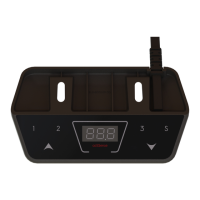
• Press and hold the “S” Button for 3 seconds.
• The 7-segment display now shows “S-1” [meant for CM setting].
• By pressing the up & down buttons, the “S-X” level can be adjusted.
• Adjust the display to the Unit “S-2” [meant for Inch setting] and press the save button.
• To switch the display back to CM units, repeat the instruction above and set “S-1” instead of “S-2”.
Set Lower Height Limitations
• Move the desk to the desired lower position, which shall not be exceeded.
• Press and Hold the “S” Button for 3 seconds.
• The 7-segment display now shows “S-1” .
• Adjust the value to “S-3” with the up & down buttons.
• Press the “S” button.
• The 7-Segment Display shows “L-L” (Locked – Lower).
• To unlock the lower limitation again, repeat the process above, until pressing the “S” button.
• The 7-Segment Display shows “U-L” (Unlock – Lower).
Set Upper Height Limitations
• Move the desk to the desired upper position, which shall not be exceeded.
• Press and Hold the “S” Button for 3 seconds.
• The 7-segment display now shows “S-1” .
• Adjust the value to “S-4” with the up & down buttons.
• Press the “S” button.
• The 7-Segment Display shows “L-U” (Lock – Upper).
• To unlock the upper limitation again, repeat the process above, until pressing the “S” button.
• The 7-Segment Display shows “U-U” (Unlock – Upper).
Adjustment of Height Indication
• Press the “S” button.
7-Segment display shows “S- “.
• Press and hold the down button for 5 seconds.
• Thru the up and down buttons, the value can be adjusted to a desired new value.
• Press the save button,
• 7-Segment display indicates new height (Offset)


 To Next Page
 Loading...