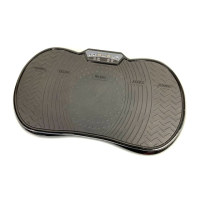
S001942-2V Action Vibration Trainer
7
1. Decrease Time Button, this button can be used to adjust the length of your workout – you
can pre -set a workout time from 1 – 15 minutes, aer which time the machine will stop.
2. Increase Time Button, this button can be used to adjust the length of your workout, similar
to the “Decrease Time Button” using these two buttons you will be able to select the time
length that suits you best.
3. Power Button, this button can be used to turn the machine on / off.
4. Pre-set Program Button, this button can be used to cycle between the nine pre-set
workouts. Please see below for a guide to each workout
Pre-set workout Duration of Workout Speed Setting of Workout
PO 14 Minutes 04
P1 14 Minutes 02
P2 14 Minutes 08
P3 14 Minutes 12
P4 14 Minutes 18
P5 14 Minutes 05
P6 14 Minutes 12
P7 14 Minutes 15
P8 14 Minutes 09
P9 14 Minutes 06
5. Start Button, this button is used to begin your workout, press this button and the machine
will begin a workout with a duration of 15 minutes on power level 01. The time duration of
the workout and the power setting can be adjusted aer pressing the “Start Button” using
buttons 1 & 2 for time, and buttons 7 & 8 for power.
6. Stop Button, press this button to stop any workout.
7. Power Decrease Button, once a workout has been started, press this button to decrease the
power setting (01 is the lowest power setting).
8. Increase Power Button, once a workout has begun, use this button to increase the power
setting (power level 99 is the highest power setting).
9. Time Display Screen, this screen displays the time remaining for your workout. When “HA”
appears on this screen – no workout has been selected and the machine is not currently
Vibrating
10. Remote Sensor, this panel is the infrared sensor for the remote, this panel should never be
obstructed.
11. Speed Display Screen, this screen displays the speed setting of your workout – when -
- appears on the screen, no workout has been selected and the machine is not currently
vibrating.
Instructions for Use


 To Next Page
 Loading...