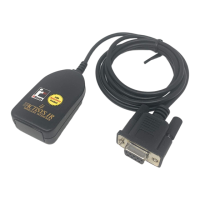
This document describes the ACT-IRx24UN-Lx / ACT-IRx24UN-Lx-LE USB to RAW SIR Serial Adapter, a device designed to facilitate infrared (IR) communication with other RAW IR devices by creating a virtual COM port. The manual provides comprehensive information on its features, installation procedures across various operating systems, operational guidelines, and technical specifications.
Function Description:
The ACT-IRx24UN-Lx and ACT-IRx24UN-Lx-LE are USB-to-Raw-IR adapters. Their primary function is to enable a computer to communicate with other RAW IR devices by generating a virtual COM port. The key distinction between the -Lx and -Lx-LE series lies in their LED behavior, which is detailed in Chapter 12. The ACT-IR424UN-Lx and ACT-IR424UN-Lx-LE are smaller, thumb-sized versions of these adapters, offering the same functionality in a more compact form factor. The device supports RAW IR communication, meaning it does not utilize IrDA® protocols. It is designed to be compatible with and replace older RS232 Raw IR adapters such as ACT-IR220L+, ACT-IR220L, ACT-IR220Li, and ACT-IR220LN. The virtual COM port functionality allows for minimal or no changes to existing user software that was originally designed to work with RS232 adapters.
Important Technical Specifications:
The ACT-IRx24UN-Lx series includes various customized sub-models, such as ACT-IRx24UN-Li, ACT-IRx24UN-L+, and ACT-IRx24UN-LNnn. The "nn" in the model name specifies the supported Baud Rate: LN96 for 9.6k bps, LN19 for 19.2k bps, LN38 for 38.4k bps, LN57 for 57.6k bps, and LN115 for 115.2k bps. The device supports a total of 8 baud rates: 1.2k, 2.4k, 4.8k, 9.6k, 19.2k, 38.4k, 57.6k, and 115.2k bps, depending on the specific sub-model. It generates a 1.63 µs IR pulse. The latency time is approximately 1.5 ms on average, which is slightly higher than a real COM port's latency of about 0.5 ms. The adapter is fully compliant with USB 2.0 (Full speed, 12 Mbps) and features 256 bytes of outbound buffer and 256 bytes of inbound buffer.
Electrical Characteristics and Specifications:
- DC supply voltage: MIN 5.0 V, TYPICAL 5.0 V, MAX 5.2 V
- Supply voltage, VSS: 0 V
- Operating temperature range, TA: 0 °C to 60 °C
- DC current (Ready mode): TYPICAL 15 mA, MAX 20 mA
- DC current (Active mode): TYPICAL 60 mA, MAX 100 mA
- Infrared Transmitting range: MIN 1 cm, TYPICAL 158 cm, MAX 200 cm
- USB signal threshold level: +4.8 V to +5.5 V
Physical Dimensions:
- ACT-IR224UN: Length 61.8 mm, Width 35.6 mm, Height 18.7 mm. It includes a USB cable with a length of 120 cm.
- ACT-IR424UN: Length 47 mm, Width 18 mm, Height 9.38 mm. This model requires a separated USB cable.
Usage Features:
The device is designed for ease of use across a wide range of operating systems.
System Requirements:
- Windows: 98/ME/2000 SP4, XP SP2/Vista (32 & 64 bit), 7/8 (32 & 64 bit), Server 2003/2008 (32 & 64 bit), CE (ARM & x86).
- Mac OS X: 10.1 to 10.9 (including 64-bit and Lion 10.7).
- Linux.
- Android.
- Minimum 256MB RAM (512MB recommended).
- Processor Speed 1.8 GHz.
- USB 1.1 port (or above).
Installation Procedures:
- General Setup: The USB dongle should NOT be plugged into the PC until the driver is installed. Users should check for existing "PL-2303 USB-to-Serial" or "PL-2303 Vista Driver Installer" in "Add or Remove Programs" (Windows 98/ME/2K/XP) or "Programs and Features" (Windows Vista/7/8) and remove them if present. The installation CD typically autoruns on Windows, but for WinCE, Mac, Android, or Linux, manual setup is required by browsing the CD to the "D:\Driver" path and selecting the appropriate folder (e.g., "Linux_RedHat"). For Windows Vista/7/8, ensure "AUTORUN" is selected under "Control Panel => AUTOPLAY" if the CD doesn't autorun. After driver installation, plugging the IR adapter into a USB port will initiate the "Found New Hardware" procedure.
- Windows Installation (Specifics):
- Windows 8 (New Chip Inside - PL2303TA): Plug in the dongle; the OS will auto-detect. If unsuccessful, run the latest Driver Installer v1.7.0.
- Windows 8 (Old Chip Inside - PL2303HXA): Disable "Auto Update" on Windows Update to prevent the system from installing a native driver that does not support the old chip. Do NOT run Driver Installer v1.7.0; instead, run Driver Installer v1.5.0.
- Windows Vista/7 (New or Old Chip Inside): Follow "Case1" in the manual.
- Windows XP and under (New or Old Chip Inside): Directly run Driver Installer v1.7.0 from the installation CD.
- Mac OS Installation: Insert the CD, click the DMG file to extract the driver installer package, then double-click "PL2303.1.4.0" to start. Follow the on-screen prompts, clicking "Continue" and "Install." A system restart is required after installation. After rebooting, plug the ACT-IRx24UN into the USB port. Verify detection by running the System Profiler program (Applications-Utilities folder), looking for "USB-Serial Controller" or "USB-Serial Controller D" under USB hardware.
- Android and Linux Based Equipments: Google Android OS is based on the Linux kernel. After driver installation or if the OS kernel has a built-in driver, plugging in the IR dongle to a USB port will result in a "ttyusb0" device.
Operational Guidelines:
- Throughput Improvement: To achieve good throughput, it is recommended to send data in bulk rather than byte-by-byte. If the data size is large, send it in multiple blocks.
- COM Port Closing: The dongle uses DTR and RTS signals to configure IR communication speed and has 256-byte inbound and outbound buffers. Since it lacks a flow control protocol, it's crucial to allow a delay time before closing the COM port to ensure all pending data is sent completely, preventing junk data at the receiver.
- LED Behavior:
- ACT-IRx24UN-Lx: LED is "on" for one second during power-on. It is "off" during standby and receiving. It blinks rapidly but weakly during transmission.
- ACT-IRx24UN-Lx-LE: LED is "off" for one second during power-on. It is "on" during standby and receiving. It blinks rapidly but weakly during transmission.
- Establishing Connection: After confirming the IR dongle's detection, place it near another Raw IR device (e.g., ACT-IR220L+) and launch a communications application like "HyperTerminal" or any other Windows application.
Maintenance Features:
Installation Check:
- Windows: Verify installation by checking "Add or Remove Programs" (Windows 98/ME/2000/XP) or "Programs and Features" (Windows Vista/7/8) for "PL-2303 USB-to-Serial." Also, check Device Manager under "Ports (COM & LPT)" for "Prolific USB-to-Serial Comm Port (COMx)" to identify the assigned virtual COM port number.
- Mac Machine: Run the Terminal program (Applications-Utilities) and type
cd /dev followed by ls tty.usbserial*. The presence of "tty.usbserial" indicates proper setup. Multiple "tty.usbserialx" entries will appear for multiple devices. Mac OS may also detect a new network interface for the USB-Serial Controller.
Driver Un-installation:
- Windows 98/ME/2000/XP (Method 1 - Add or Remove Programs): Double-click "Add or Remove Program" in "Control Panel," select "PL-2303 USB-to-Serial," and click "Remove." Confirm the un-installation when prompted.
- Windows 98/ME/2000/XP (Method 2 - Driver Installer): Run "ACT-IR224UN-DriverInstaller_v#.#.#-YYYYMMDD.exe" from "C:\Program Files\actisys\ACT-IRx24UN\Driver." This will lead to the same procedure as Method 1. Alternatively, re-inserting the installation CD will detect the installed driver and prompt for removal.
- Windows Vista/7/8 (32 & 64 bits) (Method 1 - Programs and Features): Double-click "Programs and Features" in "Control Panel," right-click "PL-2303 USB-to-Serial," and click "Uninstall." Confirm the un-installation. An "elevation prompt" (UAC) may appear if UAC is enabled.
- Windows Vista/7/8 (32 & 64 bits) (Method 2 - Driver Installer): Run "ACT-IR224UN-DriverInstaller_v#.#.#-YYYYMMDD.exe" from "C:\Program Files\ACTISYS\ACT-IRx24UN\Driver." This will follow the same procedure as Method 1. Re-inserting the installation CD will also prompt for removal.
- Mac OS: Log on as root. Open a Terminal session (Applications-Utilities-Terminal) and enter
cd /System/Library/Extensions, then sudo kextunload ProlificUSBSerial.kext (enter system password), and rm -r ProlificUSBSerialDriver.kext. Alternatively, delete "ProlificUSBSerialDriver.kext" from the System-Library-Extensions folder. To remove the port, go to "System Preferences," select "Network," choose the "USB-Serial Controller" device, and click the "-" remove button. A computer restart is required before reinstalling the driver.
User Account Control (UAC) Management (Windows Vista/7/8):
- Checking UAC Status: Go to "Control Panel => Security Center" to see if UAC is "On" or "Off."
- Turning UAC On/Off: Go to "Control Panel => User Accounts," click "Turn User Account Control on or off," and check/uncheck the box as desired.
ACTISYS Corporation provides a 1-year limited warranty to the first end-user purchaser, covering defects in workmanship and materials. ACTISYS will, at its option, repair or replace the defective product. The warranty does not cover appearance items, consumables (paper, ink ribbon, batteries), or any equipment/hardware/software/firmware/peripherals other than the product itself. Damage from misuse, abnormal service/handling, alteration, or modification voids the warranty. Tampering with the label also voids the warranty. To enforce warranty rights, the purchaser must mail, ship, or carry the product with proof of purchase to ACTISYS. Implied warranties, including merchantability and fitness for use, are limited to 1 year. ACTISYS is not liable for incidental or consequential economic or property damage.

 Need help?

 To Next Page
 General