1. INTRODUCTION
Thank you for choosing Tiger!
To get the most out of your new plugin suite, please read this user manual carefully.
1.1. Foreword
Tiger is the first Acqua plugin suite (VST/VST3/AAX/AU) in Core 19 based on our se-
cond-generation ‘Hyper’ technology encompassing a superlative collection of Acusti-
ca’s most renowned compressors.
Recently, we have witnessed the proliferation of software dedicated to dynamics: the
trend in recent releases often focuses on overcoming the limits of analog compression
while maintaining the musicality that has always distinguished it.
In the latest products, sidechain management has improved with more complete
equalizer chains or enhanced with simultaneous control based on independent de-
tectors to handle transients and the sustained part of the signal.
We have put together our experience to try to solve this problem according to our vi-
sion: the idea of Tiger is to put together our models and some very recent concepts to
create the best possible experience for “our” users.
1.2. What is Tiger not?
Tiger is not a compressor trying to imitate a specific vintage item. The idea is to have a
chameleon-like object that tries to imitate them all, overcoming the limitations of each.
If you want a replica of a specific product, we certainly have a particular thing that is
more relevant in our catalog.
We did not include final clippers and brick-wall limiters in the signal path so as not to
replicate the functionality of other products: the result would have been to complicate
it unnecessarily and duplicate functionality already found elsewhere.
1.3. What you get
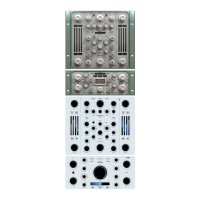
The Tiger suite includes TWO different GUIs to choose from:
- TIGER & TIGER MIX: a plugin based on a 3D ‘Acustica’s classic-style’ GUI.
- TIGER ‘Flat’ & TIGER MIX ‘Flat’: a plugin version based on a 2D ‘modern-style’ GUI.
If you are an ‘analogue-lover’, you can work with Acustica’s classic style interfaces; if
you want to experience something never seen before here, choose the 2D modern
interfaces (Tiger flat & Tiger Mix flat).
Each plug-in included in the Tiger suite comes in a “Standard” version and an alterna-
tive “ZL*” version, which operates at *zero latency and is thus suitable for use when
tracking, at the cost of extra processing resources.
NOTE: Choose the GUI you prefer at the outset. The plugin will not automatically repli-
cate the settings if you change the GUI at work started.


 To Next Page
 Loading...