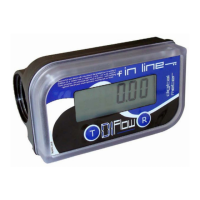
Starting from the “Partial” screen and at each time
button is pressed, system will scroll between
last 5 transactions. To go back to “partial” screens
wait 10 seconds without pressing buttons.
5 ADAM PUMPS • DI - FLOW IN LINE
3.4.1 “PARTIAL” SCREEN
3.4.3 “TOTAL PERIOD ”SCREEN WITH
MESSAGE ”TOTPER”
3.4.2 “TOTAL” SCREEN WITH MESSAGE “TO-
TAL LITRES””
3.4.0 SCROLLING THROUGH 5 MAIN SCREENS
Starting from the “Partial” screen and at each time
button is pressed, following screens sequence
will be displayed:
1)ToTal, preceded by message “Total Litres”
2)ToTal period, preceded by message “TotPer”
3)Tank STock, preceded by message “Stock”
4)MiniMuM STock alarM, preceded by message
“Alert”
5)parTial
Displays 4.2 digits, switches on while pressing a
button or detecting pulses at transaction start. An
active meter will go back to this screens after 10
seconds without activity.
This screen is used as initial condition to
describe other 4 available screens:
, displays 6 digits, no decimal, shows all litres
transferred since first use. Cannot be reset.
3.4 MAIN FUNCTIONS
The meter switches on automatically when a
transaction starts or when a button is pressed.
The display switches off automatically when no
transaction nor pulse is being detected during 120
seconds. Each time the display switches off, the
“partial” resets to “0”. It is then not necessary to
reset the meter after it has switched off. When the
meter switches o, it will automatically show the
“partial” counter, it will also go back to this screen
if buttons are not pressed during 10 seconds.
There are 5 main screens that can be scrolled
using button, last 5 transaction however could
be visualized using button.
3.3.1 SIMBOLS
simple pressure
continued pressure


 To Next Page
 Loading...