5
Step 4:
Reconnect the power cables to the computer
and external SCSI device.
Step 5:
Turn
ON
the external device and computer.
Step 6:
Go to Installing AHA-2910C Software.
Connecting Two or More Devices
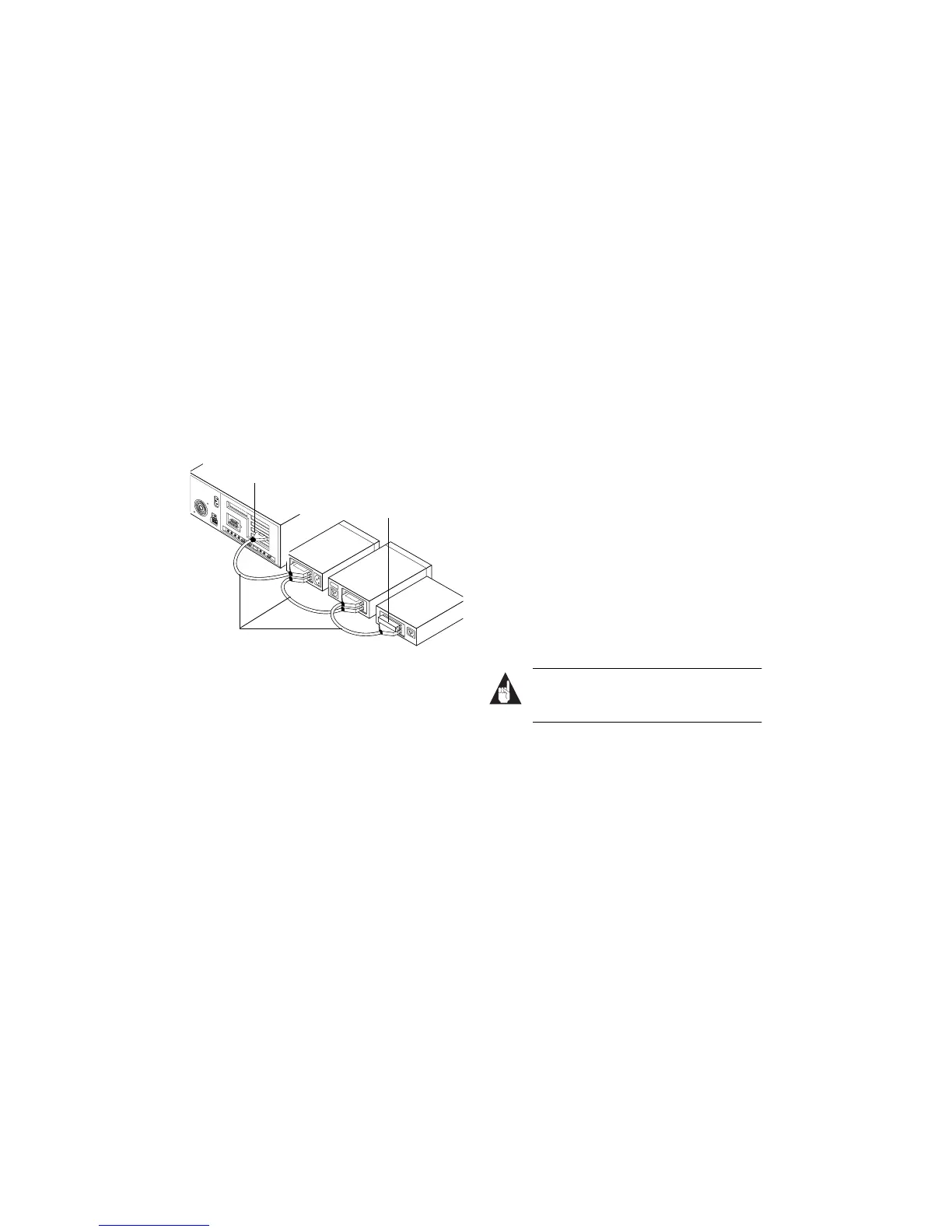
You can connect two or more SCSI devices by creating a
“daisy-chain,” that is, plugging one device into the next.
To do this, make sure you have a 50-pin high-density
external SCSI cable for each device.
Step 1:
Plug one end of the 50-pin high-density
external SCSI cable into the host adapter’s external
SCSI connector.
Step 2:
Plug the other end of the external SCSI cable
into one of the connectors on the external SCSI device.
(In the figure above, SCSI device A is connected to the
host adapter’s external SCSI connector.)
Step 3:
Take another external SCSI cable and plug it
into the next external SCSI device and the one you
connected in Step 2. (In the figure above, SCSI device
B is connected to SCSI device A.)
Step 4:
Connect your remaining devices the same
way you connected SCSI devices
A
and
B
.
Step 5:
On the last device , attach a terminating
plug or enable the terminator on the device. (In the
figure above, SCSI device
C
is terminated with a
terminating plug.)
Step 6:
Reconnect the power cables to the computer
and external SCSI devices.
Step 7:
Tur n
ON
the external devices and computer.
Step 8:
Go to Installing AHA-2910C Software.
Installing AHA-2910C Software
Install the appropriate host adapter device driver for
your operating system.
■
DOS and Windows 3.x: DOS and Windows 3.x do
not have embedded driver support for your
AHA-2910C product, so you must load the drivers
yourself. If your host adapter came with Adaptec’s
EZ-SCSI
®
software, see the EZ-SCSI software docu-
mentation for driver installation instructions.
■
Windows 95: Windows 95 has embedded driver sup-
port for the AHA-2910C. To verify that your
AHA-2910C device driver has been properly installed
under Windows 95, see Windows 95 Driver Installation
on page 7.
Note:
After installing your AHA-2910C product
and restarting Windows 95, you will be
prompted through the rest of the installation.
■
Windows NT: Windows NT 4.0 has embedded driver
support for the Adaptec AHA-2910C product. How-
ever, earlier versions of Windows NT do not have embed-
ded driver support, so you must load the driver yourself.
If your AHA-2910C came with Adaptec EZ-SCSI
software (v4.01 or later), install the Windows NT
driver from the diskette provided for your
AHA-2910C to support previous versions of
Windows NT. (Refer to the Adaptec EZ-SCSI docu-
mentation.) Otherwise, if your host adapter came
with Adaptec’s 7800 Family Manager Set software
(v1.3), see the 7800 Family Manager Set software
documentation for driver installation instructions.
External SCSI Cables
A
B
C
Host Adapter’s External SCSI Connector.
Terminating Plug


 To Next Page