10
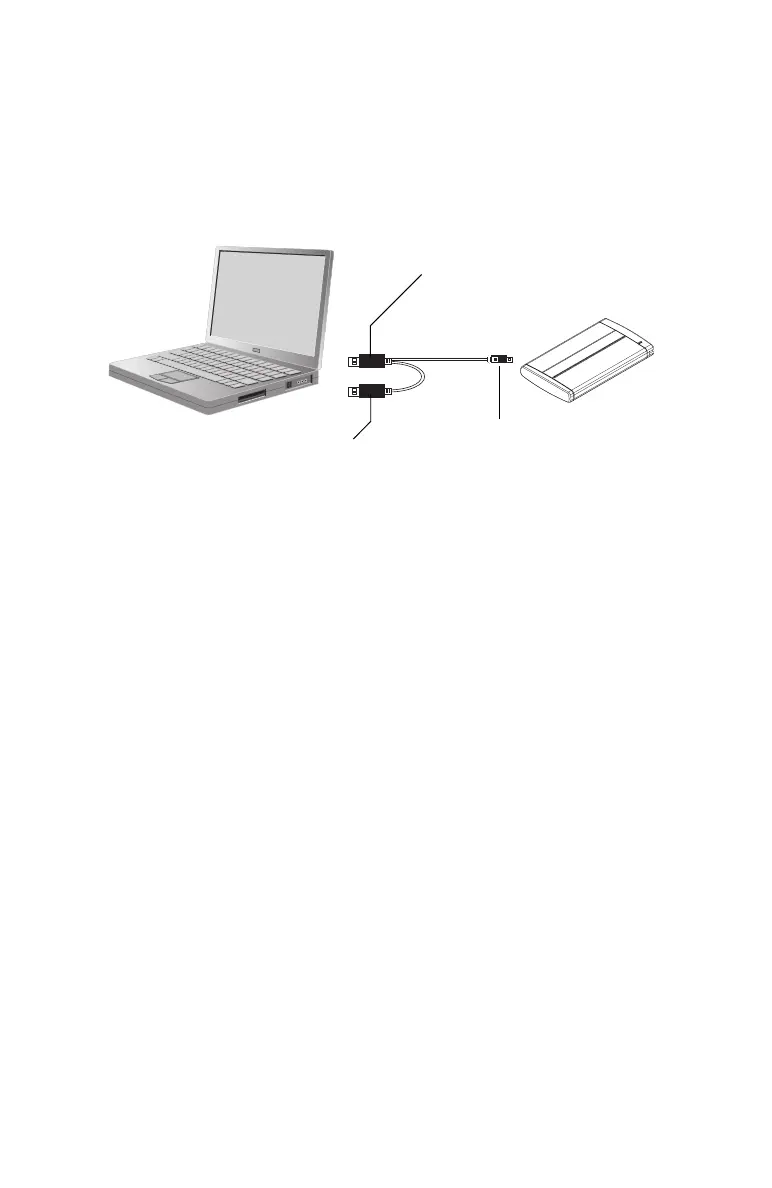
Connecting the USB Y-Cable to a Second USB 2.0 Port
If you have another available USB port on your computer (does not
have to be a USB 2.0 port), plug in the Y-cable’s secondary
connector. The secondary USB connector provides additional
power to the enclosure.
Connecting an External Power Supply
If the USB Y-cable does not supply enough power, try connecting
an external power supply (not included) to the power port on the
enclosure.
The external power supply must meet these requirements:
■ Rated at 5 Volts
■ Capable of 1–1.5 Amps (depending on disk drive power
consumption)
■ Connector size:
■ 3.5 mm outside (-) diameter
■ 1.35 mm inside (+) diameter
■ 10 mm length
Plug secondary connector
into any other USB port
for additional power
Plug into the enclosure
Plug main connector into USB 2.0
port for data and power connection



 To Next Page