Intel Platform ( LGA 1366 / 115X / 2066 / 2011 Socket )
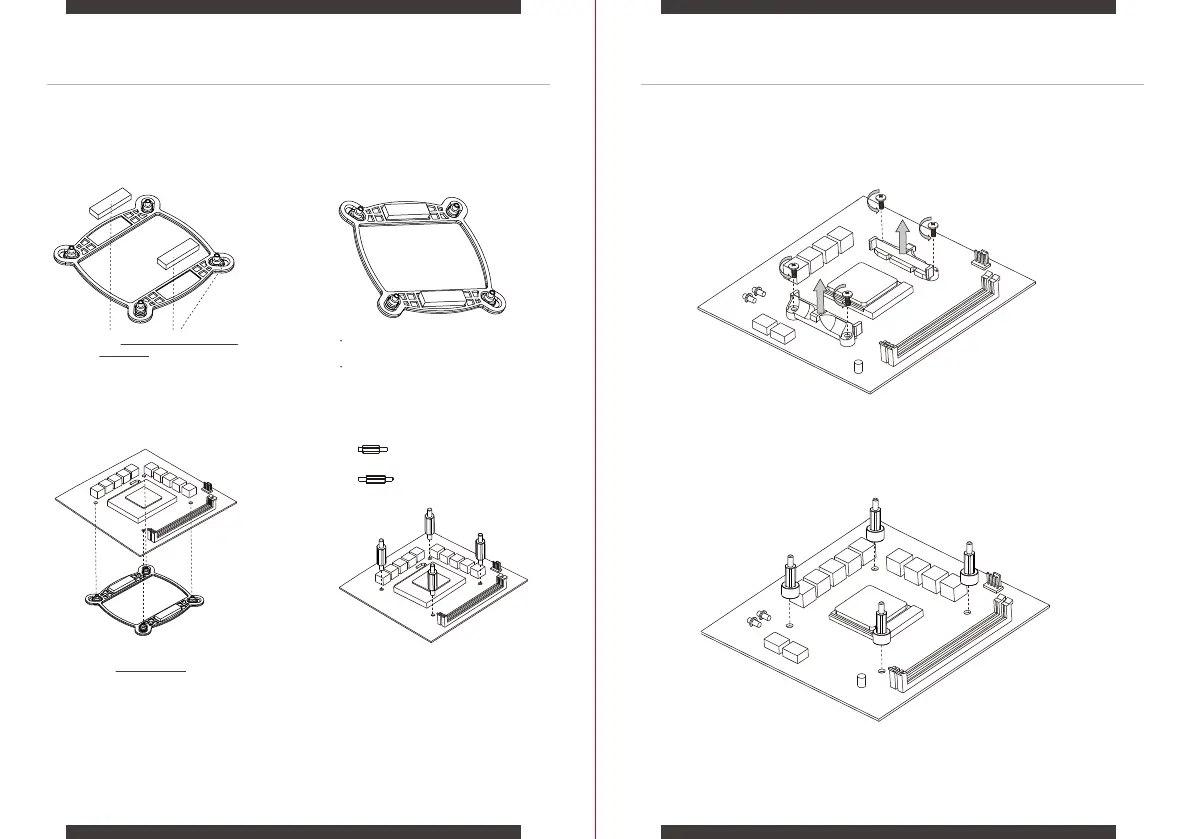
Attach the Doublesided Foam Tapes
to the Backplate.
0605
1. 2.
3. 4.
For LGA 115X / 1200 / 1366 socket
For LGA 20XX socket
AMD Platform ( AM4 Socket )
Remove the pre-installed AMD heatsink mount.
Secure with the provided AM4 Standoff Screws.
1.
2.
MOTHERBOARD SETUP:Intel PLATFORM MOTHERBOARD SETUP:AMD PLATFORM
Install the Intel Backplate on the rear of
the motherboard.
Screw the backplate with
the provided standoffs.
For LGA 115X / 1200 Socket Installation,
slide the backplate pins inwards.
For LGA 1366 / 2066 / 2011 Socket Installation,
slide the backplate pins outwards.


 To Next Page