0807
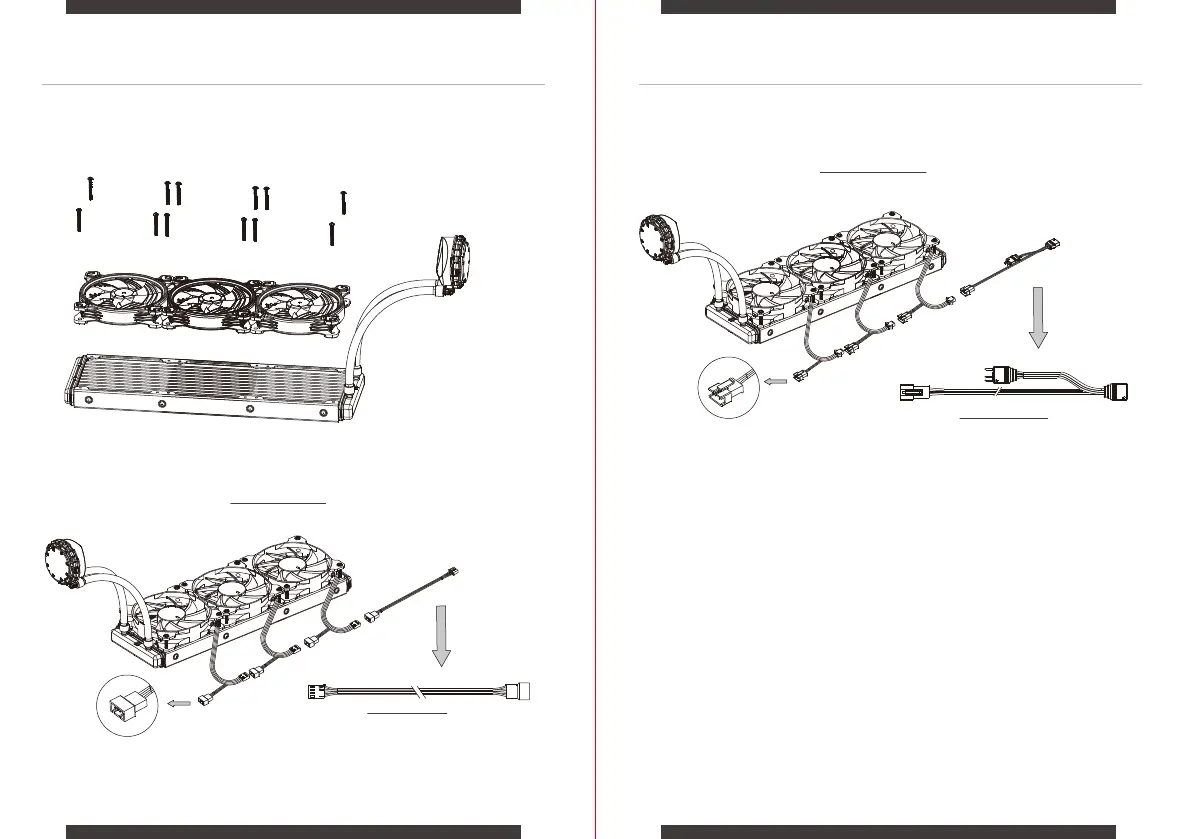
Use the provided Fan Screws to install the Fans on the Radiator. Connect each 3-Pin LED Cable in series as diagram below.
Then connect the provided ARGB LED CABLE to motherboard or I/O Ports.
ARGB LED CABLE
Connect this ARGB LED CABLE to
Pump’s ARGB 3-Pin connector for
Daisy Chain Lighting Effect.
Connect this Fan Power Cable to motherboard
Fan Power Cable
1.
Connect each 4-Pin Fan Power Connector in series as diagram below.
Finally connect the provided Fan Power Cable to motherboard.
2.
3.
FAN INSTALLATION on the RADIATOR
FAN INSTALLATION on the RADIATOR


 To Next Page