For system air and water adjustments, refer to
your Floor Boxes Owner’s Guide (A-dec Publication
No. 85-2611-00).
If the instrument holder arm on your chair starts to
droop when all the instruments are in place, or if the
arm swings too freely, an adjustment is necessary.
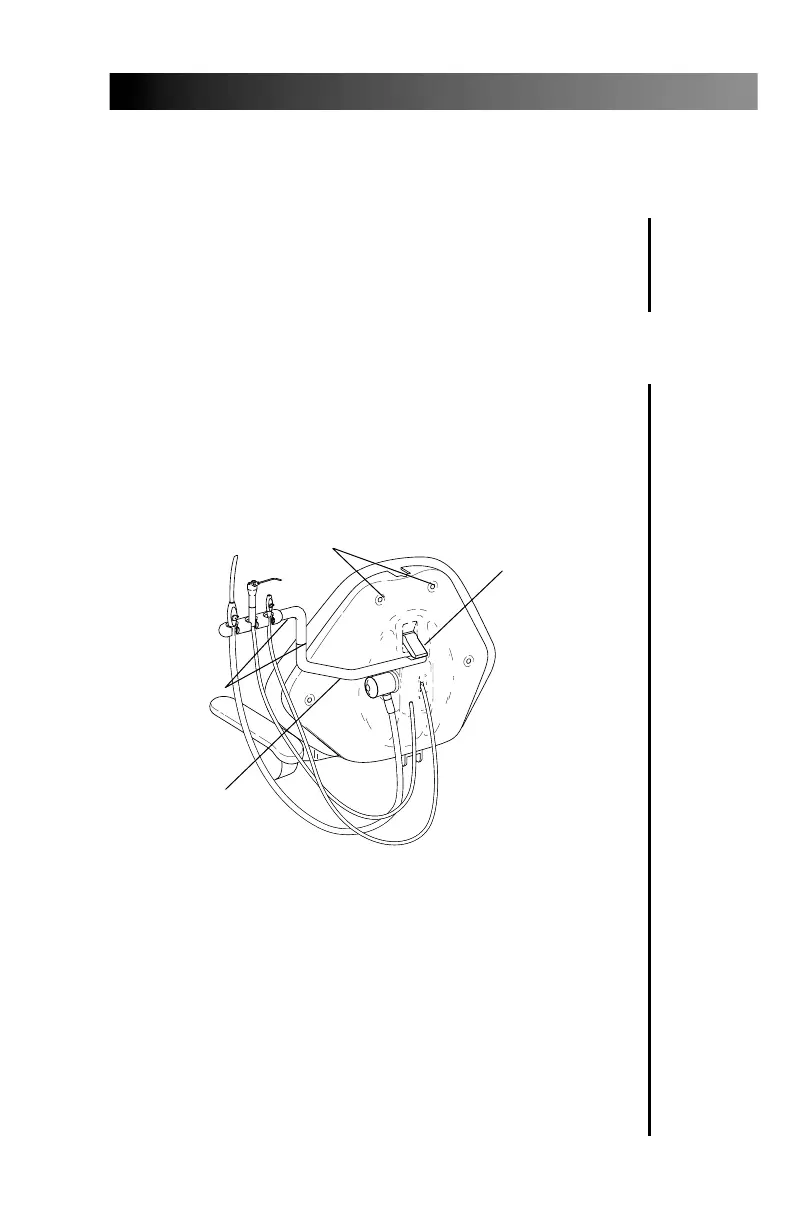
To adjust the horizontal angle of the arm, lift
the arm up and evenly tighten the break-away
mechanism screws (see Figure 4) with a 5⁄32-inch
hex key. Adjust arm to the desired position.
To adjust the tension at the joints of the arm
(see Figure 4), use a 3⁄32-inch hex key and turn the
adjustment screws clockwise to increase the tension,
counterclockwise to reduce the tension.
5
Decade 1021 Vac Back Chair
Adjustments
Arm Adjustment
Figure 4. Arm Adjustment
CHAIR BACK
RETAINING SCREWS (4)
BREAKAWAY
MECHANISM
(adjustment
screws
underneath)
INSTRUMENT
HOLDER ARM
ARM JOINT
ADJUSTMENT
SCREWS
2625 DB Doc, 1021 Vac Back 10/15/99 7:29 AM Page 5



 To Next Page