EasyManua.ls Logo

ADELSYSTEM ALL IN ONE CBI Series - User Manual

ADELSYSTEM ALL IN ONE CBI Series
12 pages
Print Icon
To Next Page IconTo Next Page
Loading...
Via Luigi Barchi 9/B Reggio Emilia 42124 Italy
Tel. +39 0522 345518 Fax +39 0522 345551 www.adelsystem.com
Instruction Manual All In One R47_1pag1-12_A24.AAA.006A41.doc
Operator manual: ADELSystem reserves the right to change the contents of this document without prior
notice.
1 ALL IN ONE” DC UPS SERIES
Thank you for having chosen one of our products for your work.
We are certain that it will give the utmost satisfaction and be a notable help on the job.
2 GENERAL DESCRIPTION
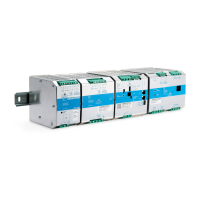
Thanks to All In OneCBI series of DC-UPS, it will
be possible to optimize the power management of
your system with one single, extremely compact and
cost-effective device, connected directly to the
mains. The available power is automatically
distributed between load and battery giving priority
to the load. Battery can supply the load even with
mains so the output power to the load can be twice
the nominal power if it is required (Power Boost). When mains failure occurs, the load continues to be
supplied by the battery in backup mode. It is also possible to switch on the device with no mains directly
from battery. The “Battery Care” algorithm performs rapid and automatic charging, battery charge
optimization during time, flat batteries recovery and real time diagnosis during installation and operation.
Temperature compensation is possible by connecting the temperature sensor probe. The real time auto-
diagnostic system monitors battery faults such as sulphated battery, shorted cells, accidental reverse
polarity connection or disconnection of the battery. Every fault is signaled by a blink code of Diagnosis
Led or via Modbus (only in some models) in order to be easily detected and removed during the
installation and after sales. The continuous monitoring of battery efficiency reduces risk of battery
damage and allows a safe operation in permanent connection. Predefined curves can be selected by
jumpers or DIP switch to optimize the charge of different battery types: Open Lead Acid, AGM and Gel
Lead Acid; Ni-Cd are rechargeable using the same device. Charging curves can be customized via
Modbus (only in some models). Output dry contacts are used to signal both backup and fault conditions.
A rugged casing with bracket for DIN rail mounting provides IP20 protection degree.
3 MAIN CHARACTERISTICS
Universal input voltage: single-phase 115–230-277 Vac
Load output:24 Vdc 3,5,10,20A; 12 Vdc 3,6,10,15,35A 48
Vdc 5,10A
Battery output:24 Vdc 3,5,10,20A; 12 Vdc 3,6,10,15,35A; 48
Vdc 5,10A
“All In One” solution: power supply + battery charger +
backup module in one single device connected directly to the
mains
Suited for different battery types: Open Lead Acid, Sealed
Lead Acid, AGM and Gel Lead Acid; Ni-Cd and Li-ion are
available as options. Four stage charging curve for Lead Acid
batteries: 5-stage IUoU (Recovery, Bulk, Absorption, Float,
Refresh Battery) plus Recovery stage for deeply discharged
batteries
Automatic diagnosis of battery status and battery Life Test
function (Battery Care)
Switching technology with high efficiency
Protected against short circuit, overload and inverted polarity
Output dry contact for signaling Low Battery or Battery
Replacement and Fault system
Output dry contact for signaling Mains or Backup
IP20 protection degree
Space saving on DIN rail
4 SAFETY AND WARNING NOTES
WARNING Explosion Hazard. Do not disconnect Equipment unless power has
been switched off or the area is known to be non-hazardous.
WARNING Explosion Hazard. Substitution of components may impair suitability for
class I, Division 2.
WARNING – Switch off the system before connecting the module. Never work on the machine when it
is live. The device must be installed in according with UL508 or UL60950. The device must have a
Question and Answer IconNeed help?

Do you have a question about the ADELSYSTEM ALL IN ONE CBI Series and is the answer not in the manual?

Summary

Understanding the ADELSYSTEM All In One DC UPS Series

General Description of DC UPS Systems

Detailed explanation of the 'All In One' DC UPS series, its function, and features.

Key Characteristics of DC UPS

Key technical specifications and features of the 'All In One' DC UPS series.

Connecting ADELSYSTEM DC UPS Units

Terminal and Wiring Connections

Specifies cable cross-sections, stripping length, and torque for device connections.

Input Line System Configurations

Illustrates different input line system configurations like TN, IT, TNS, and TNC.

Output Power Connections for Load and Battery

Explains normal and parallel connection methods for output load and battery.

Advanced Output Connection Methods

Parallel Connection for Double Power

Details how to parallel units for increased output power (1+1=2) with specific models.

Series Connection for Increased Voltage

Describes how to connect units in series to increase the output voltage, up to 150Vdc.

Output Load Behavior with Mains Input

Explains output load behavior when mains input is present, including Power Boost mode.

DC UPS Layout and Specific Connections

Input, Output Load, and Battery Connection Details

Specific instructions for connecting AC input, battery, and output load for various models.

Operating and Monitoring DC UPS Units

Fault and Status Conditions via Relays and LEDs

Details fault and status conditions indicated by relays and LEDs, including relay contact ratings.

Relay and LED Status for Backup and Faults

Maps relay and LED states to system conditions like Mains input status and faults.

Charging Mode LED Status Indicators

Describes LED indications for different charging modes: Float, Absorption, Boost, Recovery.

Identifying Faulty Batteries or Systems

Lists specific causes for faulty battery or system conditions with corresponding LED blink codes.

Battery Care and Management

Temperature Compensated Battery Charging

Explains temperature compensation for battery charging using a connected sensor probe.

Adjusting the Charging Current Limiter

Describes how to limit the maximum charge current using an internal trimmer.

Battery Management Configuration for All Sizes

Preliminary operations for configuring battery types and management settings for different sizes.

Battery Type and Functional Settings

Battery Type Selection for Specific Models

Details jumper and dip switch settings for selecting battery types on specific models.

Selecting Battery Chemistry Types

Shows jumper and dip switch settings for selecting various battery chemistries.

Configuring Functional Settings

Explains jumper/dip switch settings for Battery Life test, Boost, Start from Battery, and UPS Disabling.

DC UPS Diagnostics and Protective Features

Understanding Error Conditions and LED Indicators

Describes error conditions indicated by specific LED states and blinking sequences.

Built-in Protection Features

Details internal fuse, protection against short circuits, overload, polarity inversion, and deep discharge.

DC UPS Charging Curve Explained

Explains the multi-stage charging curve, its phases, and refresh charging.

Modbus Communication Protocol

Modbus Electrical Characteristics

Lists electrical specifications for the Modbus RTU communication protocol, including baud rate and data format.

Connecting Devices via Modbus

Provides diagrams and instructions for connecting devices in a Modbus network using specific ports.

Modbus Connection Diagrams and Termination

Modbus Connection Diagram for Size 4 CBI280

Illustrates Modbus connection diagrams for Size 4 CBI280 devices, including daisy chain setup.

Modbus Connection Diagram for Size 3 CB1500

Illustrates Modbus connection diagrams for Size 3 CB1500 devices, including daisy chain setup.

Bus Termination Settings for Size 3 Modbus

Details bus termination settings for Modbus line polarization on Size 3 devices.

Configuring Modbus Communication

Bus Termination and Fail-Safe for Size 4

Explains fail-safe function and line terminators for Size 4 devices in a daisy chain.

Modbus Configuration Procedures

Instructions on configuring Modbus connections and parameters using external devices like RTU, PC, DPY351.

Standards, Certifications, and Mounting

Electrical Safety for Mounting Requirements

Details electrical safety standards and mounting requirements for the device.

Device Safety Standards Compliance

Lists various safety standards the device complies with, including IEC 62368-1.

EMC Immunity Standards

Lists EMC immunity standards that the device adheres to.

EMC Emission Standards Compliance

Lists EMC emission standards the device must comply with.

Product Conformity Statements

States conformity to various international standards like EN60950 and UL60950.

Approved Device Models List

Lists specific device models that have received approvals.

Rail Mounting Guidelines

ADELSYSTEM ALL IN ONE CBI Series Specifications

General IconGeneral
BrandADELSYSTEM
ModelALL IN ONE CBI Series
CategoryUPS
LanguageEnglish