28 C-24c
PULSE
There are pulse sensors located on both handlebars, in order to
monitor the users pulse rate these can be held in order for the
reading to be given. The pulse monitor is a guide for reference
only and not for medical use or monitoring.
RESISTANCE
Level: 1 – 32
CALORIES
TIME
RPM
BLUETOOTH DONGLE
Insert DONGLE into port. Connect to DONGLE via Bluetooth
using the APP and your unique adidas code "adidas****".
Once connected, the indicator light will turn on.
SPEED
0.0 – 72.0 KPH/0.0 – 45.0 MPH
DISTANCE
0.0 – 99.9 KM/0.0 – 62.0ML
USB CHARGING
Device charging port is on the back of console.
RESISTANCE
In running mode: Rotate DIAL counter clockwise to decrease the RESISTANCE.
Rotate DIAL clockwise to increase the RESISTANCE
START/PAUSE/STOP
Press DIAL once to start workout. Press once again to pause workout. Press
and hold Dial for 3 seconds to STOP and RESET to Standby Mode.
CALORIES
RESISTANCE
DISTANCE
TIME
PULSE
SPEED
BLUETOOTH DONGLE
– +
CONSOLE
DIAL FUNCTIONS
COMPUTER PROGRAMS
POWER UP
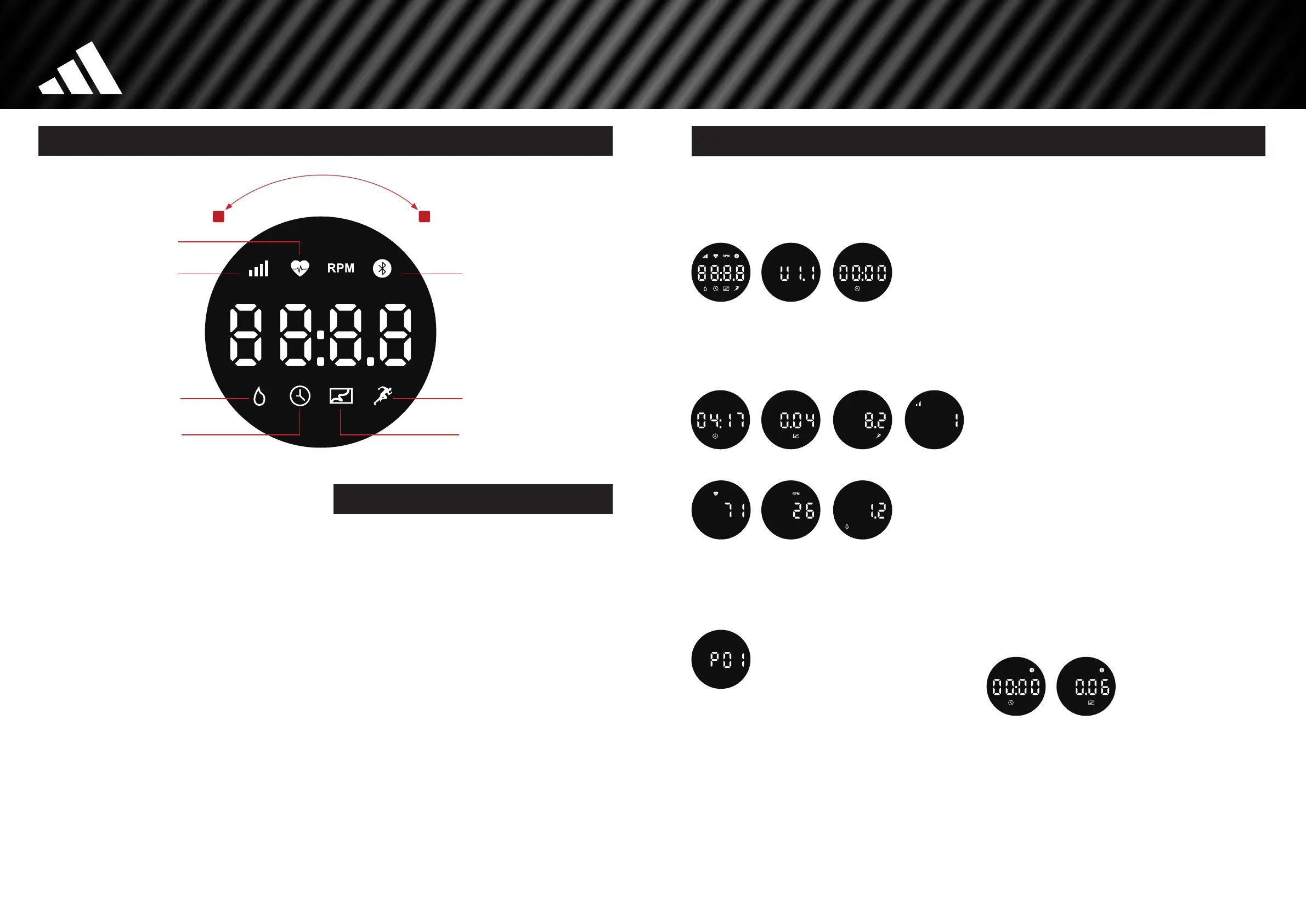
When the power supply is connected to the machine, the console will
power on with a long beep sound. All segments of the LED display
will light up for 2 seconds (Image 1), "U1.1" will be displayed (Image 2),
then it will enter Standby Mode (Image 3).
1. 2. 3.
QUICK START
In Standby Mode (Image 3) the workout can be started directly by pressing
the DIAL 1 time. All workout values will automatically cyclically display.
4. TIME 5. DISTANCE 6. SPEED 7. RESISTANCE
8. PULSE 9. RPM 10. CALORIES
PRESET PROGRAMS (P01 – P18)
• In Standby Mode (Image 3) rotate the DIAL to select Preset Program
P1 – P18 (Image 11) press the DIAL to confirm and STA RT.
11.
• During the workout, the RESISTANCE level will be automatically adjusted
according to the program, or rotate the DIAL to adjust the RESISTANCE level
• When you stop peddling, the console will be suspended, but the workout
values will automatically cyclically display
• When the program is finished, the console will beep and display "End" 4
times, then jump back to Standby Mode
4 MANUAL PROGRAMS
TIME
• From standby mode turn the DIAL clockwise, past P18, until you reach
the TIME screen (IMAGE 4)
• Press the DIAL once to enter setting mode. Turn the Dial to adjust the value
• Press the DIAL once to START. The workout values will automatically
cyclically display
• During the workout, rotate the DIAL to adjust the RESISTANCE level
• When the target value arrives, the console will beep and display "End"
4 times, then jump back to Standby Mode
DISTANCE
• From standby mode turn the DIAL clockwise, past P18, until you reach
the DISTANCE screen (IMAGE 5)
• Press the DIAL once to enter setting mode. Turn the Dial to adjust the value
• Press the DIAL once to START The workout values will automatically
cyclically display
• During the workout, rotate the DIAL to adjust the RESISTANCE level
• When the target value arrives, the console will beep and display "End"
4 times, then jump back to Standby Mode
CALORIES
• From standby mode turn the DIAL clockwise, past P18, until you reach
the CALORIES screen (IMAGE 10)
• Press the DIAL once to enter setting mode. Turn the Dial to adjust the value
• Press the DIAL once to START The workout values will automatically
cyclically display
• During the workout, rotate the DIAL to adjust the RESISTANCE level
• When the target value arrives, the console will beep and display "End"
4 times, then jump back to Standby Mode
PULSE
• From standby mode turn the DIAL clockwise, past P18, until you reach
the PULSE screen (IMAGE 8)
• Press the DIAL once to enter setting mode. Turn the Dial to adjust the value
• Press the DIAL once to START The workout values will automatically
cyclically display
• During the workout, rotate the DIAL to adjust the RESISTANCE level
• When the target value arrives, the console will beep and display "End"
4 times, then jump back to Standby Mode
CONNECT TOA FITNESSAPP
The console supports the adidas, Kinomap and Zwift APP. After connecting
with the Bluetooth the display is as follows.
POWER SAVE FUNCTION
In running mode, the cicular display will pause after 4 minutes of non use.
Under stop/pause mode, display will enter into sleep mode after 10 minutes
of non use.
EN
WWW.ADIDASHARDWARE.COM 29
C-24c (AVUS-10225) PRINT MANUAL_v9_21.02.24.indd 28-29C-24c (AVUS-10225) PRINT MANUAL_v9_21.02.24.indd 28-29 21/02/2024 09:5821/02/2024 09:58


 To Next Page
 Loading...