Need help?
Do you have a question about the ADIROffice ADI629-202 and is the answer not in the manual?
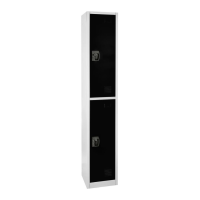
Describes using a single, standalone locker unit for personal storage needs.
Details how to mount multiple locker units together for enhanced storage capacity.
Lists the essential tools not included with the locker that are necessary for assembly.
Connects the Left Panel (B) to the Back Panel (D) using Round Head Screws (7).
Connects the Right Panel (E) to the Back Panel (D) using Round Head Screws (7).
Attaches the Door Panel (A) by inserting it into pockets on the side panels.
Secures the Top Panel (C), Middle Panel (H), and Bottom Panel (G) using screws.
Attaches Double Hooks (9) to the Back Panel (D) using Flat Head Screws (4).
Installs Shelves (F) by placing Shelf Brackets (8) at desired heights.
Secures multiple locker units together using Bolts (1), Nuts (3), and Washers (2).
Mounts the locker to the wall by marking, drilling, and inserting Wall Anchors (6).
 General
| Brand | ADIROffice |
|---|---|
| Model | ADI629-202 |
| Category | Indoor Furnishing |
| Language | English |

 To Next Page