EasyManua.ls Logo

ADJ Color Stand LED - User Manual

ADJ Color Stand LED
21 pages
Print Icon
To Next Page IconTo Next Page
Loading...
Color Stand LED
user manual

Other manuals for ADJ Color Stand LED

Question and Answer IconNeed help?

Do you have a question about the ADJ Color Stand LED and is the answer not in the manual?

Summary

FCC Compliance

Radio Frequency Interference

Instructions for mitigating harmful radio frequency interference.

General Information

Introduction

Read and understand all instructions carefully before operating.

Unpacking and Inspection

Check shipping carton for damage and verify all included accessories.

Warranty Returns Process

Obtain R.A. number, pre-pay freight, and include proof of purchase for returns.

Customer Support Contact

Information on how to contact ADJ Service for product support and needs.

Limited Warranty (USA Only)

Safety Instructions and Guidelines

Maintenance Guidelines

Cleaning

Recommended cleaning frequency and methods for the stand.

Regular Inspections

Key points for routine inspections to ensure proper function and safety.

Overview

Included Items

Lists the components included in the Color Stand LED package.

Installation Instructions

Mounting the Speaker Without a Bracket

Instructions for mounting a speaker directly onto the stand's center post.

Mounting the Speaker With a Bracket

Instructions for mounting a speaker using a bracket onto the stand.

Connecting the Power

Guide on how to connect the power supply to the unit.

Remote Control

Pairing the Remote

Steps to pair the remote control with the unit if it's not already connected.

Changing Color Sequence

Procedure to reconfigure the default color output sequence.

Power and Demo Modes

Explains the function of the Power and Demo buttons on the remote.

Mode, Speed, Color, Brightness Controls

Details on how to use +/- buttons to adjust modes, speed, color, and brightness.

Direct Color Select Buttons

Describes the 7 shortcut keys for selecting static colors.

Trouble Shooting Tips

Stand Instability Issues

Common causes and solutions for an unstable stand.

Speaker Height Adjustment

Checks to ensure the speaker stays at the desired height.

Frequently Asked Questions

Technical Specifications

Product Specifications

Key technical details including height range, load capacity, material, and power.

Dimensions

Diagrams and measurements of the product's physical size.

Summary

FCC Compliance

Radio Frequency Interference

Instructions for mitigating harmful radio frequency interference.

General Information

Introduction

Read and understand all instructions carefully before operating.

Unpacking and Inspection

Check shipping carton for damage and verify all included accessories.

Warranty Returns Process

Obtain R.A. number, pre-pay freight, and include proof of purchase for returns.

Customer Support Contact

Information on how to contact ADJ Service for product support and needs.

Limited Warranty (USA Only)

Safety Instructions and Guidelines

Maintenance Guidelines

Cleaning

Recommended cleaning frequency and methods for the stand.

Regular Inspections

Key points for routine inspections to ensure proper function and safety.

Overview

Included Items

Lists the components included in the Color Stand LED package.

Installation Instructions

Mounting the Speaker Without a Bracket

Instructions for mounting a speaker directly onto the stand's center post.

Mounting the Speaker With a Bracket

Instructions for mounting a speaker using a bracket onto the stand.

Connecting the Power

Guide on how to connect the power supply to the unit.

Remote Control

Pairing the Remote

Steps to pair the remote control with the unit if it's not already connected.

Changing Color Sequence

Procedure to reconfigure the default color output sequence.

Power and Demo Modes

Explains the function of the Power and Demo buttons on the remote.

Mode, Speed, Color, Brightness Controls

Details on how to use +/- buttons to adjust modes, speed, color, and brightness.

Direct Color Select Buttons

Describes the 7 shortcut keys for selecting static colors.

Trouble Shooting Tips

Stand Instability Issues

Common causes and solutions for an unstable stand.

Speaker Height Adjustment

Checks to ensure the speaker stays at the desired height.

Frequently Asked Questions

Technical Specifications

Product Specifications

Key technical details including height range, load capacity, material, and power.

Dimensions

Diagrams and measurements of the product's physical size.

Overview

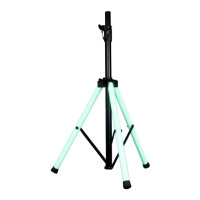
The ADJ Color Stand LED is a lighting stand with integrated LED lighting, designed to provide both structural support and ambient illumination. It includes an RF remote control and a 12V, 3A power supply for operation.

Function Description

The primary function of the Color Stand LED is to serve as a stable support for speakers or other equipment, while simultaneously offering dynamic LED lighting effects. The integrated LED lighting can be controlled via an RF remote, allowing users to select from a variety of colors, modes, speeds, and brightness levels. This dual functionality makes it suitable for events, performances, or any setting where both equipment support and atmospheric lighting are desired.

Important Technical Specifications

  • Total Height Range: The stand is adjustable from 43.2 inches (1,097.3 mm) to a maximum recommended height of 73.68 inches (1,871.5 mm).
  • Load Capacity: Each stand has a maximum weight capacity of 60 lbs. (27.2 kg).
  • Inner Pipe Diameter: The pipe diameter is 1.38 inches (35 mm), making it compatible with standard pole-mount speaker sockets.
  • Material: Constructed from steel and PVC, ensuring durability and stability.
  • Power: Operates on AC100-240V 50/60Hz, supplied by an included 12V, 3A power supply.
  • Lighting Modes: Features 22 dynamic modes for varied lighting effects.
  • Static Colors: Offers 20 static color options.
  • Speed: Provides variable speed control for dynamic modes, with 10 selectable speeds.
  • Brightness: Includes 5 brightness levels for adjusting light intensity.
  • Remote Distance: The RF remote control has an operating range of up to 49 feet (15 m).
  • DMX Compatibility: The Color Stand LED does not use DMX.

Usage Features

Setup and Installation: The stand's setup involves loosening Knob A to spread the legs horizontally, then loosening Knob B to extend the center post to the desired height. A safety pin must be inserted through the stopper holes in the center post for security, and Knob A should be tightened clockwise to secure the stand.

Mounting Speakers:

  • Without a Bracket: If a speaker has a pole mount socket, it can be directly placed on top of the stand's center post. It is crucial to ensure the center post fits securely into the socket. Due to variations in speaker size, weight, and mounting height, it is recommended that at least two persons install the speaker to prevent personal injury.
  • With a Bracket: If a speaker requires a mounting bracket, the bracket should be installed onto the speaker first, then lowered onto the stand's center post. The center post must fit securely into the speaker mounting bracket. Any additional adjustments for the bracket or speaker aiming should follow the bracket's instructions. Again, two persons are recommended for installation to avoid injury.

Power Connection: The stand is powered by a 12V, 3A power supply, which connects to an adapter located at the mid-section of the stand.

Remote Control: The included RF remote control offers comprehensive control over the LED lighting:

  • Pairing: The remote is pre-paired, but if re-pairing or pairing to an additional unit is needed, the user must unplug and reconnect power, then press "SPEED –" and "SPEED +" together within 5 seconds.
  • Change Output Color Sequence: To reconfigure the default color sequence (Green, Red, Blue) or match direct color select keys, the user must unplug and reconnect power, then press "RED" and "Blue" together within 5 seconds. This toggles through 6 color combinations, which are then memorized.
  • Power: Turns the unit ON/OFF and restores its previous status.
  • DEMO: Plays 17 dynamic modes in a loop, with each mode repeating 3 times.
  • MODE +/-: Cycles through 22 different color fade, color change, and auto run programs.
  • SPEED +/-: Selects from 10 different speeds for dynamic modes.
  • COLOR +/-: Chooses from 20 static colors.
  • BRIGHT +/-: Adjusts brightness across 5 levels.
  • Direct Color Select Buttons: Provides 7 shortcut keys for static colors, which are also included in the COLOR +/- selections.

Safety Guidelines:

  • Never set up or install the stand on an uneven or unstable surface.
  • Spread the legs until the stays extend horizontally.
  • Never remove the safety pin when a knob is loose.
  • Do not overextend the inner pipe.
  • Keep flammable materials away from the device.
  • Maximum load capacity is 60 lbs. (27.2 kg).
  • For indoor/dry locations use only; do not expose to rain or moisture.
  • When used outdoors under strong wind, take appropriate measures to prevent falling.
  • Tighten all knobs and bolts securely.
  • Avoid placing the unit in doorways or high-traffic areas.
  • Mount devices in areas outside walking paths or seating areas.
  • Take care not to pinch fingers or hands between stand legs.
  • Never stand directly below devices during mounting, removal, or servicing.
  • All installations must follow local, national, and country electrical and construction codes.
  • Never look directly into the light source due to retina injury risk.

Maintenance Features

Cleaning: Frequent cleaning is recommended for proper function and extended life. The cleaning frequency depends on the operating environment (damp, smoky, or dirty environments require more frequent cleaning). The external surface should be cleaned at least every 20 days with a soft cloth to prevent dirt/debris accumulation. Alcohol, solvents, or ammonia-based cleaners should never be used.

Maintenance Inspections: Regular inspections are recommended. There are no user-serviceable parts inside the device; all service issues should be referred to an authorized ADJ service technician. Genuine spare parts should be ordered from a local ADJ dealer if needed.

Routine inspections should include:

  • A detailed review by an approved electrical engineer every three months to ensure circuit contacts are in good condition and prevent overheating.
  • Checking that all screws and fasteners are securely tightened to prevent parts from falling during operation.
  • Inspecting the stand, stays, legs, knobs, inner pipe, and T-bar for any deformations, which could allow dust entry or compromise structural integrity. Damaged rigging points or unsecured rigging could cause the devices to fall.
  • Verifying that electric power supply cables show no damage, material fatigue, or sediments.

General Maintenance Advice:

  • Always disconnect devices from the main power source before performing any cleaning or maintenance.
  • Ensure proper ventilation by installing devices in appropriate areas.
  • Safely route and secure power cords to prevent pinching.
  • Disconnect power cords during long periods of non-use.
  • Only use recommended rigging hardware.
  • Use original packaging and materials for transporting devices for service.
  • Devices should be serviced by qualified personnel if power cords/plugs are damaged, objects/liquid have entered the device, the device has been exposed to rain/moisture, or if it does not operate normally or exhibits a marked change in performance.

ADJ Color Stand LED Specifications

General IconGeneral
BrandADJ
ModelColor Stand LED
CategoryCamera Accessories
LanguageEnglish