151
ADOBE FRAMEMAKER 7.0
Classroom in a Book
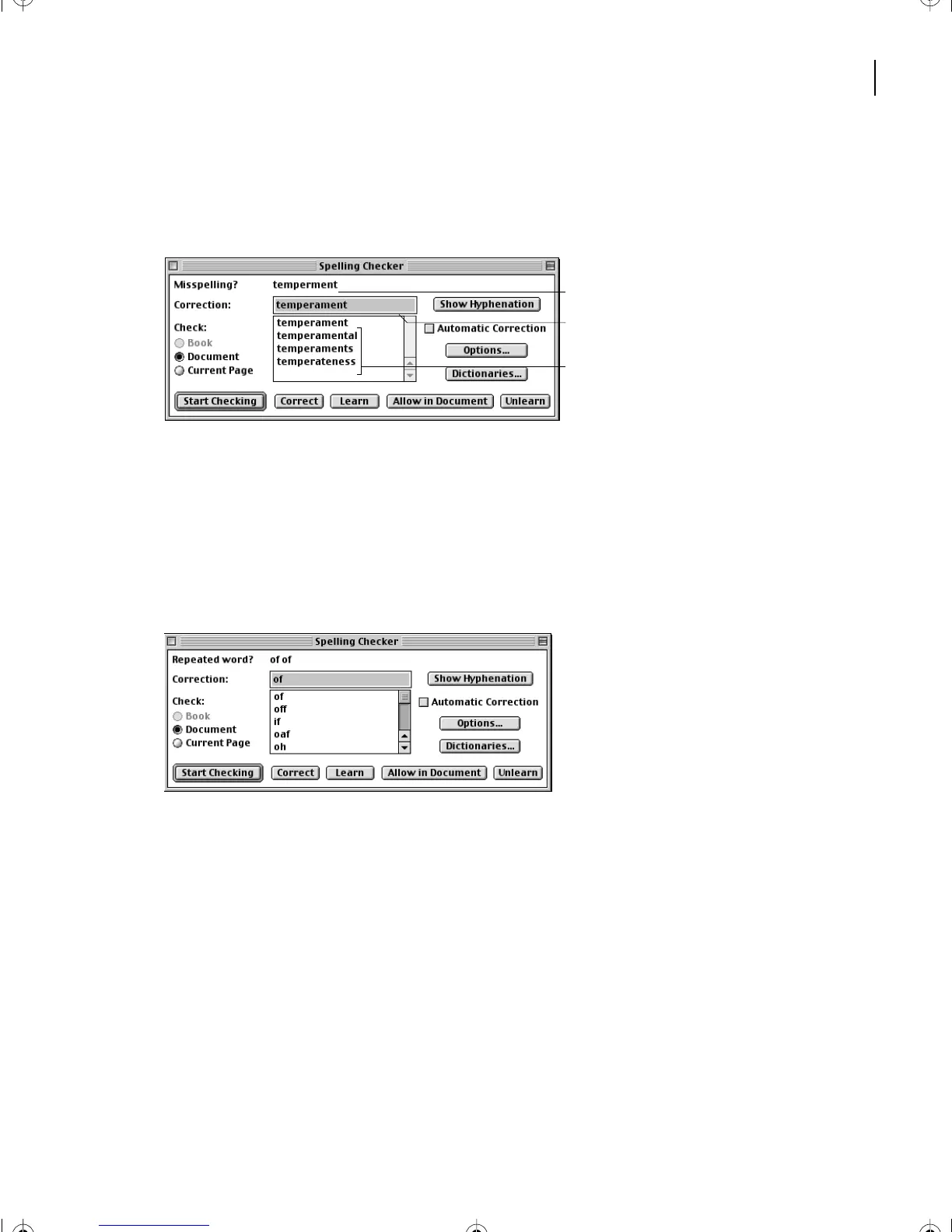
Because the first word found is not in any of the dictionaries, FrameMaker 7.0 selects the
word temperment and suggests that it’s a misspelling. FrameMaker 7.0 recommends a
spelling of temperament, and provides several other choices.
A. Suspected problem B. Recommended correction
C. Additional choices
The suggested correction is the right one, so you’ll accept it.
5 Click Correct.
Next, FrameMaker 7.0 stops at the repeated words of of and suggests that only one of the
words is necessary. This is a typing error rather than a spelling error.
6 Click Correct.
FrameMaker 7.0 now stops at Labradoodle, a word that describes a breed that hasn’t found
it’s way into the dictionaries yet.
7 Click Allow in Document. FrameMaker 7.0 adds the word to the document’s
dictionary. If Labradoodle appears elsewhere in this document, FrameMaker 7.0 won’t
question it again.
This time, FrameMaker 7.0 stops at dogwalk. Yo u’ll replace this with the two words
dog walk.
8 Enter dog walk in the Correction text box and click Correct.
A
C
B
L06.fm Page 151 Saturday, July 6, 2002 11:51 AM



 To Next Page