347
ADOBE FRAMEMAKER 7.0
Classroom in a Book
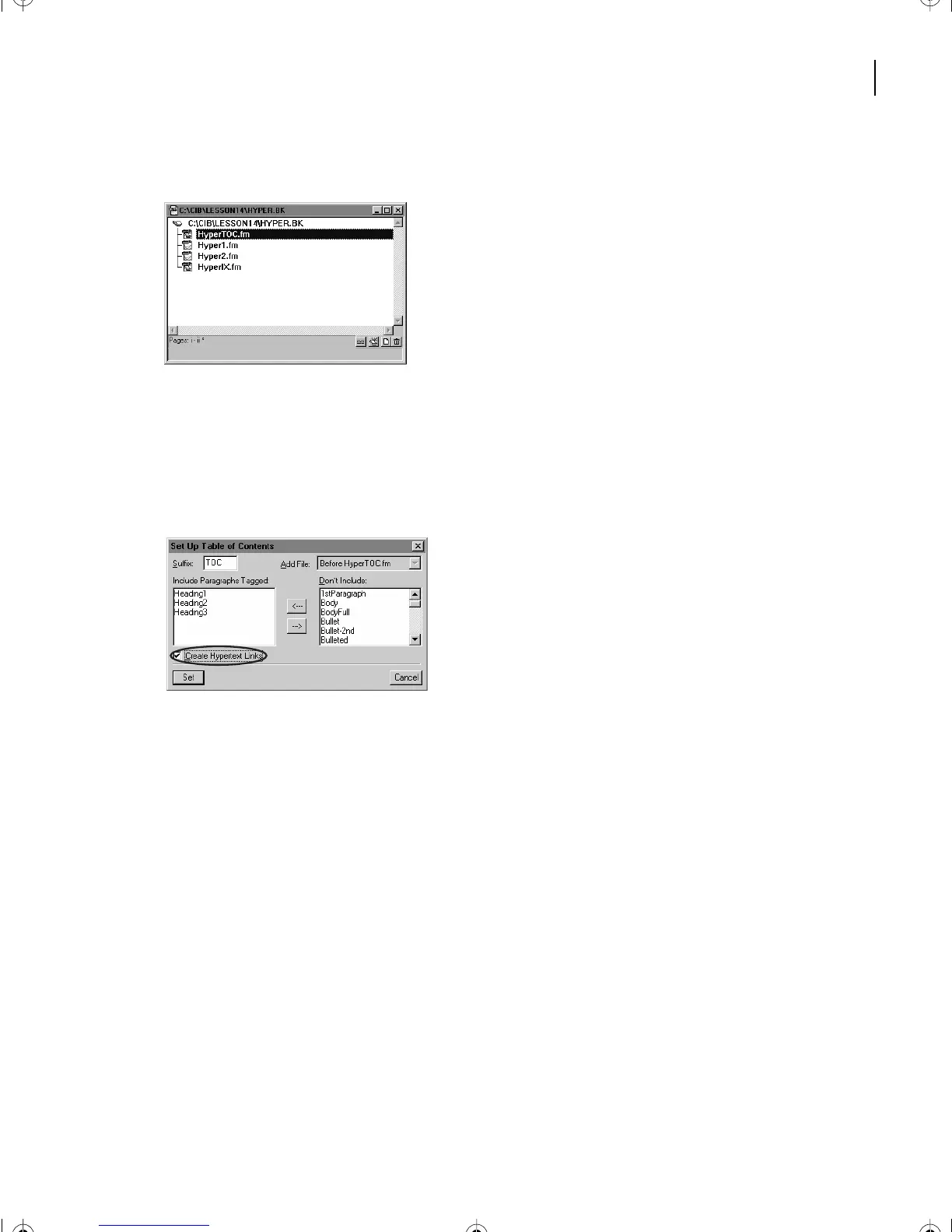
This book file contains a table of contents, two chapter files, and an index.
2
Select Hyper1.fm in the book window by clicking it once.
3
Choose Add > Table of Contents. A dialog box appears to Set up TOC.
4
Move Heading1, Heading 2, and Heading3 from Don’t Include to Include
Elements/Paragraphs by double-clicking each or by using the move arrow (<---).
5
Make sure that Create Hypertext Links is checked.
6
Click Add.
7
You won’t generate the table of contents yet, so click Cancel to close the Update Book
dialog box that appears.
Now you’ll set up the index to contain hypertext links.
8
Select Hyper2.fm by clicking on it once.
9
Choose Add > Standard Index. The Setup Standard Index dialog box appears.
10
Be sure that Create Hypertext Links is checked. Then click Add.
Now you’ll generate the table of contents and the index from the Update Book dialog box.
11
Be sure the two files (HyperTOC.fm and HyperIX.fm) are in the Generate list on the left.
12
Deselect Apply Master Pages. Click Update.
L14.fm Page 347 Sunday, July 7, 2002 10:18 PM



 To Next Page