93
ADOBE FRAMEMAKER 7.0
Classroom in a Book
5
Choose Format > Headers & Footers > Insert Other.
6
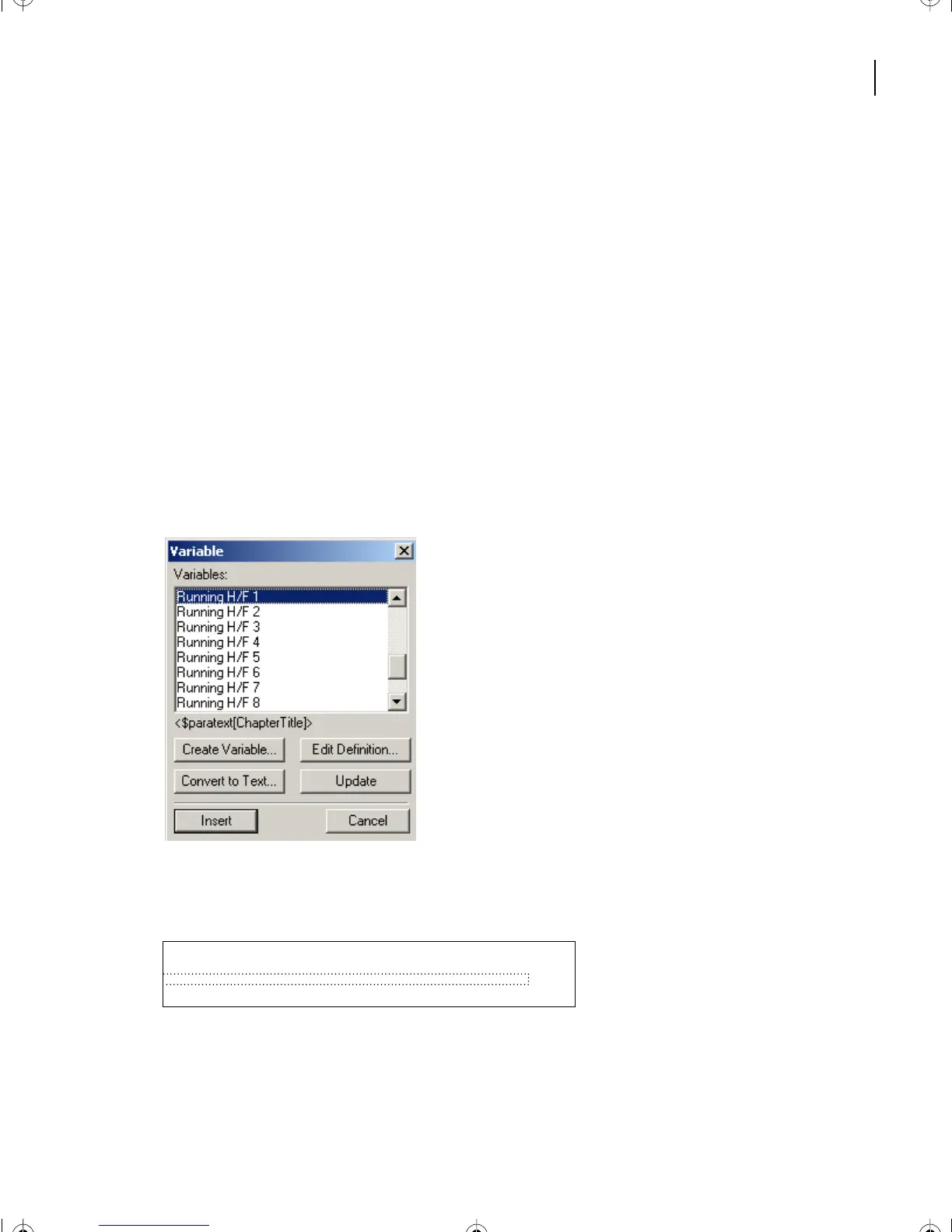
Scroll the Variables scroll list until you see
Running H/F 1
in the list. This is one of
twelve system variables provided especially for running headers and footers.
7
Select Running H/F 1. The definition of the variable appears under the scroll list.
The definition uses the <$paratext>
building block,
which tells FrameMaker 7.0 to use the
text of a paragraph with the tag that follows in square brackets. The definition specifies
the Title paragraph format. Your chapter title uses the ChapterTitle format, so you’ll
change the definition.
8
Click Edit Definition.
9
Enter
Chapter
in front of
Title
in the Definition text box and click Edit. The variable
definition is now <$paratext[ChapterTitle]>. (Capitalization is significant, so be sure to
match the capitalization style of the paragraph tag you’re using, as shown here.)
10
Click Insert.
Running H/F 1
appears in the footer, but the actual chapter title will
appear on body pages.
Yo u’ll separate the chapter title from the text of the first-level heading with a colon and an
en space (a wide space).
Running H/F 1
L04.fm Page 93 Saturday, July 6, 2002 11:34 AM



 To Next Page