Need help?
Do you have a question about the Adonit Jot Pro and is the answer not in the manual?
Describes key features like available colors, precision disc, writing angle, and rubber grip for comfort.
Details the magnetic capability of the stylus for adhering to magnetic surfaces.
Lists compatible capacitive touch devices and screens, noting specific incompatibilities.
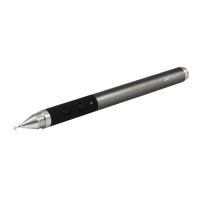
Defines key components such as the Precision Disc, Rubber Grip, and Protective Cap.
Provides instructions for cleaning the stylus using a slightly damp cloth, advising against opening it.
Highlights apps integrated with Adonit's SDK for optimal Jot Pro experience and how to request new integrations.
Explains that slight writing offsets are due to software design, not the stylus itself.
Discusses compatibility with screen protectors and recommends them for screen protection.
Offers a method to test Jot Pro performance using Chinese Simplified (Handwriting) input to diagnose software issues.
The Jot Pro is a sophisticated stylus designed to bridge the gap between traditional writing and digital interaction, offering precision and comfort for a wide range of users. It aims to empower thinkers, doers, and makers by providing a tool that allows for more vibrant and precise digital creation. The stylus is ideal for those who are never satisfied with the status quo and constantly imagine what could be.
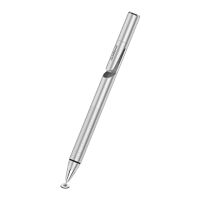
The Jot Pro functions as a precision input device for capacitive touch screens. Unlike typical styluses that mimic a finger's broad contact, the Jot Pro utilizes a unique "Precision Disc" at its tip. This thin, clear disc is engineered to replicate the capacitance signature of a human finger, allowing the stylus to be recognized by the screen while simultaneously providing the user with an unobstructed view of exactly where they are drawing or writing. This design enables a level of accuracy comparable to a calligrapher's stroke or an artist's brushwork, making it suitable for detailed tasks that demand fine motor control.
The stylus is designed to work across a broad spectrum of capacitive devices. This includes popular tablets like iPads, smartphones such as iPhones, and various Android devices from manufacturers like HTC, Samsung, Nokia, and Motorola. It also extends its compatibility to MacBook Trackpads and Magic Trackpads. However, it's important to note that the Jot Pro is not compatible with Wacom tablets or Cintiq monitors, as these devices employ different underlying technologies for input. For PC users, the Jot Pro will only function with monitors that feature capacitive touch technology; it will not work with standard, non-touch monitors.
The Jot Pro is optimized for a range of writing angles, with a particular emphasis on a minimal angle of 45 degrees. This design allows users to hold the stylus in a way that feels natural and comfortable, mimicking the experience of writing or sketching with traditional tools. This flexibility in writing angle contributes to a more intuitive and enjoyable digital creative process.
One of the key distinguishing features of the Jot Pro is its "Rubber Grip." This ergonomic addition provides enhanced command and comfort during extended use, setting it apart from the regular Jot stylus which lacks this grip. The rubberized surface helps prevent slippage and reduces hand fatigue, making it a more comfortable tool for detailed work or prolonged creative sessions.
Another notable feature is the "Internal Magnet" integrated into the stylus body. This magnet allows the Jot Pro to adhere to magnetic surfaces, such as the side of an iPad 2. While convenient for temporary storage, it's advised not to rely on this magnetic attachment for securing the stylus when the iPad is being carried, as it can be easily dislodged.
The Jot Pro is available in three distinct colors: gunmetal, silver, and turquoise, offering users a choice that aligns with their personal aesthetic preferences.
For an enhanced experience, Adonit has developed a "Jot Ready SDK" that allows app developers to calibrate their applications specifically for the Jot Pro. While the stylus works with any app, those integrated with the SDK offer a superior precision stylus experience. Users are encouraged to check for a list of Jot Ready apps on the Adonit website and can even request integration for their favorite applications.
Users might occasionally notice a slight offset in their writing on screen compared to the actual tip of the Jot Pro. This is not a fault of the stylus but rather a characteristic of certain software applications designed for capacitive touch screens. These applications deliberately introduce an offset to compensate for potential imprecision in general stylus use. Therefore, if an offset is observed, it is typically a software-related issue rather than a hardware one.
Regarding screen protectors, the Jot Pro is generally compatible with most types. However, certain screen protectors, particularly those with an "extra grip" nature, such as Zagg Glossy Invisible Shield (though the Smudge-Proof Invisible Shield works well), Ghost Armor, Bodyguardz, Skinomi, and Wrapsol, are not recommended as they can interfere with the stylus's performance. It is generally advisable to use a screen protector to maintain the condition of the device's screen, as particles between the stylus/finger and an unprotected screen can cause scratches. If a screen protector shows wear, it should be replaced. Keeping the screen clean of dust and particles is also recommended.
The most critical component of the Jot Pro is its "Precision Disc." This small plastic disc is essential for the stylus's functionality and should always be attached when the stylus is in use. It should not be removed unless it is being replaced due to damage. To protect the disc when the stylus is not in use, a "Protective Cap" is provided. This cap twists onto both the front and back of the stylus, safeguarding the disc from damage.
If the disc becomes damaged or dislodged, it can be replaced. To remove a damaged disc, the user should place the disc flat on a hard surface, position the stylus at an angle to clearly see the disc, hold the disc down firmly with two fingers, and then pull the stylus up sharply. The stylus should detach from the disc. To attach a new disc, the user should place the new disc flat on a hard surface, position the stylus directly above it, and push straight down until the ball tip is securely inserted into the disc's recess.
For cleaning, the Jot Pro should not be exposed to water or submerged. If cleaning is necessary, a slightly damp cloth should be used. It's crucial to dry the surface thoroughly with a soft cloth afterward. Users should not attempt to open the stylus, as it contains no serviceable parts inside, and doing so could damage the device or void any warranty.
In cases of performance issues, particularly with iOS5, it's noted that this operating system version can cause problems with various applications, leading to poor Jot Pro performance until those apps are updated. To confirm if the Jot Pro itself is functioning correctly, users can test it using the in-system Chinese text input. This involves navigating to Settings > General > Keyboard > International Keyboards > Add new keyboard > Chinese - Simplified (Handwriting). After bringing up the keyboard in any application and selecting the handwriting recognition option via the globe key, if the Jot Pro performs correctly, it indicates that any performance faults in other applications are due to software issues rather than the stylus itself.
 General
| Type | Stylus |
|---|---|
| Tip Type | Precision Disc |
| Pressure Sensitivity | No |
| Compatibility | iOS and Android devices |
| Battery Life | Not applicable (passive stylus) |
| Material | Aluminum |
| Connectivity | Not applicable (passive stylus) |
| Features | Precision disc for accurate writing and drawing, magnetic adsorption, protective cap |

 To Next Page