44 VIDEOSTUDIO USER GUIDE
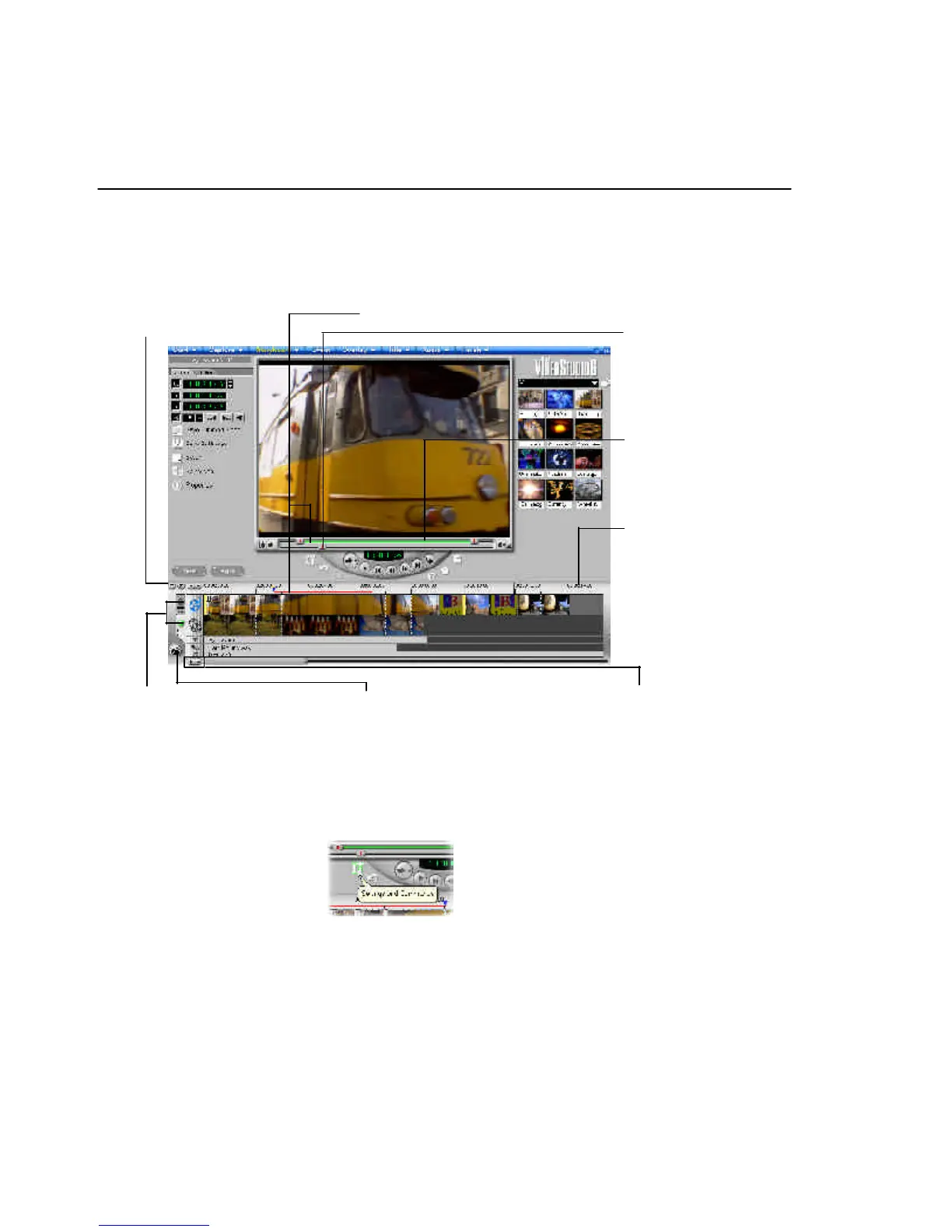
ToolTips
Place the mouse over a button or object to display a
balloon which identifies the item.
Zoom controls
Increase or decrease the
number of frames
displayed in the
Timeline.
Selected range
These color bars represent the
trimmed or selected part of a clip
or project.
Trim handle
Click and drag to trim
a clip.
Time units
Represents the timing
of clips in hours :
minutes, seconds, and
milliseconds
Project scroll
controls
Use the left and right
buttons or grab the
Scroll Bar to move
around your project.
Insert media files
Displays a menu allowing you
to place video, audio or image
clips directly on the project.
Storyboard and Timeline
Click tabs to switch between
Storyboard Mode and
Timeline Mode.
Preview Bar
Click and drag these
controls to scroll
through a clip. The
position is shown in
the Preview Window’s
content.
VS6-A.p65 6/4/2002, 12:22 PM44


 To Next Page