ADT-TP3340DJ Three-axis Dispenser
- 30 -
After installation, you can output the PLTT files in the following steps:
<1>. Draw the graph
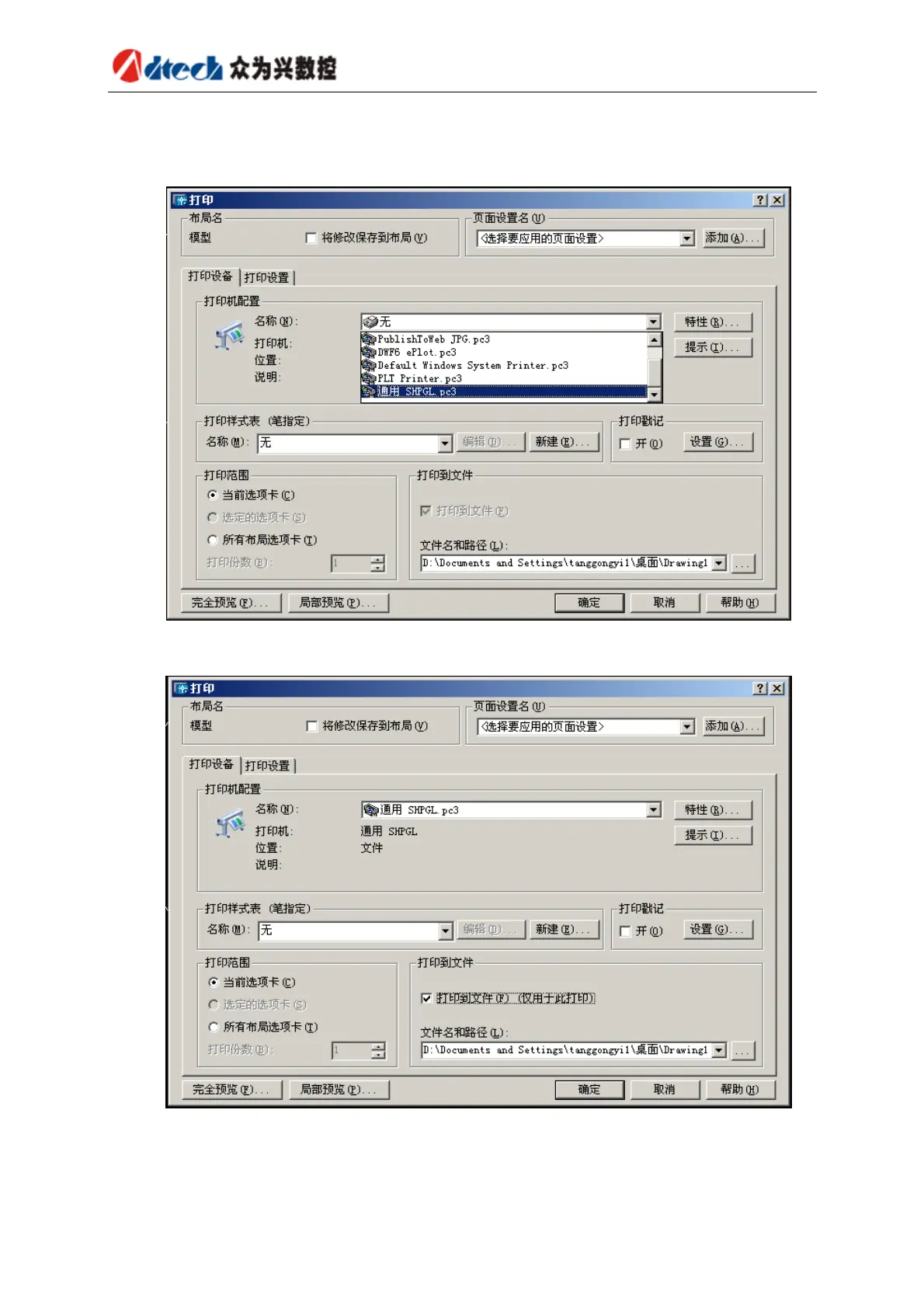
<2>. Click “File”Æ“Print” to have the following dialog box
<3>. Select “Universal SHPGL.PC3” printer in “Printer device”, select “Print to file” checkbox, and
set the path and name of output file
<4>. Click “OK” to output PLT file
PLT files can be opened in Text editor. A PLT file sample follows:
_.(;_.I81;;17:_.N;19:IN;SC;PU;IP;IW;VS20,1;VS20,2;VS20,3;VS20,4;VS20,5;VS20,6;VS20,7;VS20,
8;SP1;PU;PA0,0;SP1;LT;PA3985,3940;PD;PA5344,3940;PA5344,2497;PA3985,2497;PA3985,3940;P



 To Next Page