a O l t
1 1 ) 0 0
C-8
Z s c l r
n o n e
C-7
a O s n
) 0 0
C-6
a O z o
) 0 0
C-5
a O h s
5 ) 0 0
C-4
a O l s
) 0 0
C-3
Engineer level ( 485 )RS Output
p r i t y
N s t B 2
D-3
b a u d
9 6 0 0
D-2
a d r e s
1
D-1
N s t B 1( . .1):n Stb None, 1 stop bit
N s t B 2( . .2):n Stb None, 2 stop bit
o d d ( ):odd odd
e v e n ( ):EvEn Even
Back to D-1
g r o u p
RS485
GROUP
r s 4 8 5
ENT
!
RS485
GROUP
Display
Back to C-1
P 1s Back
20 24/
Engineer level( )AO Output
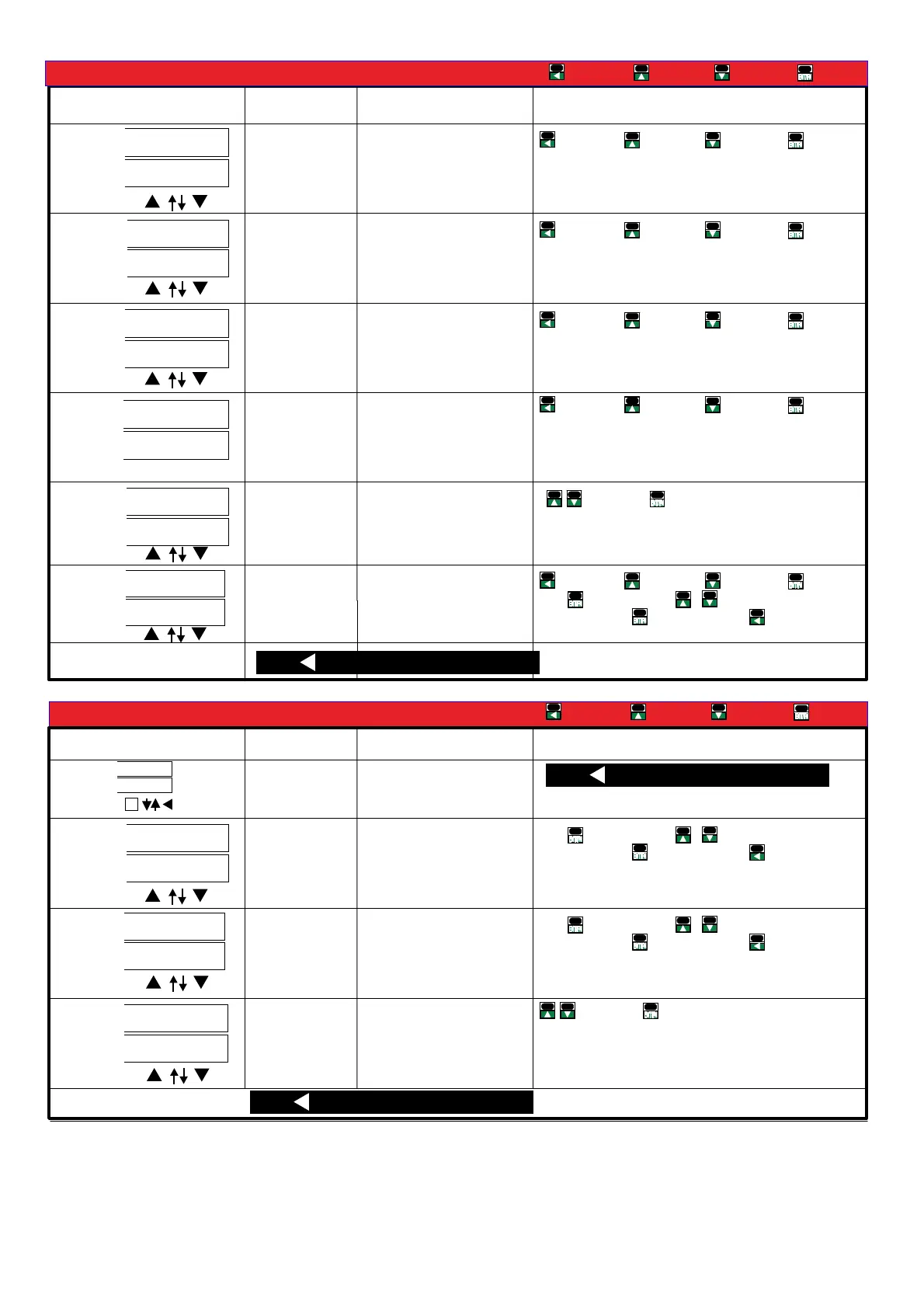
■Operating Steps
Enter
DecreaseIncrease
Shift
Parameters
Display
Setting
Operation
A/O Low scale
range:
Setting range:
-199.99~299.99
Enter
DecreaseIncrease
Shift
Ex When A O set display value as: / (4~20mA)A 4 - 2 0
0~199.99 user may set 5 so when,! [ ] (Ao.LS)a O l s
display value is 5 , A/O will give 4mA output
A O high/
scale range:
Setting range:
-199.99~299.99
Enter
DecreaseIncrease
Shift
Ex When A O set mA display value as: / (4~20 )A 4 - 2 0
0 199.99 user may set Ao HS 15so when,~ ! [ ] ( . )a O h s
display value is 1 5 , A/O will give 20mA output
A O signal
/
zero fine
tunning:
Setting range:
-32768~32767
Enter
DecreaseIncrease
Shift
When A/O low value is different from display (low),fine
tunning can be done from front panel. During tunning
please connect a higher accuracy meter, to measure
output signal, so as calibration is within accuracy
A O signal span/
fine tunning:
Setting range:
-32768~32767
Enter
DecreaseIncrease
Shift
When A/O high value is different from display
(high),fine tunning can be done from front panel. During
tunning please connect a higher accuracy meter, to
measure output signal, so as calibration is within
accuracy。
Clear fine tunning
value:
Setting range:
NONE/AO.ZRO/AO.SPN/BOTH
Enter
Cycle
n o n e ( ):None None clear
a O z r o( . ) :Ao Zro Zero clear
a O s p n( . ) :Ao SPn Span clear
b o t h ( ) : &both Zero span clear
A/O range limit:
Setting range in
% 00 00%:0. ~110.
Enter
DecreaseIncrease
Shift
Press values blink press change value or selection, , &
when done press secto next setting or hold 1 .
to previous selection list
Press 1 sec to [ ]rs 4 85 g ro up
Parameters
Display
Setting
Operation
Press values blink press change value or selection, , &
when done press secto next setting or hold 1 .
to previous selection list
Enter
DecreaseIncrease
Shift
Setting range:1~255
Address setting:
Setting range:
1200/2400/4800/9600/
19200/38400
Modbus Baud rate:
Press values blink press change value or selection, , &
when done press secto next setting or hold 1 .
to previous selection list
Press 1 sec to measuring page
Modbus pairty bit:
Setting range:
n.stb.1/n.stb.2/odd/even
Enter
Cycle
Press 1 sec to measuring page
En d te rm in al o hm
ADEFGHI -1,:JKL)*MNO.PQNOMRS.<)
*3 4RSTUVWP4W.3
)*1 2 4,1-10~1-27XYZRSP W
)*1 4,1-14/1-1 ~ XYZRSP3W 6 27
)*3 4,1-1 1-1 /1-1 1- /P3W.1 3~ 5 7/1-18/ 20 1-21/1-23/1-24/1-
26/1-27XYZRS
)*3 4,1-1 1- /1- XYZRSP3W.2 7/ 20 23/1-26
)*3 4,1-1 1- /1- XYZRSP3W.3 7/ 20 23/1-26
)*3 4,1-1 1- /1-P4W.1 4~15/ 17~18 20~21/1-23~24/1-26~27
XYZRS
)*+,:1 p 2 w 1 p 3 w 3 p 3 w .1 3 p 3w .2 3p 3w .3/ / / / /
3 p 4 w .1 3 p 4 w .3/
"#$%&':
v a v g. ()*+,-.:
i a v g. ()*/,-.:
f r e q :
2345.
p . t l :()673.
q . t l :()6873.
s . t l :()69:73.
p f . a vg :(),-73;
%45.
v a : )*+.45A
vb :B)*+.45
vc :C)*+.45
ia :A)*/.45
ib :B)*/.45
ic :C)*/.45
p f - a :A)7345.
pf-b :B)7345.
pf-c :C)7345.
p - a :A)7345.
p-b :B)7345.
p-c :C)7345.
q - a :A)87345.
q-b :B)87345.
q-c :C)87345.
s - a :A)9:7345
s - b :B)9:7345
s - c :C)9:7345
RELAY / PULSE output of the outputs can
only choose a functional output
EX: Select PULSE output and then RELAY
function no output and vice versa
Clamp CT
Optional of Clamp CT, make sure
(1)CT of the SN number with the
CPM-10 SN number, as shown
( )2 On the label
A A Phase B B: - ; : -
Phase C C Phase; : - ;
According to the phase matching
Relay Pulse output
CL
BK
AK
AL
BL
CK
, ,0123CT4 56789:; <=>?@A


 To Next Page
 Loading...