
 Need help?
Do you have a question about the ADTI Surveyor 61S and is the answer not in the manual?
Offers reliable wide voltage input range and improved PPK results.
The lightest and smallest full-frame camera, weighing only 220 grams.
Compatible with Pixhawk, DJI, and various commercial autopilots for drone integration.
Features STMicro chip for firmware and protocols, and a CNC aluminum case.
Provides 0.34 cm/pix GSD for high-quality aerial imaging.
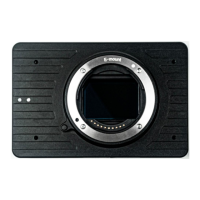
The primary camera component included in the package.
Cable for connecting various functions and power sources to the camera.
Cable used for connecting the camera to a PC via the UART interface.
Identifies physical ports like USB, HDMI, SD, GPS, and UART for connectivity.
Details pin assignments for VIN, GND, PWM, HOTSHOE, and UART connections.
Connect to 12-28V LiPo battery; avoid exceeding 28V or using AC-DC supplies.
Use the power button for ON/OFF; LED indicates camera status.
Do not power the camera via USB through the multi-terminal port.
Connect flight controller and use PWM signal to activate the shutter.
Trigger camera via GCS before mission for proper capture.
Trigger via PWM from radio controller; test with transmitter.
Press and hold the power button until the LED flashes to initiate reset.
Steps for the camera's self-check procedure after a factory reset.
Install software, connect via micro HDMI and UART to USB cable, then power on.
Connect camera via HDMI to transmitter, UART to computer, power, and link GCS.
Compatible with Sony E-mount; offers 35mm, 40mm, 50mm, 56mm F5.6 lenses.
Three slots (2 SD, 1 TF); requires formatting according to camera specifications.
Confirm data deletion, wait for formatting completion, and test with a photo.
Details virtual keys, PC keys, and pins for camera button functions.
Press the 'P'-Camera ON/OFF button to save any applied setting changes.
Use MAVlink via UART for video feed and camera control; Hi3516 for streaming.
Connect PWM cable to Pixhawk AUX2 (RC10) for trigger functionality.
Trigger camera via Mission Planner by selecting the 'do action' command.
Set ports as 'Shutter' in DJI Assistant 2 and adjust relevant parameters.
Connect camera to Emlid Reach M+ for PPK feedback and time stamping.
Table showing GSD values for different altitudes and focus lengths.
Guidelines for frontal and side overlap percentages for mapping scenarios.
Announces a new 30X RGB zoom camera with thermal object tracking.
 General
| Brand | ADTI |
|---|---|
| Model | Surveyor 61S |
| Category | Digital Camera |
| Language | English |

 To Next Page