Need help?
Do you have a question about the Adventure Force BLAZE BUGGY and is the answer not in the manual?
Guide to adjust steering wheel trim for straight forward movement of the truck.
Table of common truck issues, their causes, and solutions for troubleshooting.
Essential safety warnings for battery use, operation environment, and vehicle handling.
Information regarding FCC rules, interference, and user authority to operate the equipment.
List of items included in the BLAZE BUGGYTM package for initial setup.
Step-by-step guide for charging the Li-poly battery using a USB charger.
Instructions for installing the Li-poly battery into the truck and securing the compartment.
Detailed steps for syncing the remote control with the truck for operation.
Guide on how to turn on the truck and operate it for driving and steering.
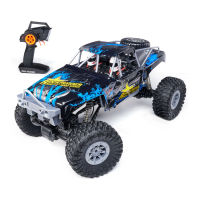
This document describes the BLAZE BUGGY™ Radio Controlled High Speed Vehicle, a 4x4 radio-controlled buggy designed for outdoor use. It is intended for ages 8 and up, with adult supervision required during charging.
The BLAZE BUGGY™ is a high-speed, radio-controlled vehicle that allows users to experience remote-controlled driving. It operates using a 2.4G channel selection system, enabling up to 8 players to race simultaneously without interference. The vehicle is controlled via a remote control that features a steering wheel trim for precise adjustments and a throttle for speed and direction control. The truck is powered by a rechargeable Li-poly battery, while the remote control uses two AA batteries.
Getting Started: Before operating, ensure the Li-poly battery is fully charged and installed correctly in the truck, and two fresh AA batteries are installed in the remote control. The battery compartment on the truck is located on the bottom side and secured with a cover. The Li-poly battery connects directly to the truck's power cord socket, ensuring a secure connection. The USB charger facilitates charging, with a red indicator light showing charging progress and turning off when complete. Average charging time is approximately 2.5 hours using a 5.0V 2A USB wall charger, providing about 40 minutes of operation on a full charge.
Syncing the Vehicle: The BLAZE BUGGY™ utilizes an automatic 2.4G channel selection system. For single-player use, ensure both the truck and remote control are in the OFF position and no other 2.4G devices are nearby. Turn on the truck, place it on a flat surface, then turn on the remote control. The remote's power indicator will flash; pull the throttle all the way down until the indicator lights continuously, confirming successful syncing. If syncing fails, repeat the process. For multiple players, each truck must be synced individually at different times to avoid interference. After syncing, all players should keep their trucks ON until all others have synced. If interference occurs, all controllers and trucks should be turned off and the syncing process restarted.
Driving the Truck: Once synced, pick up the truck, ensure the battery is properly installed and the compartment door is closed and locked, then place it on the ground. To drive forward at low speed, pull the throttle halfway. For high speed, pull the throttle fully. Pushing the throttle forward will make the truck move in reverse. To turn left, turn the steering control counterclockwise. To turn right, turn the steering control clockwise. To brake or quickly stop, simply pull or push the throttle in the opposite direction.
Steering Wheel Trim Adjustment: If the truck does not drive straight, the steering wheel trim on the bottom of the truck can be adjusted to correct its forward trajectory.
Safety Precautions: The BLAZE BUGGY™ is designed for high-speed outdoor use. Avoid playing indoors or in small, enclosed areas. Do not use the truck in inclement weather, during storms, or when lightning or thunder are present. Avoid wet, sandy, or muddy environments, as these can damage the truck. Do not modify or attempt to replace the built-in antenna on the remote or truck, as this can damage the set and affect operation. Avoid pulling on any wires of the truck, as this can cause malfunction. Keep fingers, hair, and clothing away from the truck's spinning tires to prevent injury. Never aim the truck at other people, throw it, or purposely hit objects. Store the truck in a cool environment, away from high-temperature sources like fires, stoves, and radiators.
Battery Care: Periodically examine the charger for external damage. Do not use a damaged adapter, as this poses risks of fire, electric shock, or injury. When replacing batteries, do not mix alkaline, standard (carbon-zinc), and rechargeable batteries, nor old and new batteries. Ensure batteries are installed with correct polarity. Remove dead batteries immediately. If the truck will not be used for an extended period, remove the batteries from both the truck and the remote control. Non-rechargeable batteries should not be recharged. Rechargeable batteries must be removed from the unit before charging (if removable) and should only be charged under adult supervision. Exhausted batteries must be removed, and the supply terminals should not be short-circuited. Only batteries of the same or equivalent type as recommended should be used.
Troubleshooting: If the truck does not move, check for weak or absent batteries in the remote control and recharge the truck battery. If the truck does not respond properly to the remote control, re-sync the truck and remote. If another RC truck is transmitting on the same radio frequency, move to a new location. If the truck loses connection in a small enclosed area or indoors, move outdoors to a large open area. If the truck battery is fully charged but operates slower than normal, it might be due to the motor overheating from prolonged high-speed driving; turn the truck off for 10-15 minutes to allow it to cool down.
General Maintenance: The truck has no user-serviceable parts. Do not attempt to modify components or the circuit board. Avoid liquids, which can short-circuit the batteries. Avoid using the truck near furniture or glass to prevent damage to these objects. Avoid playing in crowded areas to prevent injury or damage; choose a safe location away from traffic.
 General
| Product Name | Adventure Force BLAZE BUGGY |
|---|---|
| Category | Motorized Toy Car |
| Power Source | Battery |
| Number of Batteries Required | 1 |
| Material | Plastic |
| Battery Type | 12V |
| Color | Red |
| Features | Working headlights |
| Type | Ride-On |
| Recommended Age | 3-7 years |


 To Next Page