9
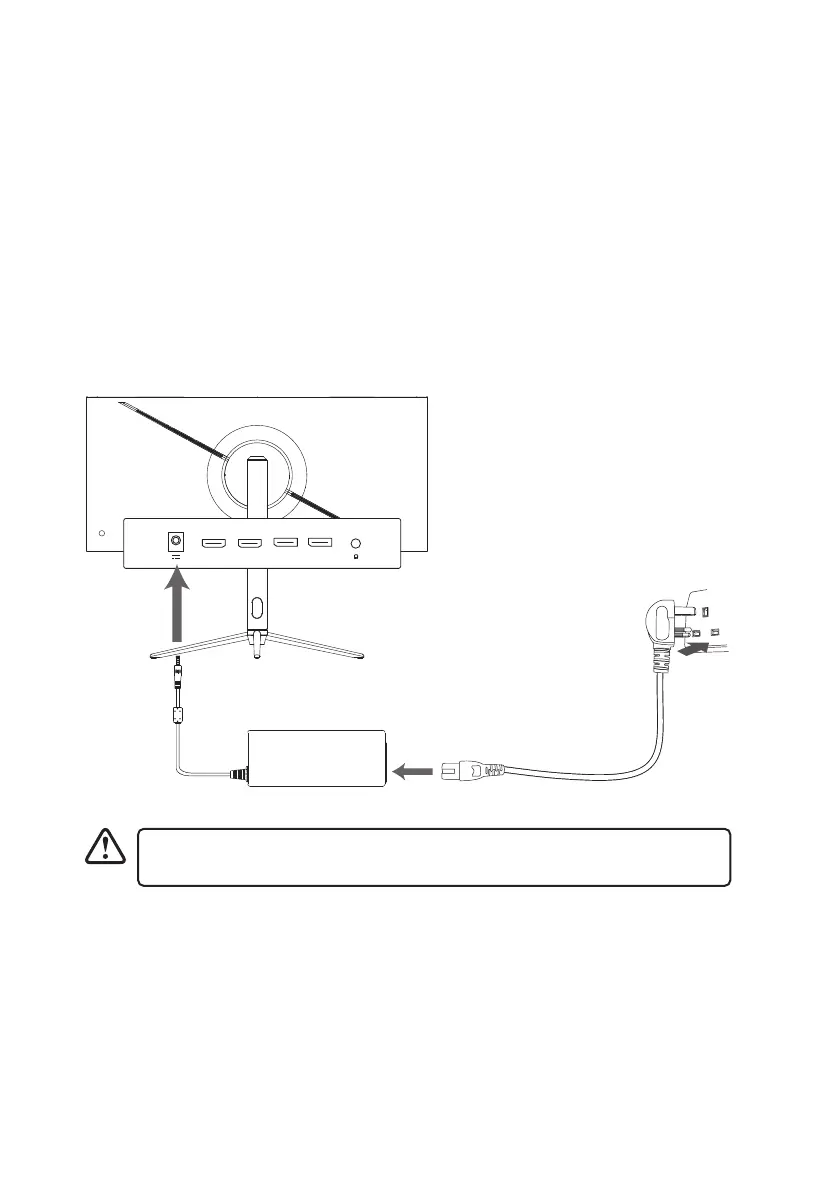
Rear View of Main Unit
Mains Adapter
Mains Cable
Connecting to Mains Supply
1. This unit operates with a mains adapter and cable (included).
2. Connecting the unit to any other power source may damage the unit. Unwind the mains
cable and mains adapter to their full length. Connect the end of the cable of the mains
adpater to the Power socket of the unit, and then connect the end of the mains cable to
the mains adapter. Connect the mains plug into the mains socket.
3. Make sure the mains plug is fully inserted into the mains socket, and the cable of
adapter fully inserted into the Power socket of the unit. The unit is now connected and
ready to use.
4. To switch the unit o completely, unplug the mains plug the mains socket.
HDMI 2 DP1
DP1HDMI 1 DP2HDMI2
Ensure all connections are completed before connecting to the mains power
socket.
Mains Socket



 To Next Page