3. PRODUCT DESCRIPTION
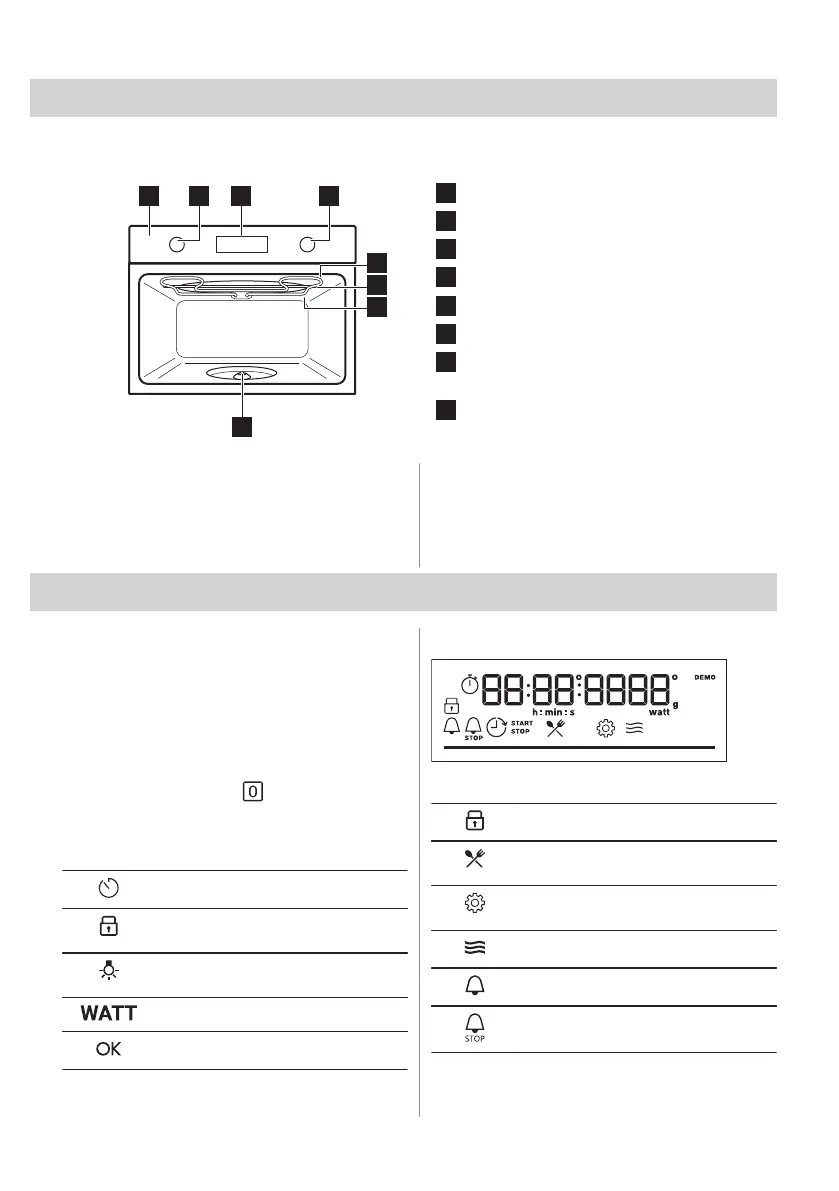
3.1 General overview
Control panel
Knob for the heating functions
Display
Control knob
Heating element
Microwave generator
Lamp
Turntable shaft
3.2 Accessories
• Turntable set
To place food and cookware on it.
Maximum load: 4 kg.
• Grill rack set
To grill. The set includes: Low rack, High
rack.
4. CONTROL PANEL
4.1 Turning the appliance on and off
To turn on the appliance:
1. Press the knob. The knob comes out.
2. Turn the knob for the heating functions to
select a function.
3. Turn the control knob to adjust settings.
To turn off the appliance: turn the knob for the
heating functions to the .
4.2 Control panel overview
Press to set: Clock functions.
Press and hold to set the function:
Lock.
Press to turn on or to turn off the oven
lamp.
Press to set: Microwave power.
Press to confirm your selection.
4.3 Display indicators
Display with key functions.
The appliance is locked.
Enter the menu and select the icon to
open: Assisted Cooking.
Enter the menu and select the icon to
open: Settings
Microwave function is turned on.
Minute minder is turned on.
End time is turned on.
ENGLISH 65



 To Next Page