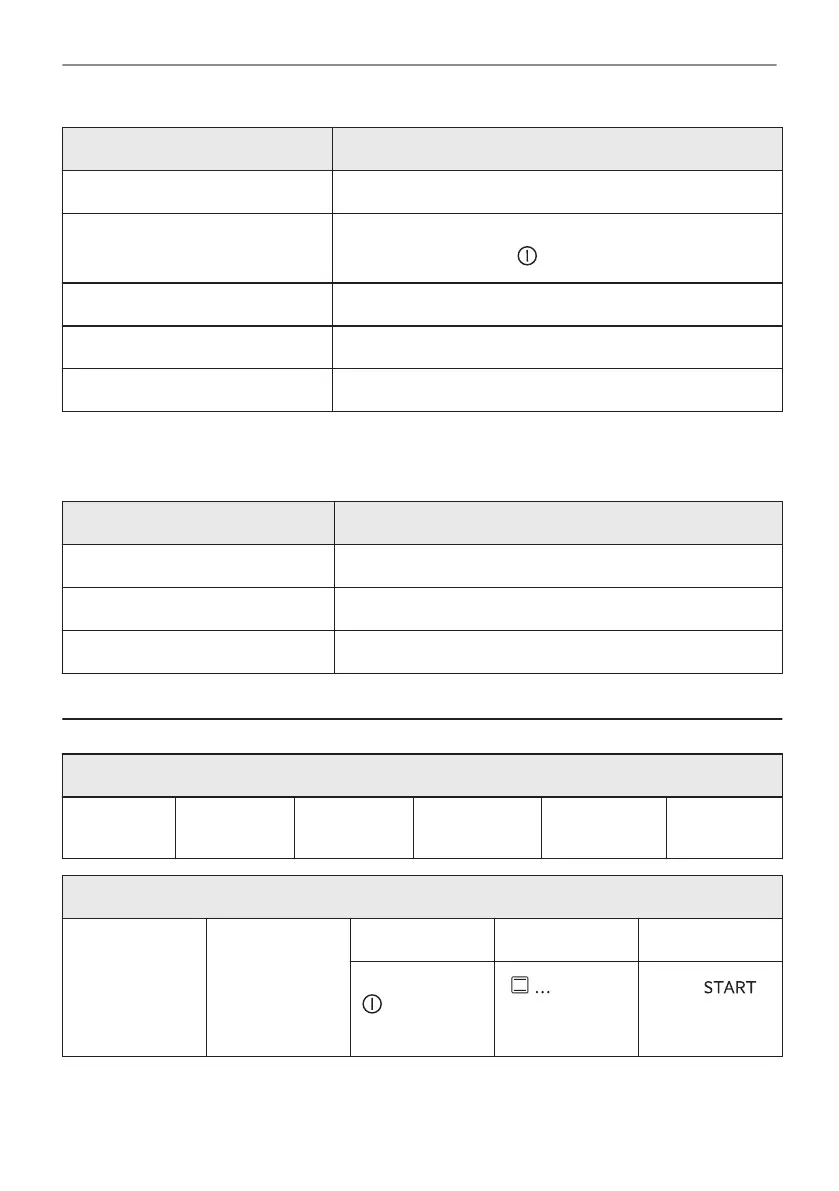
Submenu Description
Display brightness Sets the display brightness.
Key tones Turns the tone of the touch fields on and off. It is not possi‐
ble to mute the tone for: .
Buzzer volume Sets the volume of key tones and signals.
Water hardness Sets the water hardness.
Time of day Sets the current time and date.
14.6 Submenu for: Service
Submenu Description
Demo mode Activation / deactivation code: 2468
Software version Information about software version.
Reset all settings Restores factory settings.
15. IT'S EASY!
Before the first use you have to set:
Language
Display
brightness
Key tones
Buzzer vol‐
ume
Water hard‐
ness
Time of day
Start using the oven
Quick start Turn on the
oven and start
cooking with the
default tempera‐
ture and time of
the function.
Step 1 Step 2 Step 3
Press and hold:
.
- select
the preferred
function.
Press: .
44/48
IT'S EASY!


 To Next Page