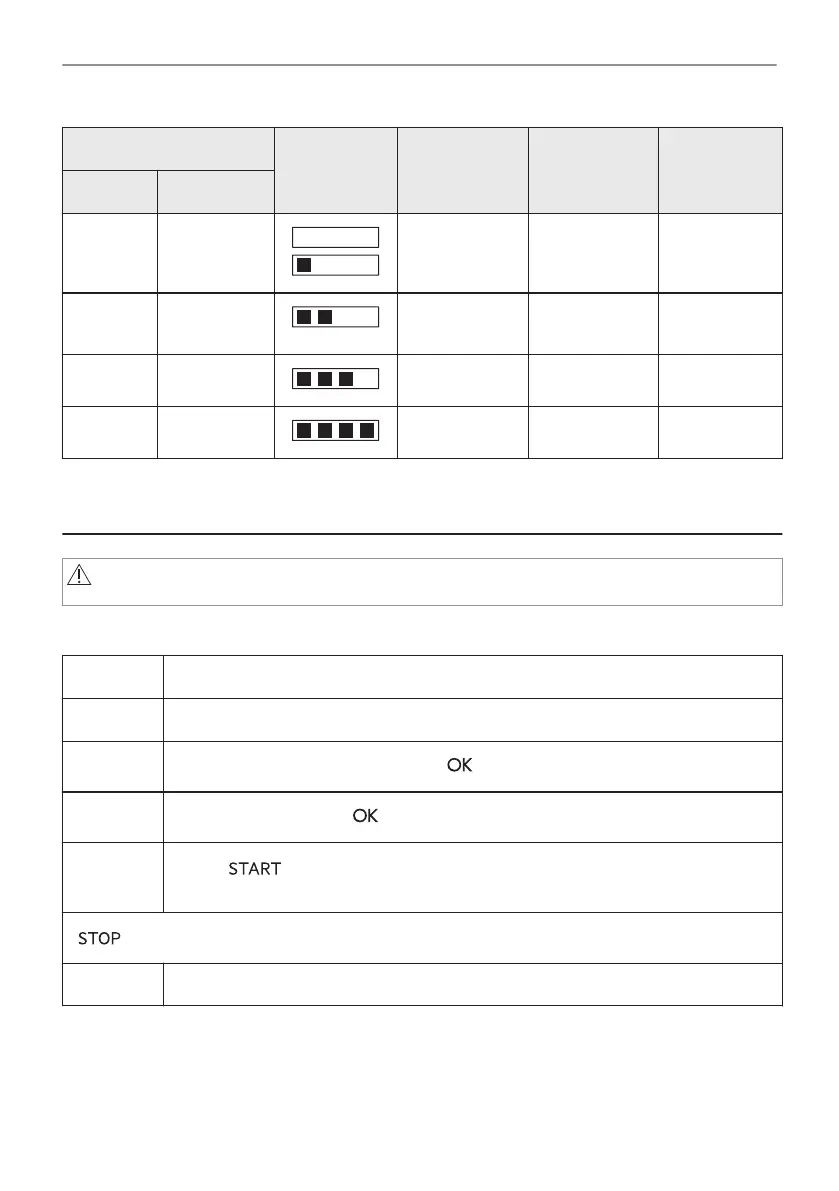
Water hardness Test paper Calcium de‐
posit (mmol/l)
Calcium de‐
posit (mg/l)
Water classi‐
fication
Level dH
1 0 - 7 0 - 1.3 0 - 50 soft
2 8 - 14 1.4 - 2.5 51 - 100 moderately
hard
3 15 - 21 2.6 - 3.8 101 - 150 hard
4 ≥22 ≥ 3.9 ≥151 very hard
When the tap water hardness level is 4, fill the water drawer with still bottled water.
6. DAILY USE
WARNING!
Refer to Safety chapters.
6.1 How to set: Heating functions
Step 1 Turn on the oven. The display shows the default heating function.
Step 2 Press the symbol of the heating function to enter the submenu.
Step 3
Select the heating function and press: . The display shows: temperature.
Step 4
Set: temperature. Press: .
Step 5
Press: .
Food Sensor - you can plug the sensor at any time before or during cooking.
- press to turn off the heating function.
Step 6 Turn off the oven.
65/260
DAILY USE



 To Next Page