16
QUICK START MANUAL
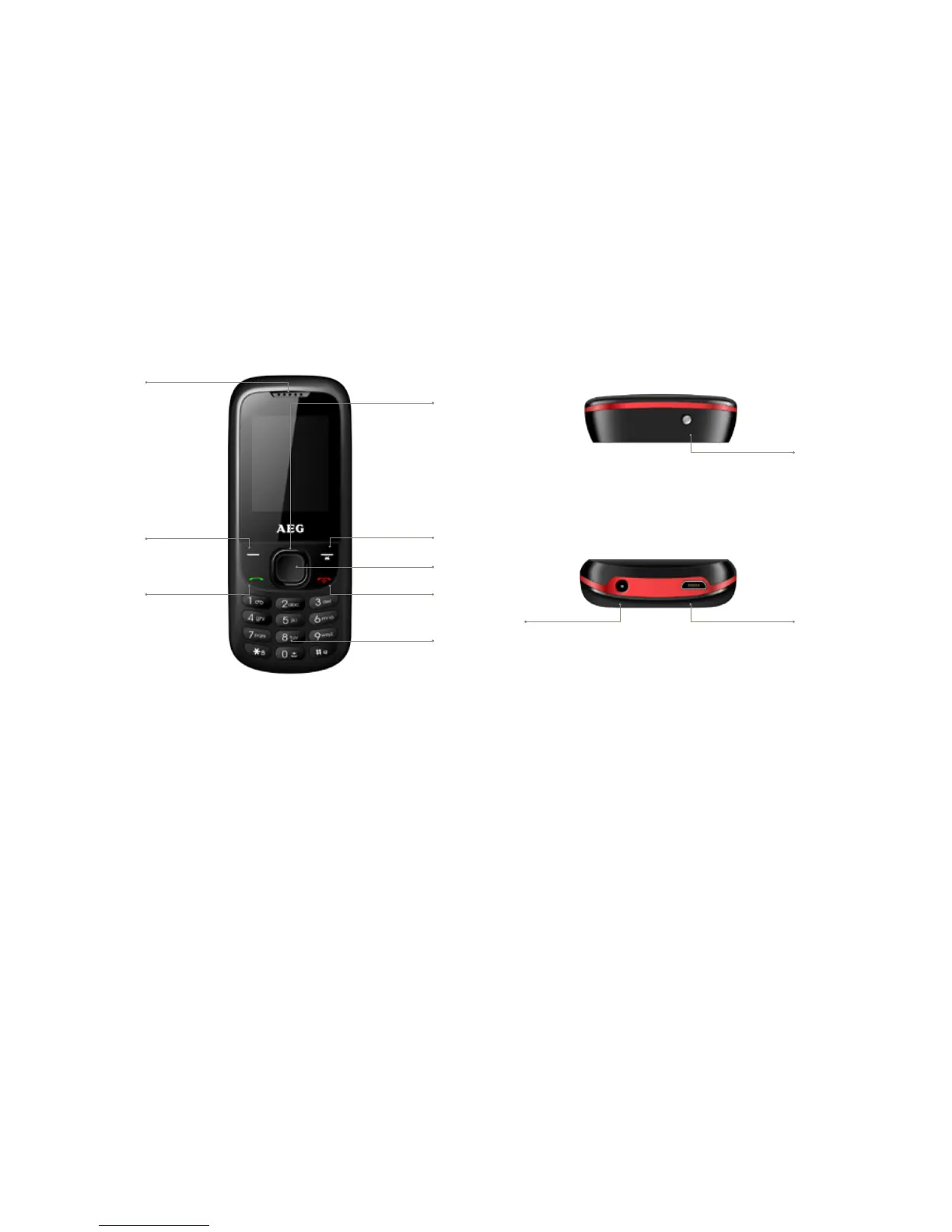
LIST OF PRIMARY KEYS
This QUICK START MANUAL is
intended to give you a basic idea
of how to start using your phone.
Further information may be found
on AEG Telecom’s website. To learn
about specific operator services
and functions, contact your network
provider.
1. Earpiece
2. Left soft key: Performs the
function indicated at the left bottom
of the screen.
3. Send key: Dials a phone
number using SIM1 or SIM2.
4. 4-Way Navigation key: These
keys (Up, Down, Left and Right)
allow for navigation through menu
options and quick access to some
function menus.
5. Right Soft Key: Performs the
function indicated at the right
bottom of the screen. Hold to
switch on/off the torch.
6. Centre Key: Press to confirm
actions and make selections.
7. End/Power key: Press to end a
call. Press to exit to the main screen.
Hold to switch on/off the phone.
8. Numeric keys: Press to enter
numbers or letters, etc
9. Torch
10. Earphones
11. Charging Port
6
1
4
3
5
7
8
10
2
11
9



 To Next Page