68
ENGLISH
2. Device Overview
2.1 Location of Controls and Connections
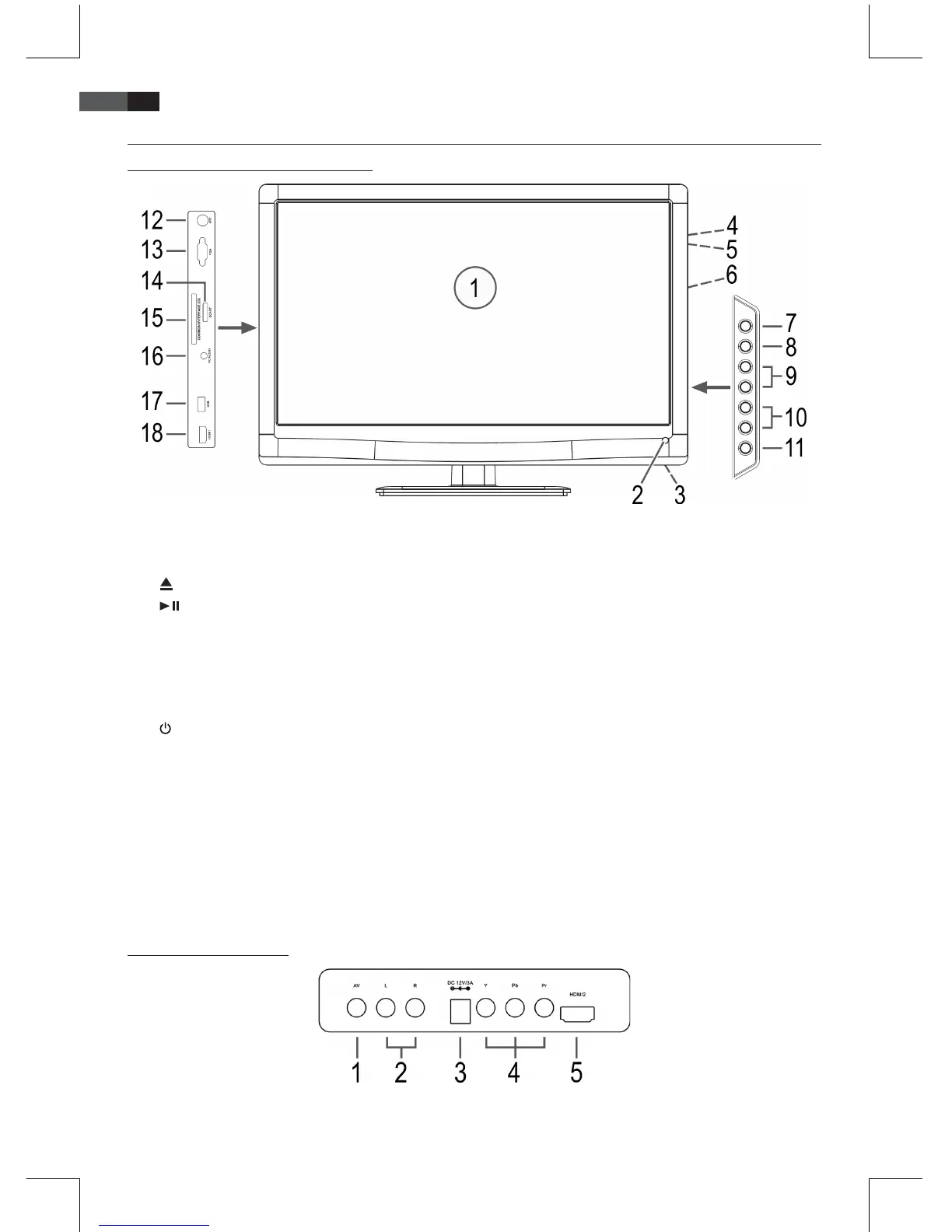
1 LCD Display
2 Sensor for the remote control
3 Status indicator (operation = blue, standby = red)
4
CD/DVD eject button
5
Play/Pause button
6 CD/DVD slot
7 Select signal source
8 MENU Open/close OSD menu
9 CH+/CH- Select channel (next/previous channel number). In menu navigate one position up/down.
10 VOL+/VOL- Adjust volume. In menu navigate one position right/left/confirm selection.
11
Switch device to standby mode
12 ANT 75 Ohm antenna input
13 VGA PC Input
14 SCART Adapter connection
15 CI Common interface port (optional) IMPORTANT: Only for encrypted DVB-T programs (Pay-TV)! Ask
your programme provider or your dealer whether DVB-T Pay-TV is offered in your broadcasting
area!
16 PC AUDIO Audio input
17 USB USB port
18 HDMI1 Input
2.2 Rear View (Connection)
1 AV – Video input
2 R/L –Audio inputs (right/left)
3 DC 12V/3A Power supply connection
4 Y / Pb / Pr Component Video input
5 HDMI2 input


 To Next Page