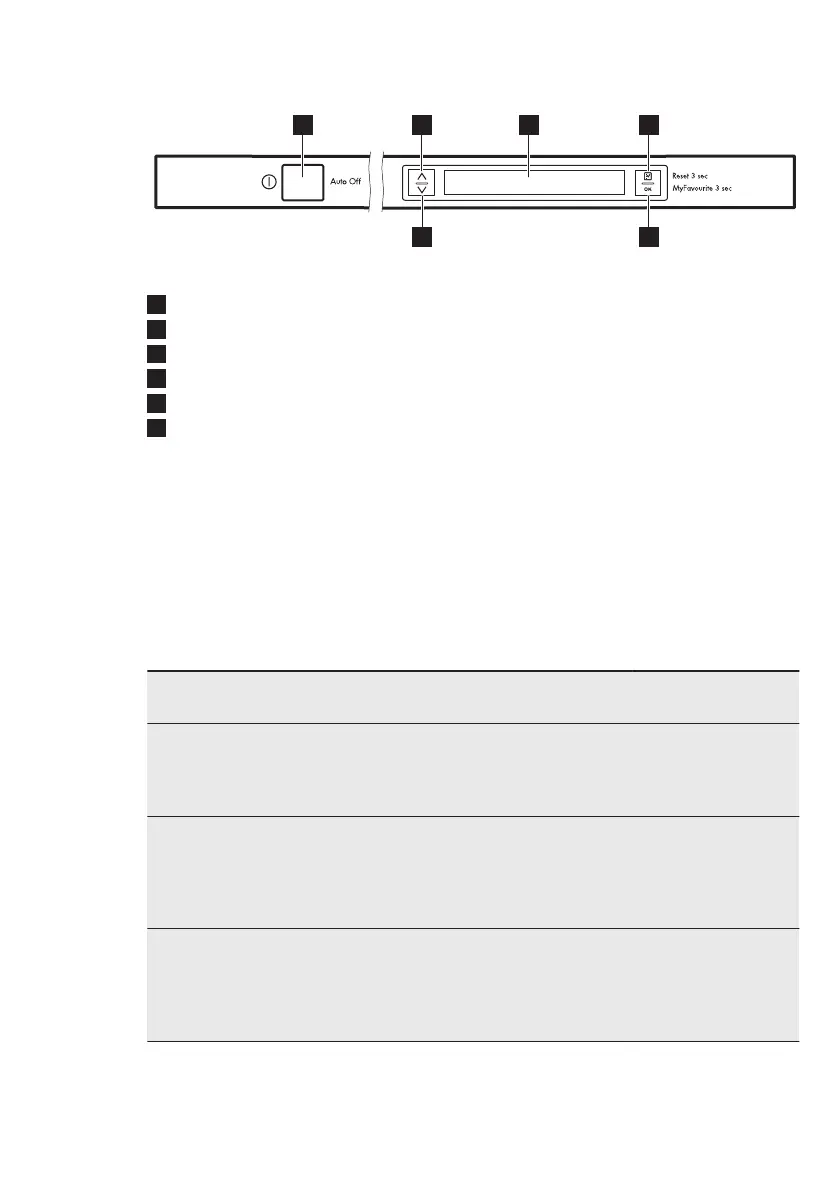
4. CONTROL PANEL
1
On/off button
2
Navigation key (up)
3
Display
4
Option key
5
OK key
6
Navigation key (down)
4.1 Key behaviour
Navigation keys (up and down)
• Use these keys to scroll the lists and
information texts that show on the
display.
Option key
• Short press will enter the option list.
• Short press in the option list takes you
back to the programme list.
• Short press in the settings list takes
you back to the option list.
• Long press (3 sec.) when a delay start
or a programme is running will delete
the delay start, the programme and
options. The display shows the default
programme: ECO.
OK key
• Short press: Confirms the selection of
the programme, options and settings.
• Long press: Starts the MyFavourite
programme. If no programme has
been saved it will display the setting
Set MyFavourite.
5. PROGRAMMES
Programme Degree of soil
Type of load
Programme phases Options
ECO 50°
1)
• Normal soil
• Crockery and
cutlery
• Prewash
• Wash 50 °C
• Rinses
• Dry
• Extra Hygiene
• AutoOpen
• Multitab
AutoSense 45°-70°
2)
• All
• Crockery, cut-
lery, pots and
pans
• Prewash
• Wash from 45 °C
to 70 °C
• Rinses
• Dry
• Extra Hygiene
• Multitab
ProZone 50°-65°
3)
• Mixed soil
• Crockery, cut-
lery, pots and
pans
• Prewash
• Wash 50 °C and
65 °C
• Rinses
• Dry
• Multitab
www.aeg.com28


 To Next Page