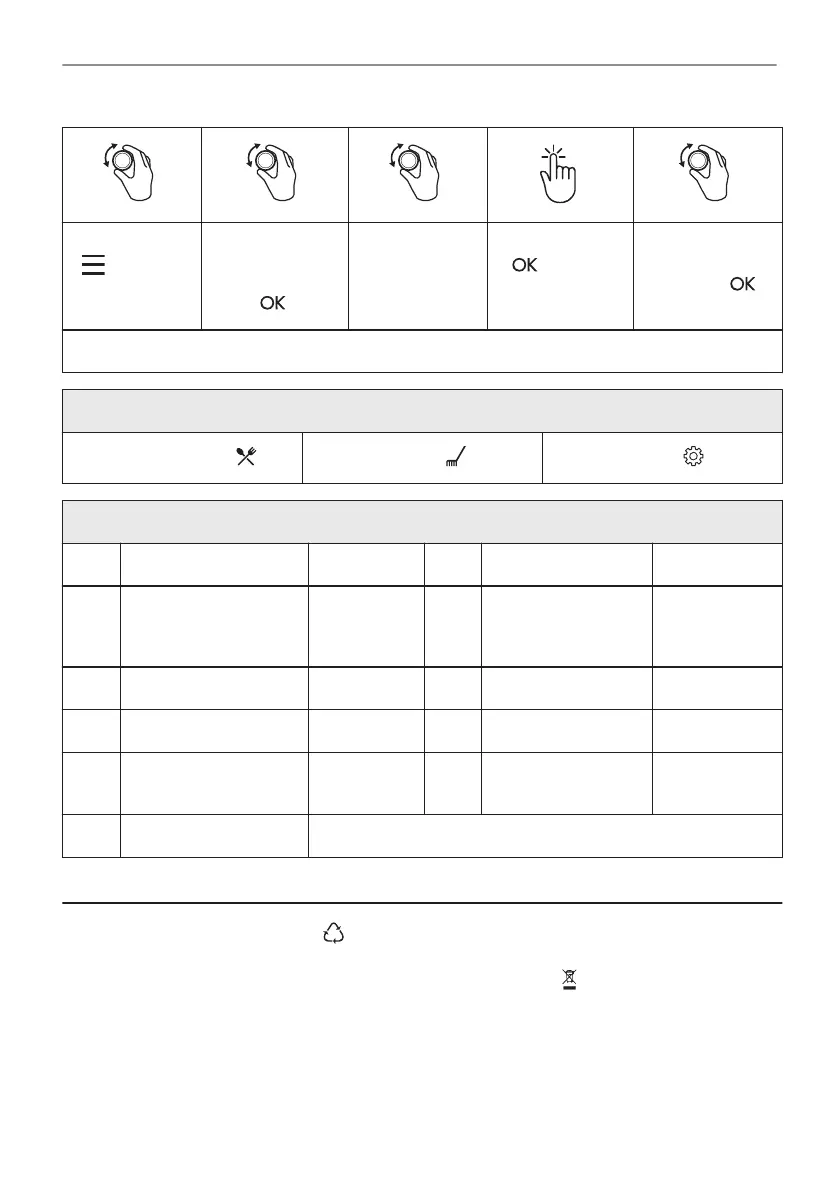
- select to
enter the Menu.
Select the option
from Menu struc‐
ture and press
.
Select the set‐
ting.
- press to
confirm setting.
Adjust the value
and press .
Turn the knob for the heating functions to the off position to exit the Menu.
Menu structure
Assisted Cooking
Cleaning
Settings
Settings
01 Time of day Change 02 Display brightness 1 - 5
03 Key tones 1 - Beep
2 - Click
3 - Sound off
04 Buzzer volume 1 - 4
05 Uptimer On / Off 06 Light On / Off
07 Fast Heat Up On / Off 08 Cleaning Reminder On / Off
09 Demo mode Activation
code: 2468
10 Software version Check
11 Reset all settings Yes / No
15. ENVIRONMENTAL CONCERNS
Recycle materials with the symbol . Put the packaging in relevant containers to recycle it.
Help protect the environment and human health by recycling waste of electrical and electronic
appliances. Do not dispose of appliances marked with the symbol with the household waste.
Return the product to your local recycling facility or contact your municipal office.
31/32
*
ENVIRONMENTAL CONCERNS



 To Next Page