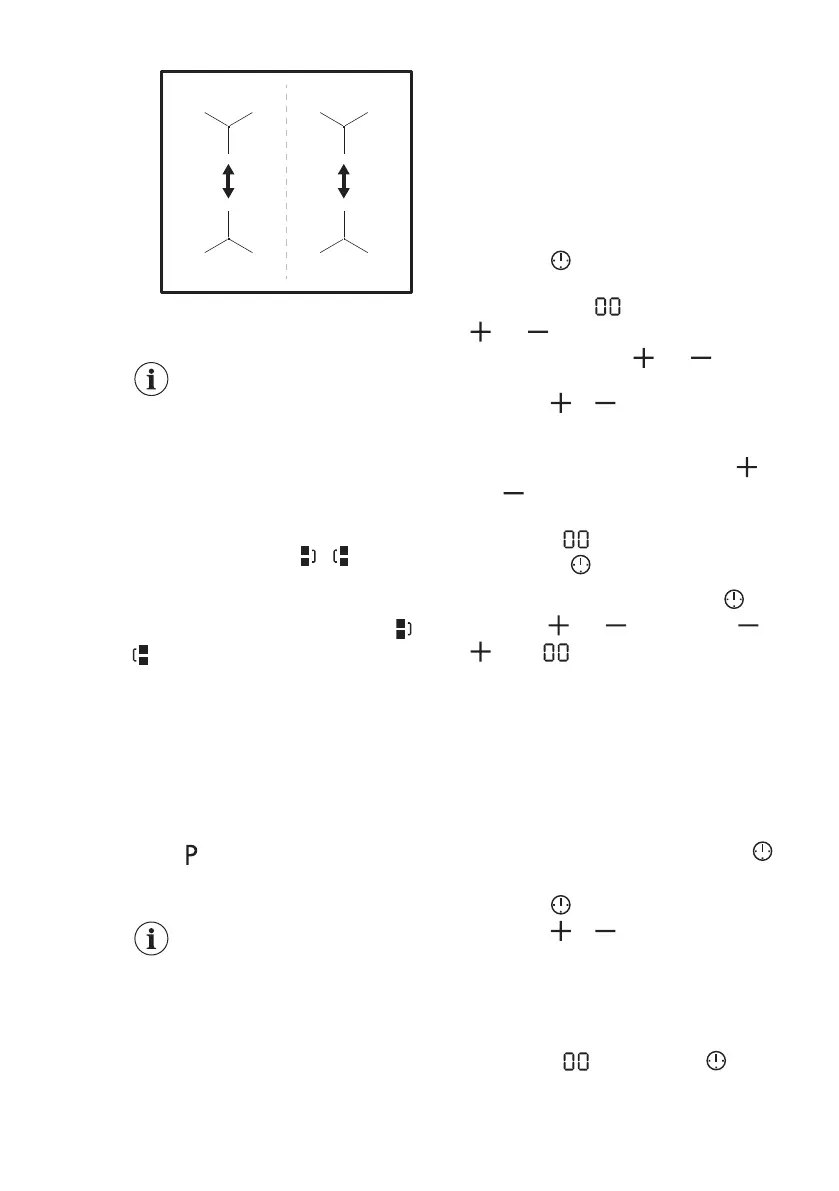
5.6 Bridge
The function operates when
the pot covers the centres of
the two zones.
This function connects two cooking
zones and they operate as one.
First set the heat setting for one of the
cooking zones.
To activate the function for left / right
cooking zones: touch
/ . To set or
change the heat setting touch one of the
left / right control sensors.
To deactivate the function: touch /
. The cooking zones operate
independently.
5.7 PowerBoost
This function activates more power for
the appropriate induction cooking zone,
depending on the cookware size. The
function can be activated only for a
limited period of time.
Touch to activate the function for the
cooking zone.
The function deactivates automatically.
For maximum duration
values, refer to "Technical
data".
5.8 Timer
Count Down Timer
Use this function to specify how long a
cooking zone should operate during a
single cooking session.
Set the heat setting for the appropriate
cooking zone and then set the function.
1. Touch
to activate the function or
change the time.
The timer digits and the indicators
and come on the display.
If the timer is not set, and
disappear after 3 seconds.
2. Touch
or to set the time (00 -
99 minutes).
After 3 seconds, the timer starts to count
down automatically. The indicators ,
and
disappear.
When the time comes to an end, a signal
sounds and flashes. To stop the
signal, touch .
To deactivate the function: touch . The
indicators
and come on. Use or
to set on the display.
Alternatively, set the heat level to 0. As a
result, a signal sounds and the timer is
cancelled.
Minute Minder
You can use this function when the hob is
activated but the cooking zones do not
operate.
Place a pot on a cooking zone to see
symbol.
1. Touch to activate the function.
2. Touch or to set the time.
The function starts automatically after 4
seconds.
When you set the function, you can
remove the pot.
When the time comes to an end, a signal
sounds and flashes. Touch to
stop the signal.
ENGLISH
11


 To Next Page