Automatic Heat Up
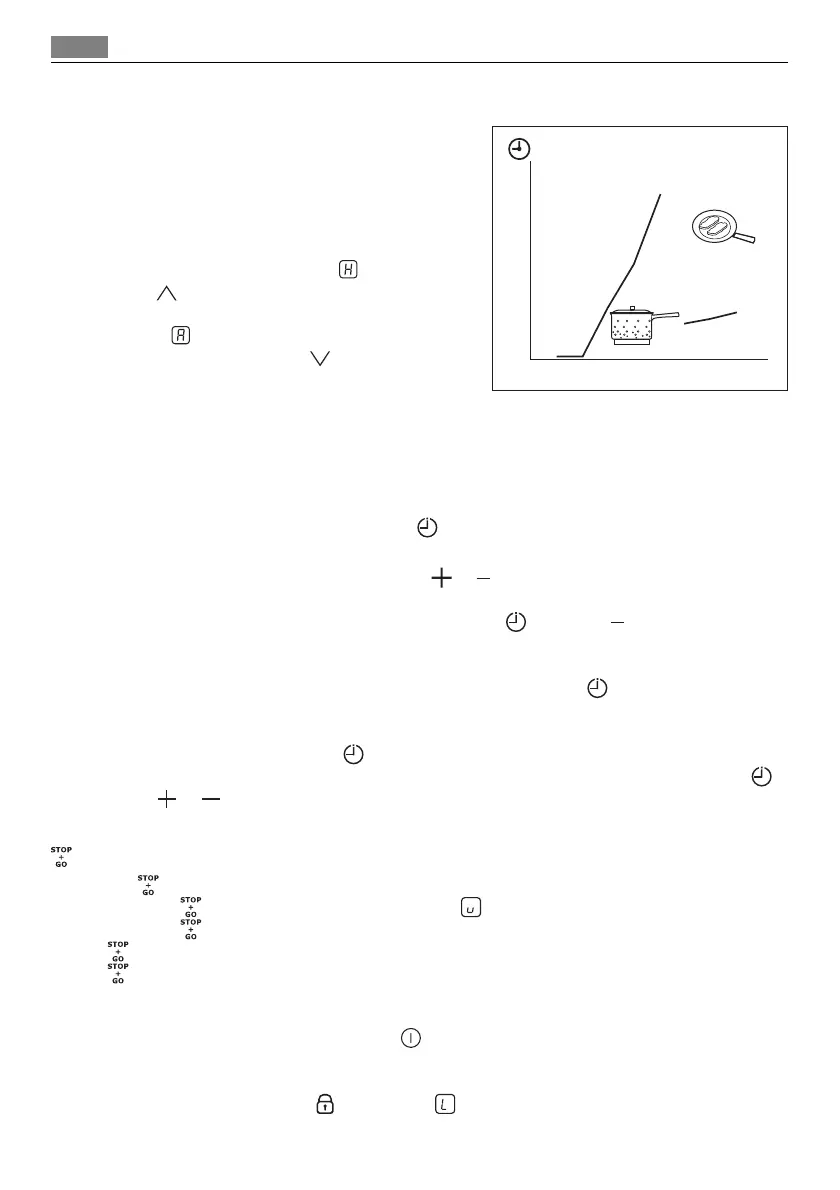
You can get a necessary heat setting in a shorter
time if you activate the Automatic Heat Up func-
tion. This function sets the highest heat setting
for some time (see the illustration), and then de-
creases to the necessary heat setting.
To start the Automatic Heat Up function the
cooking zone must be cold (no
in the display).
Touch
of the cooking zone again and again
until the necessary heat setting comes on. After 3
seconds
comes on in the display.
To stop the function touch
.
Timer
Use the timer to set how long the cooking zone operates for one cooking session.
Set the timer after the selection of the cooking zone.
You can set the heat setting before or after you set the timer.
• Selection of the cooking zone:touch
again and again until the indicator of a neces-
sary cooking zone comes on.
• Starting or changing the timer: touch
or of the timer to set the time (
-
minutes). When the indicator of the cooking zone flashes slower, the time counts down.
• Stopping the timer: select the cooking zone with
and touch to switch off the
timer. The remaining time counts backwards to
. The indicator of the cooking zone
goes out.
• Checking the remaining time: select the cooking zone with
. The indicator of the
cooking zone flashes faster. Display shows the remaining time.
When the time elapses, the sound operates and
00
flashes. The cooking zone switches off.
• Stopping the sound: touch
You can use the timer as a minute minder while cooking zones do not operate. Touch .
Touch
or to select the time. When the time elapses, the sound operates and
00
flashes
Starting the STOP+GO
The function sets all cooking zones that operate to a keep warm setting.
• Touch
to start this function. The symbol comes on.
• Touch
to stop this function. The heat setting that you set before comes on.
does not stop the timer function.
locks the control bars.
Lock
You can lock the control panel, but not . It prevents an accidental change of the heat
setting.
First set the heat setting.
To start this function touch
. The symbol comes on for 4 seconds.
The Timer stays on.
1
2
3
4
5
6
7
8
9
10
11
0
123456789
44 Operating the appliance



 To Next Page