7ENGLISH
4. CONTROL PANEL
4.1 Control panel
1 2 3
C1
C3 C2 C4 C5
C1
Display
C2
Rotary
C3
Favourite icons
C4
START icon
C5
STOP icon
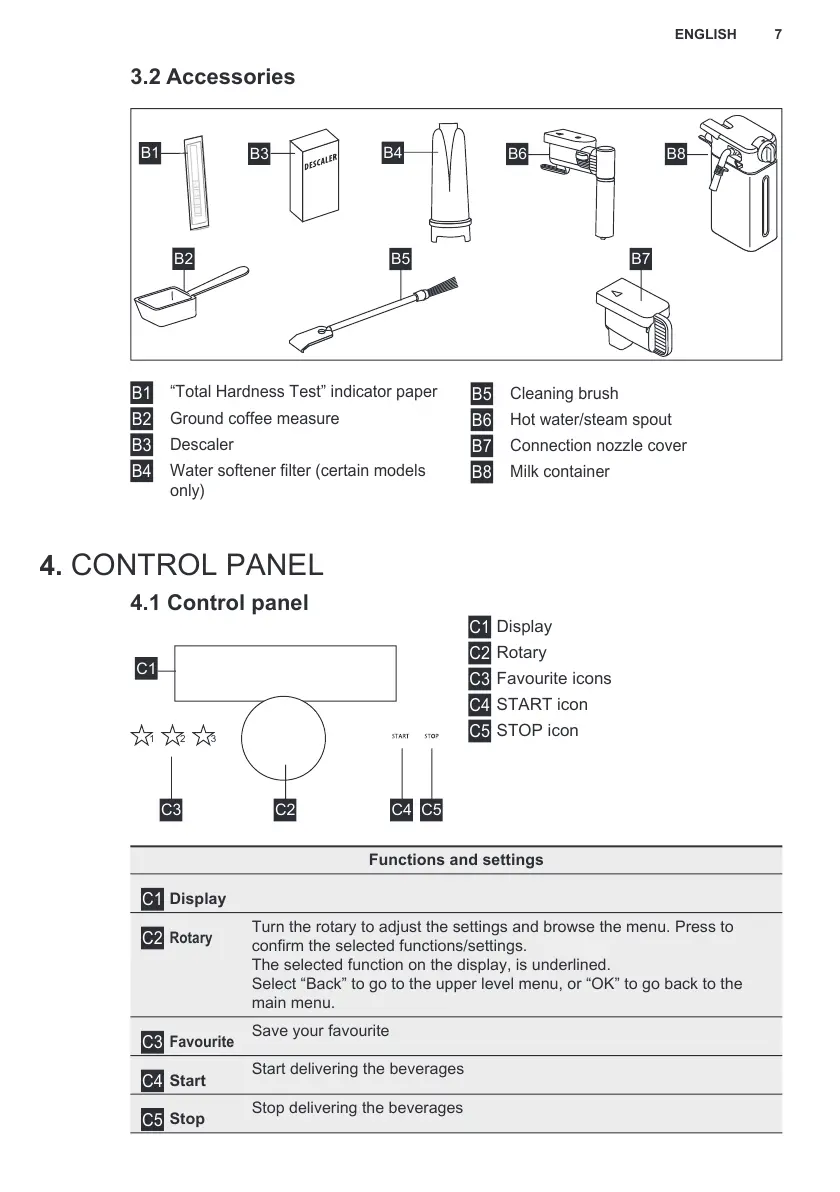
3.2 Accessories
B1
B3
B4
B5 B7
B6 B8
B2
B1
“Total Hardness Test” indicator paper
B2
Ground coee measure
B3
Descaler
B4
Water sotener ilter (certain models
only)
B5
Cleaning brush
B6
Hot water/steam spout
B7
Connection nozzle cover
B8
Milk container
Functions and settings
C1
Display
C2
Rotary
Turn the rotary to adjust the settings and browse the menu. Press to
conirm the selected unctions/settings.
The selected unction on the display, is underlined.
Select “Back” to go to the uppe r level menu, or “OK” to go back to the
main menu.
C3
Favourite
Save your avourite
C4
Start
Start delivering the beverages
C5
Stop
Stop delivering the beverages


 To Next Page