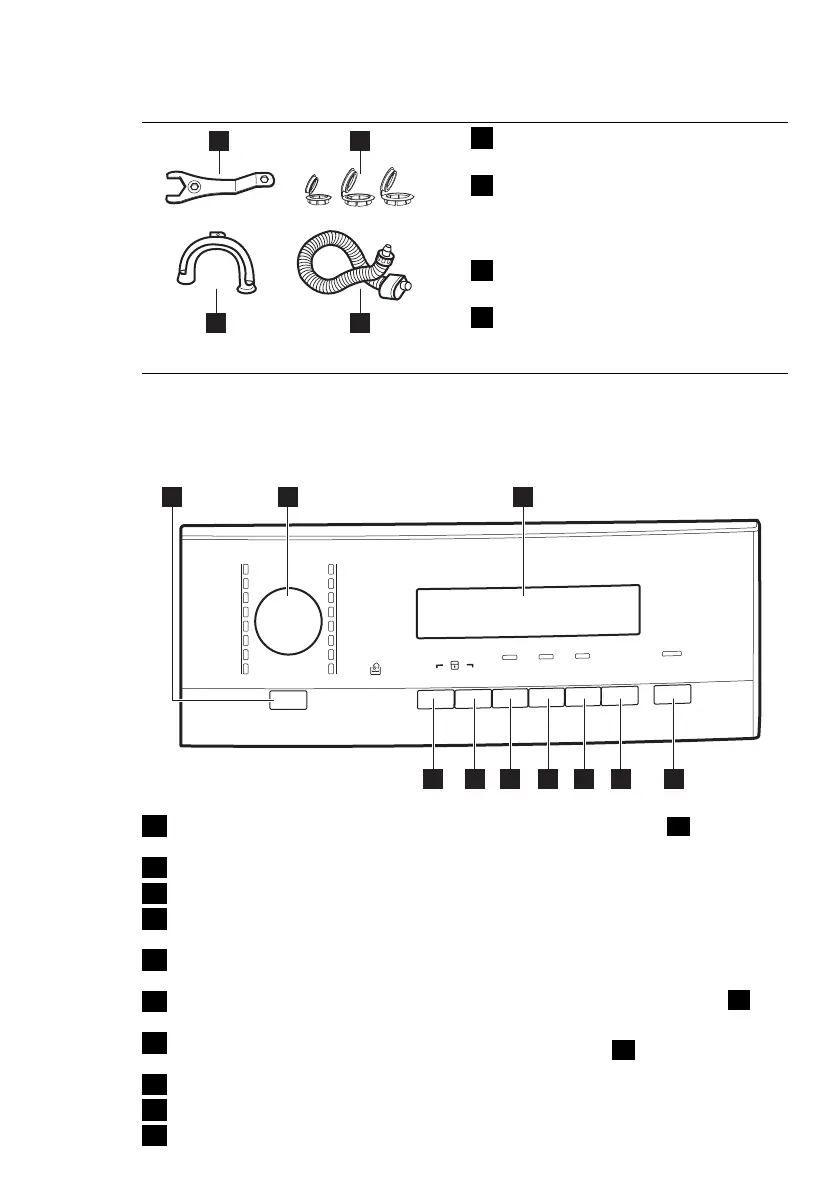
4.1 Accessories
1 2
34
1
Spanner
To remove the transit bolts.
2
Plastic caps
To close the holes on the rear side
of the cabinet after the removal of
the transit bolts.
3
Anti-flood inlet hose
To prevent possible leakage
4
Plastic hose guide
To connect the drain hose on the
edge of a sink.
5. CONTROL PANEL
Marche/Arrêt
Katoen
Blanc/Couleurs
+Voorwas
+Prélavage
Extra Stil
Extra Silence
Synthetica
Synthétiques
Strijkvrij
Repassage Facile
Fijne Was
Délicats
Wol/Zijde
Aan/Uit
Laine/Soie
Centrif./Pompen
Essorage/Vidange
Spoelen
Rinçage
Gordijnen
Rideaux
Kort Intensief
Intensif
Katoen Eco
Coton Eco
Jeans
Super Eco
20 Min. - 3 kg
+Voorwas
+Prélavage
Temp.°C
T/min.
Start/Pauze
Départ/Pause
Startuitstel
Départ
Différé
Gain de
Te mp s
Vlekken
Extra
Spoelen
Rinçage +
Taches
Tijd Besparen
1 2 3
45678910
1
On/Off button (Aan/Uit - Marche/Ar-
rêt)
2
Programme knob
3
Display
4
Start Pause button (Start/Pauze - Dé-
part/Pause)
5
Delay start button (Startuitstel - Dé-
part Différé)
6
Time saving button (Tijd Besparen -
Gain de Temps)
7
Extra rinse button (Extra Spoelen -
Rinçage+)
8
Stain button (Vlekken - Taches)
9
Spin reduction button (T/min.)
10
Temperature button (Temp. ºC)
5.1 On Off button
1
Press this button to activate or deacti-
vate the appliance. A tune sounds when
the appliance is activated.
The AUTO Stand-by function automati-
cally deactivates the appliance to de-
crease the energy consumption when:
• You do not use the appliance for 5 mi-
nutes before you press button
4
.
– All settings are cancelled.
–
Press button
1
to activate the ap-
pliance again.
– Set again the washing programme
and all possible options.
ENGLISH 7


 To Next Page