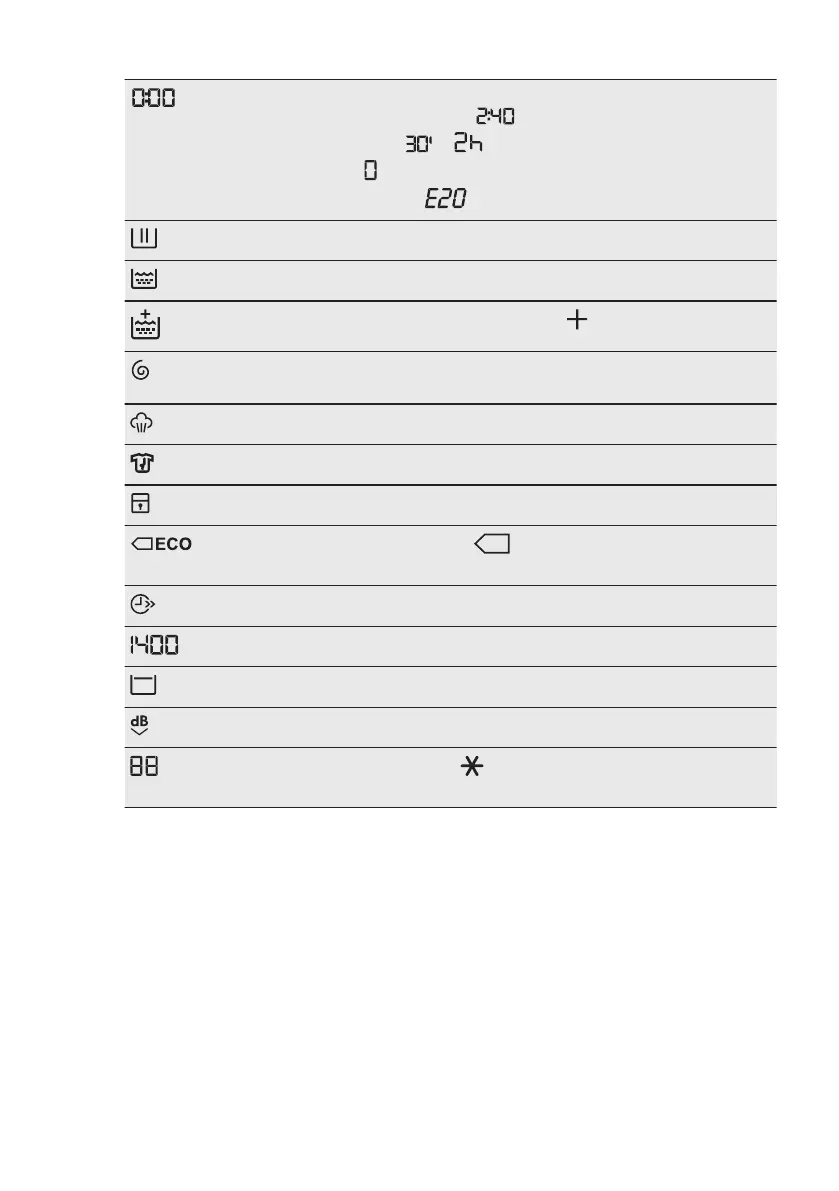
The digital indicator can show:
• Programme duration (e. g. ).
• Delay time (e. g. or ).
• Cycle end ( ).
• Warning code (e.g. ).
Washing phase indicator. It flashes during pre-wash and wash phase.
Rinsing phase indicator. It flashes during rinse phase.
When the Soft Plus option is activated, the indicator appears.
Spinning and draining phase indicator. It flashes during spin and drain
phase.
Steam phase indicator.
Anti-crease phase indicator.
Child safety lock indicator.
Energy saving indicators. The indicator appears by selecting a
programme for cotton at 40 °C or 60 °C.
Time saving indicator.
Spin speed indicator.
Rinse hold indicator.
Extra Silent indicator.
Temperature indicator. The indicator appears when a cold wash is
set.
7. DIAL AND BUTTONS
7.1 On/Off
Pressing this button for a few seconds
allows to activate or deactivate the
appliance. Two different tunes sound
while switching the appliance on or off.
As the Stand-by function automatically
deactivates the appliance to decrease
the energy consumption in a few cases,
you may need to activate the appliance
again.
For more details, refer to Stand-by
paragraph in Daily Use chapter.
www.aeg.com14


 To Next Page