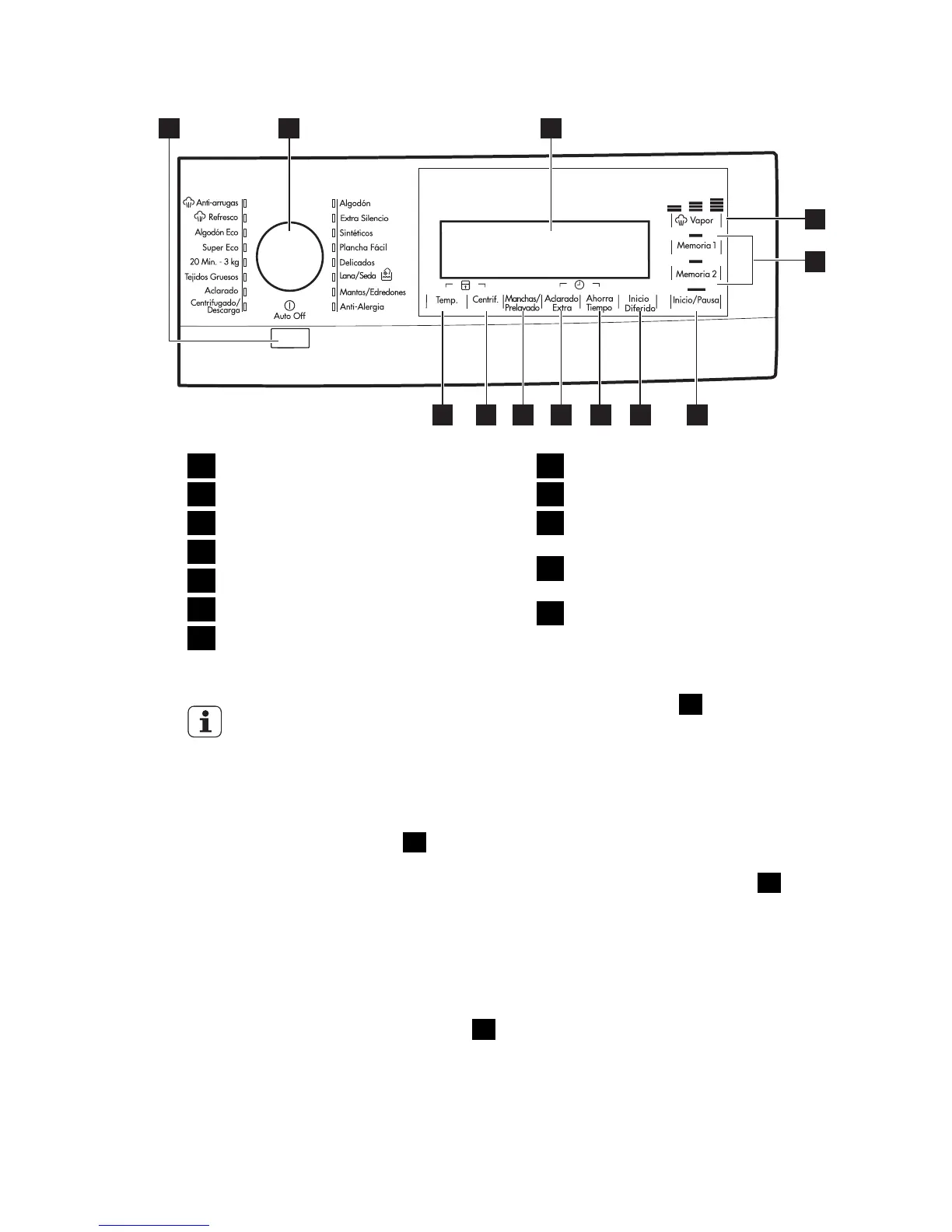
CONTROL PANEL
1 2 3
4
5
6789101112
1
Auto Off button
2
Programme knob
3
Display
4
Vapor touch button
5
Memoria touch buttons
6
Inicio/Pausa touch button
7
Inicio/Diferido touch button
8
Ahorra Tiempo touch button
9
Aclarado Extra touch button
10
Manchas/Prelavado/Remojo touch
button
11
Spin reduction touch button (Cen-
trif.)
12
Temperature touch button (Temp.)
TOUCH SCREEN
Do not wear gloves when you
touch the buttons.
Make sure the touch screen and
buttons are always clean and
dry.
AUTO OFF BUTTON
1
Press this button to activate or deacti-
vate the appliance. A tune sounds when
the appliance is activated.
The AUTO OFF function automatically
deactivates the appliance to stop the
energy consumption when:
• You do not use the appliance for 5
minutes before you press button
6
.
– All settings are cancelled.
–
Press button
1
to activate the ap-
pliance again.
– Set again the washing programme
and all possible options.
• After 5 minutes from the end of the
washing programme. Refer to 'At the
end of programme'.
PROGRAMME KNOB
2
Turn this knob to set a programme. The
related programme indicator comes on.
8


 To Next Page