5.7 Electrical connection
At the end of installation you can connect
the mains plug to the mains socket.
The rating plate and the 'Technical Data'
chapter indicate the necessary electrical
ratings. Make sure that they are
compatible with the mains power supply.
Check that your domestic electrical
installation can take the maximum load
required, also taking into account any
other appliances in use.
Connect the appliance to an earthed
socket.
The power supply cable must be easily
accessible after installing the appliance.
For any electrical work required to install
this appliance, contact our Authorised
Service Centre.
The manufacturer does not accept any
responsibility for damage or injury
through failure to comply with the above
safety precaution.
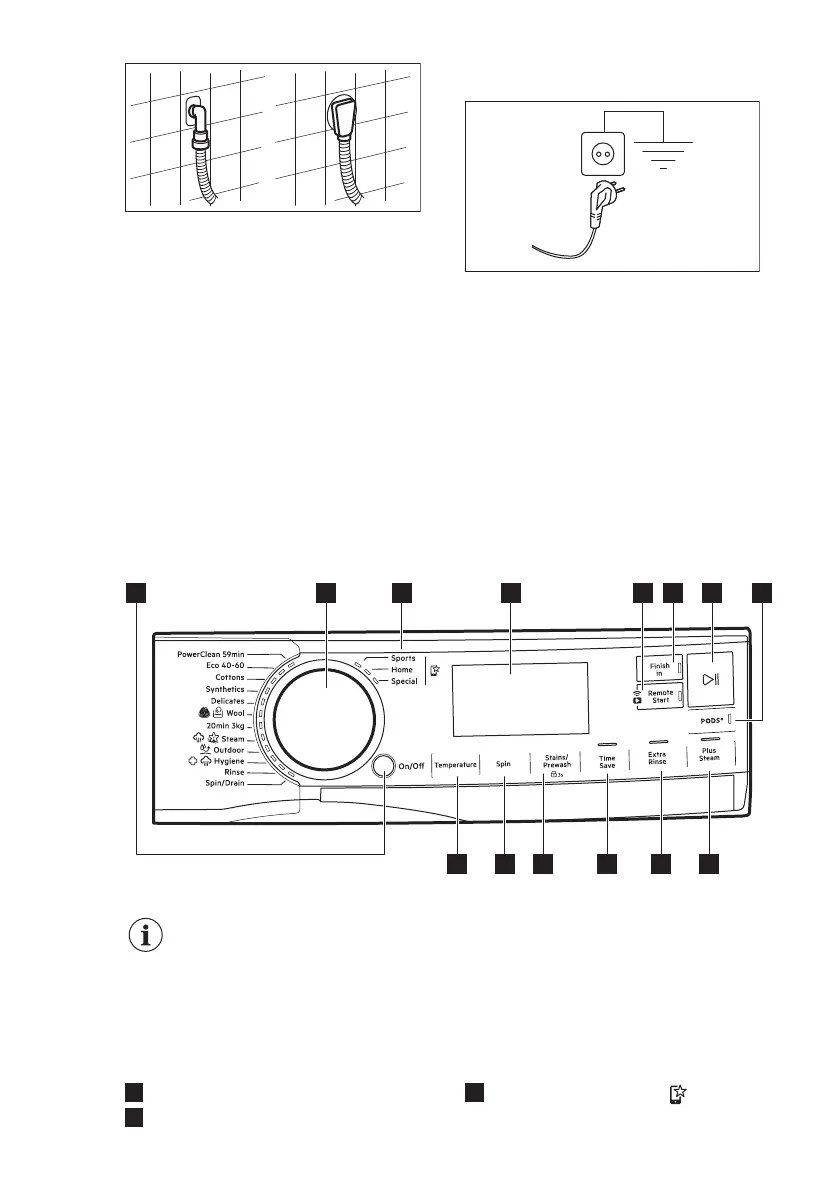
6. CONTROL PANEL
6.1 Control panel description
432
6 7 85
14 13 11 10 9
12
1
The options are not selectable with all washing programmes. Check the
compatibility between options and washing programmes in the "Options
compatibility with programmes" paragraph in the "Programmes" chapter.
An option can exclude another one, in this case the appliance doesn't
allow you to set the incompatible options together.
Make sure the screen and touch buttons are always clean and dry.
1
On/Off push button
2
Programme dial
3
Favourite programmes
www.aeg.com14


 To Next Page