Need help?
Do you have a question about the AEG MC 4447 iP and is the answer not in the manual?
This document describes the AEG MC 4447 iP Wireless Speaker System for iPhone/iPod, a portable audio device designed for personal use.
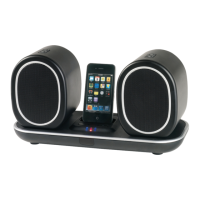
The MC 4447 iP is a wireless speaker system that allows users to play music from their iPod or iPhone devices, as well as from a PC or other external analog audio sources. The system consists of a base station with a docking connector for iPod/iPhone, and two wireless speakers that can be placed independently. An audio transmitter is included for wireless connection to a PC or other audio sources. The base station and speakers feature volume controls, and the system can be operated via an infrared remote control. The speakers are powered by built-in rechargeable lithium batteries, allowing for portable use. The base station also charges the docked iPod/iPhone.
The base station can be switched on/off by pressing the dedicated button on the unit or by holding the /ENTER button on the remote control for 3 seconds. The power indication (5) on the base station lights blue when on and red in standby. The speakers are switched on/off using the ON/OFF switch (10) on each speaker, with the power indication (7) lighting up when on. Volume for the base station is controlled by +/- buttons (3/3). When speakers are operated on the base station, the volume automatically reduces to approximately 80% to enable charging. The speakers always start at maximum volume when switched on.
The system is "Made for iPod" and "Made for iPhone," indicating it's designed to connect specifically with these devices and meets Apple performance standards. However, full compatibility with all iPod/iPhone models and generations, especially regarding remote functions, cannot be guaranteed. Users should ensure their device has a compatible interface. If an error message appears on an iPhone, pressing "OK" is usually sufficient. To play music, insert the iPod/iPhone into the dock connector (2). Ensure it is plugged in upright to avoid damage. Depending on the model, the button lock may need to be released, and playback initiated with the II button (4) on the remote. Further control follows the iPod/iPhone's own manual. If an incoming call is received on a docked iPhone, music playback will stop, and the ringtone will be heard. The iPod/iPhone battery charges automatically when docked, provided the unit is connected to the mains. Not all generations support this, and charging duration varies by device and operating condition.
To play music from a PC, insert the audio transmitter (14) into a free USB port on a Windows PC. The PC will install necessary drivers (may display "Found new hardware"). Once installed, select "SYNIC Wireless Audio" as the "Standard device" for "Sound reproduction" in the "Sound and Audio Devices" settings. Switch on the speakers using their ON/OFF switch (10). If the speakers are not yet connected to the transmitter, follow the connection procedure (described below). Users can then play music from their PC using media players like Windows Media Player. It is recommended to set a low volume in the music playback program and gradually increase it after the speakers are on. The speakers always start at maximum volume. The base station does not need to be switched on for PC playback.
An external analog playback device (e.g., MP3 player, CD player) can be connected to the AUX IN jack (13) using a 3.5 mm stereo jack. The unit automatically switches to AUX operation. Volume can be adjusted using the +/- buttons (3/6/3). Users should set the external device's volume to a reasonable level.
Before use, the audio transmitter must be connected to the speakers.
The infrared remote control (Fig. 3) allows wireless operation up to 8 meters. If the range decreases, batteries should be replaced. Ensure a clear line of sight between the remote and the sensor (8) on the device. Remote control buttons include:
Before cleaning, disconnect the device from the mains power supply. Clean the device with a soft, damp cloth without detergents. Do not submerge the device in water.
The speakers are powered by rechargeable lithium batteries. When the speaker's power indication (7) lights red, the battery is low and needs recharging. To charge:
The remote control uses a long-life lithium cell (CR 2025). If the remote's range shortens, open the battery compartment on the underside, replace the cell with one of the same type (ensuring correct polarity), and close the compartment. If the remote is not used for extended periods, remove the battery to prevent leakage. Batteries should not be exposed to intense heat, direct sunlight, or fire due to explosion risk. Keep batteries out of reach of children. Do not force them open or allow contact with metallic objects to prevent short circuits and overheating. When transporting batteries, cover terminals with adhesive tape for safety. If a battery leaks, avoid contact with eyes or skin; rinse with purified water and seek medical advice if symptoms persist.
Before disposing of the unit, the built-in rechargeable lithium batteries in the speakers must be removed.
Electrical appliances should not be disposed of with household waste. Obsolete or defective devices must be disposed of at municipal collection points. This helps prevent environmental and health impacts from improper disposal and contributes to recycling. Information on collection points can be obtained from local authorities.

 To Next Page
 General