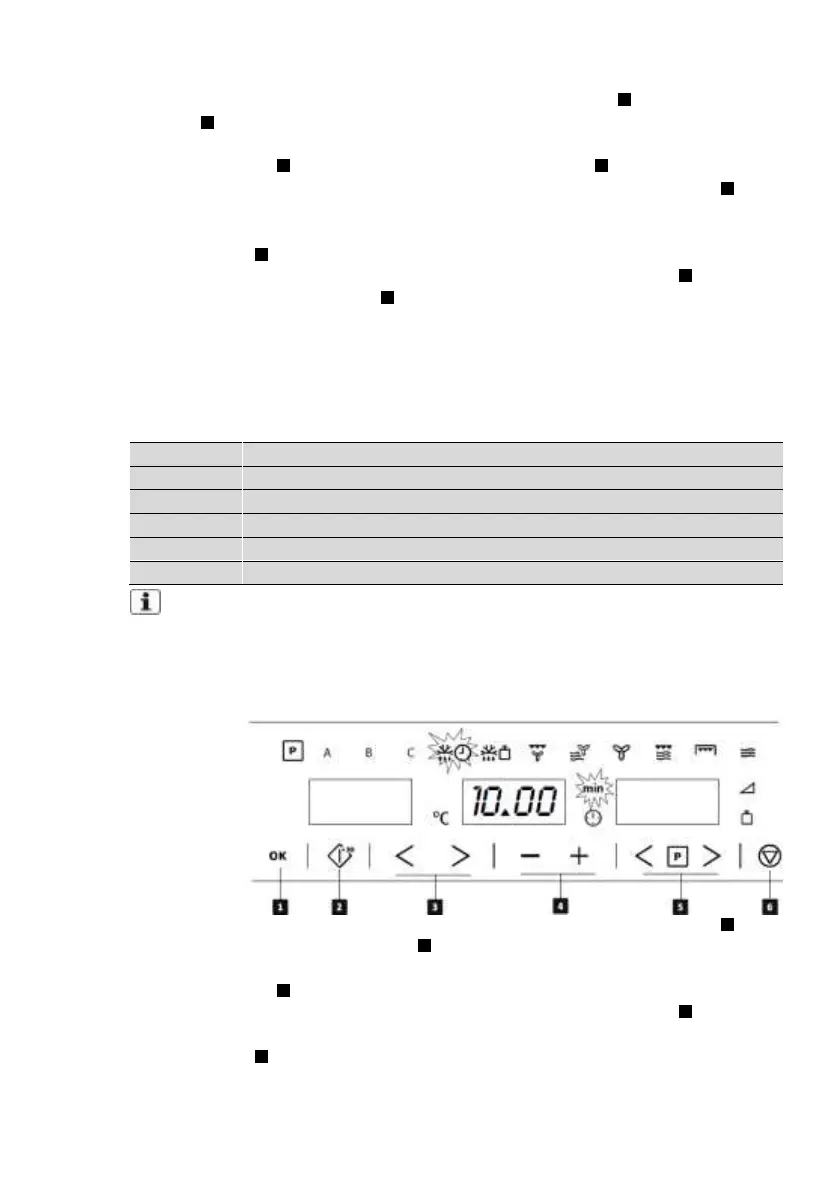
1. Select the Defrost by Weight
function with the Function selection
keys .
2. Select the Program with Parameter
selection keys . The Duration and
Clock symbols and the display start
blinking.
3. Set the program with the Plus and
Minus keys (refer to the table
below).
4. Press the Confirmation key to
validate the program. The display
and symbols stop blinking.
5. Select the Weight with Parameter
selection keys . The Weight
symbol and display start blinking.
6. Set the weight with the Plus and
Minus keys .
7. Press the Confirmation key to
validate the weight. The display
and symbol stop blinking.
8. Start the cooking process by
pressing the Start key .
The following table shows the
defrosting by weight function
programmes, indicating weight
intervals, and defrosting and standing
times (in order to ensure the food is of
a uniform temperature).
Important Note: see “General instructions for defrosting“.
8.13. Defrosting by time (manual)
Use this function to defrost meat, poultry, fish, fruit and bread quickly.
1. Select the Defrost by Time function
with the Function selection keys .
2. Select the Duration with Parameter
selection keys . The Duration
symbol and display start blinking.
3. Set the duration with the Plus and
Minus keys .
4. Press the Confirmation key to
validate the duration. The display
and symbol stop blinking.
5. Start the cooking process by
pressing the Start key .


 To Next Page