8.7. Grill
Use this function to brown the top of food quickly.
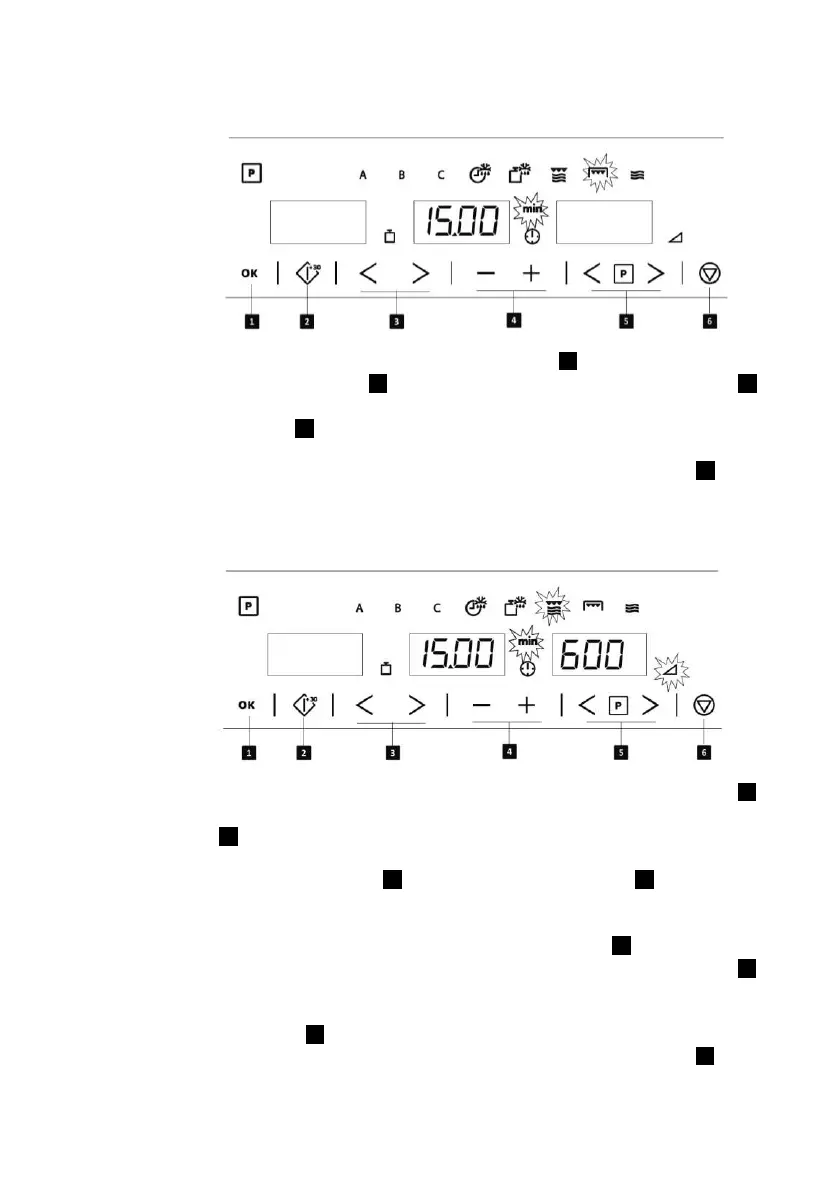
1. Select the Grill function with the
Function selection keys .
2. Select the Duration with Parameter
selection keys . The Duration
symbol and display start blinking.
3. Set the duration with the + and –
keys .
4. Press the Confirmation key to
validate the duration. The display
and symbol stop blinking.
5. Start the cooking process by
pressing the Start key .
8.8. Microwave + Grill
Use this function to cook lasagne, poultry, roast potatoes and toasted foods.
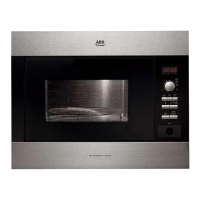
1. Select the Microwave + Grill
function with the Function selection
keys .
2. Select the Power Level with
Parameter selection keys . The
Power Level symbol and display
start blinking. If you do not change
the power level the microwave
operates with the default power
600 W.
3. Set the power level with the Plus
and Minus keys .
4. Press the Confirmation key to
validate the power level. The
display and symbol stop blinking.
5. Select the Duration with Parameter
selection keys . The Duration
symbol and display start blinking.
6. Set the duration with the Plus and
Minus keys .
7. Press the Confirmation key to
validate the duration. The display
and symbol stop blinking.
8. Start the cooking process by
pressing the Start key .


 To Next Page