EN - 7 -
PART- 2.
USAGE INFORMATION
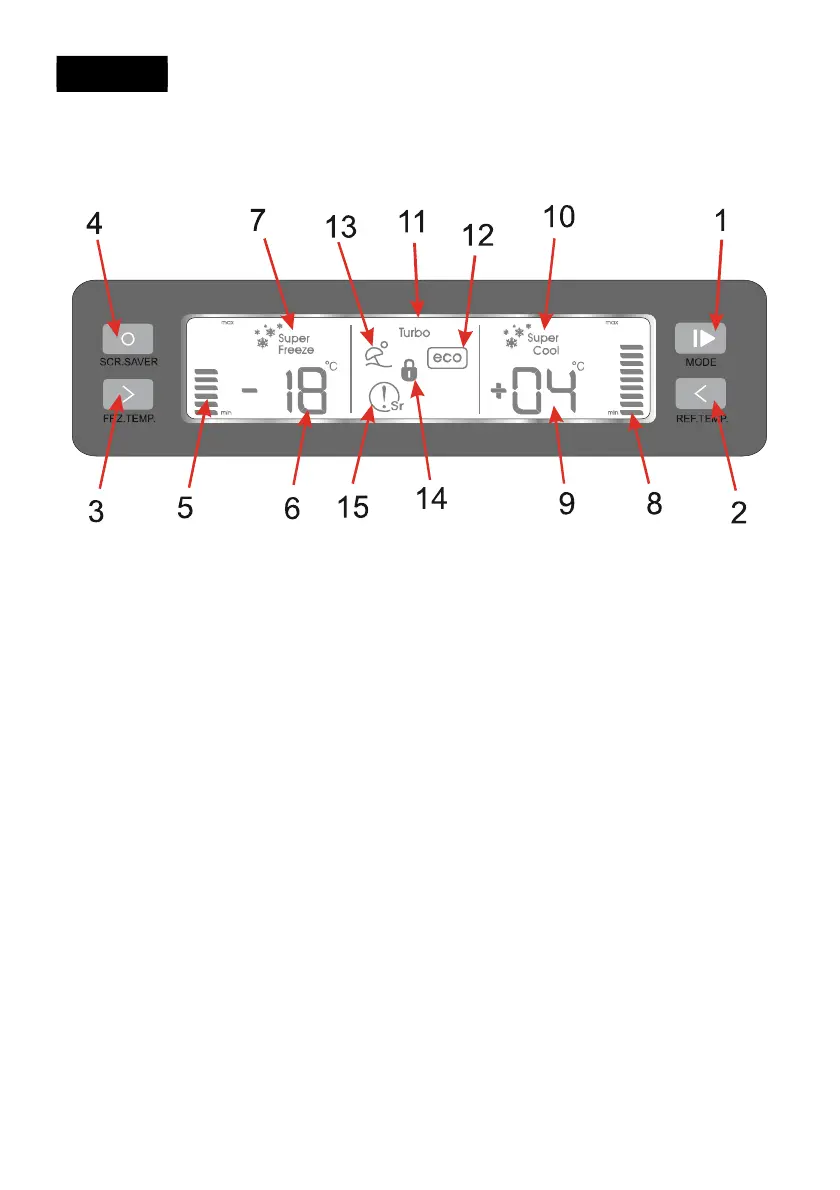
Display and control panel
1. MODE button
Thanks to this button you can select the different modes: Economy, Super Freezing,
Turbo, Super Cooling, Holiday.
2. REF. TEMP. button
Set the cooler compartment temperature.
3. FRZ.TEMP. button
Set the feezer compartment temperature.
4. SCR.SAVER button
All lights on the screen are turned off when you hold this button pressed for 5 seconds.
Screen lights are turned on again when you press any button.
5. Freezer compartment temperature bar graphic
Shows the temperature value set for the freezer compartment. 3 bars at -16
o
C, 6 bars at
-18
o
C, 8 bars at -20
o
C, 10 bars at -22
o
C, 12 bars at -24
o
C. The highest number of bars
is displayed at the coolest setting.
6. Freezer compartment adjusted temperature indicator
Shows the temperature value set for the freezer compartment.
7. Symbol of Super Freezing Mode
It is super Freeze mode symbol.
8. Cooler compartment temperature bar graphic
Shows the temperature value set for the cooling compartment. 3 bars at 8
o
C, 6 bars at
6
o
C, 9 bars at 4
o
C, 12 bars at 2
o
C. The highest number of bars is displayed at the
coolest setting.


 To Next Page