English
22
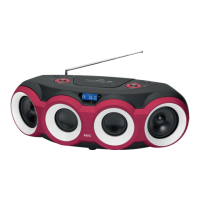
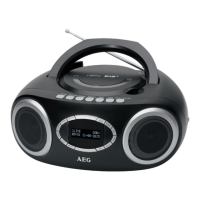
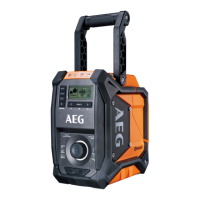
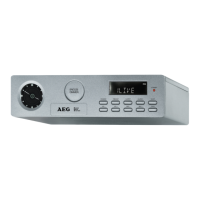
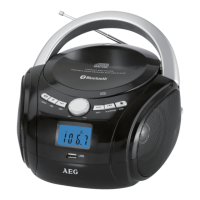
Overview of the Components
1 USB Connection
2 Battery compartment
3 Operating mode switch (CD/USB; Radio; Bluetooth/AUX)
4 Mono/Stereo selector switch
5 AUX input 3.5 mm
6 On/Off switch
7 230 V connection
8 Carrying handle
9 CD tray
10 Loudspeakers.
11 Open CD tray
12
Stop button
13
button (replay/pause)/Automatic search radio
14
button Search forwards/Radio station +
15 Volume knob
16 Display
17 button search run backwards/Radio station –
18 PRG button/Tuning +
19 Repeat button/Tuning –
20 Receiving antenna
Putting the device into operation/
Implementation
• Carefullyreadtheoperatinginstructionsbeforethecom-
missioning.
• Selectasuitablelocationforthedeviceandtheloud-
speakers. Ensure an even and non-slip surface.
• Takecaretoprovidesufcientventilationforthedevice.
Power supply
• Plugthemainsplugintotheproperlyinstalledwall
socket, 230 V, 50 Hz.
• Ensurethatthemainsvoltagecorrespondswiththetype
plate.
• Thedevicecanalternativelyalsobeequippedwith6
C batteries. For this purpose, slide open the battery
compartment in direction of the arrow and insert the bat-
teries with the correct polarity. Then reclose the battery
compartment.
WARNING:
Do not expose the batteries to any high heat input
such as direct sunlight, for example. There is a risk of
explosion.
CAUTION:
• Unequalbatteriesornewandspentbatteriesmaynot
be used together.
• Batteriesmustnotbedisposedoffinthehousehold
wate. Please dispose of spent batteries at the appropri-
ate collection points or return them to the distributor.
Transport lock CD tray
• OpentheCDtray(2)bypressingthe
button (19).
• RemovethetransportlockfromtheCDplayer,ifpresent,
before commissioning.
• ClosetheCDtraybypressingthe button (19).
General operation
On/Off switch (6)
You will turn the device on (I) and off (0) with this button.
Volume MIN/MAX (15)
Use this turning knob to adjust the volume to your individual
needs.
USB connection (1)
This device has been developed according to the latest state
of the technical developments in the USB field. The large
number of different USB storage media of any kind that are
offered nowadays do unfortunately not guarantee that a full
compatibiity with all the USB storage media is ensured. It is
for this reason in rare cases that it can result in problems when
replaying USB storage media . This is not an error function of
the device.
To start the USB replay, proceed as follows:
• Turnthedeviceon.
• Slidetheoperatingmodeswitch(3)tothe“CD”position.
• Keepthe
button pressed down until “USB” is shown in
the display.
• ConnectaUSBstoragemediumwithmusicles.
• Pressthe button (13) to start the replay.
For more operating options plrease refer to the chapter Play-
ing CDs/MP3.
Listening to radio
To restart the radio replay, proceed as follows:
• Turnthedeviceon.
• Slidetheoperatingmodeswitch(3)tothe“Radio”posi-
tion.
• SetthedesiredstationwiththebuttonsTuning+/-.The
frequency will thereby be shown in the LCD display (16).
• Thedisplay(ST)isshownintheLCDdisplayduringan
optimal reception of the station. Reposition the antenna
in case of bad radio reception. Should the radio recep-
tion be disturbed by static, you can reset the replay to
mono operation with the switch (4).
• Startautomaticstationsearchwiththebutton
Play/
Pause (13)/Station search.
Playing CDs/MP3
Replay of a CD
To play back an audio CD, please proceed as follows:


 To Next Page