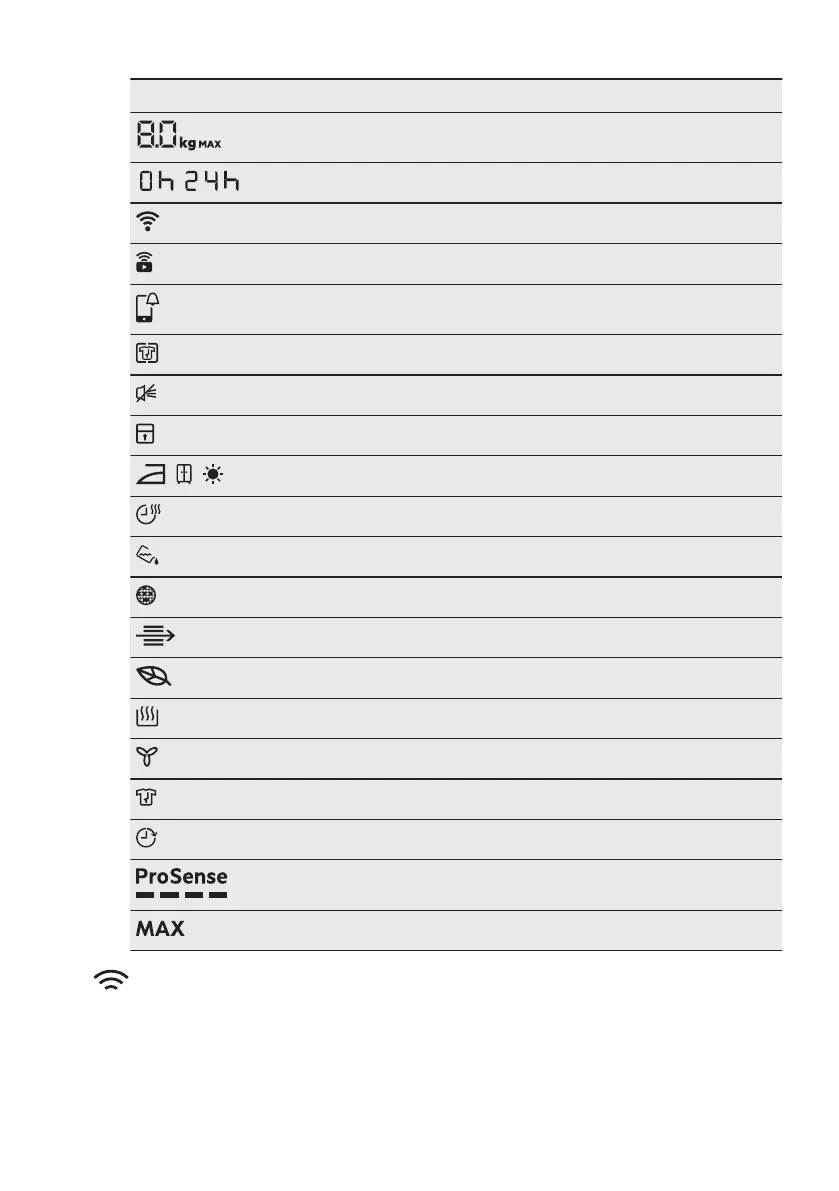
Symbol on the display Symbol description
maximum load
-
finish in selection (up to 24h)
wireless connection
remote control
APP notification to check
Knitterschutz option on
buzzer off
child lock on
, ,
laundry dryness: iron dry, cupboard dry, extra dry
Trockenzeit option on
indicator:
drain the water container
indicator:
clean the filter
indicator:
check the condenser
ECO
mode drying
indicator:
drying phase
indicator:
cooling phase
indicator:
crease guard phase
Fertig In option on
ProSense indicator
indicator:
maximum load exceeded
5. WI-FI - CONNECTIVITY SETUP
This chapter describes how to connect
the smart appliance to the Wi-Fi network
and to link it to a mobile devices.
By this functionality you can receive
notifications, monitor and control your
tumble dryer from your mobile devices.
The Wi-Fi functionality is off as factory
default setting.
ENGLISH 11


 To Next Page