Using the Setting mode, you can change the
temperature unit displayed on the control
panel from Celsius to Fahrenheit. To change
the temperature unit:
1. Activate the Setting mode (refer to
"Activating the Setting mode").
The display shows .
2. Tap repeatedly until you see and
. Tap the indicator showing the unit to
select between for Celsius and
for Fahrenheit.
3. Press and hold the ECO button for
approximately 3 seconds to exit the
Setting mode.
Factory settings
This function restores each setting to the
factory default settings. To restore the factory
default settings:
1. Activate the Setting mode (refer to
"Activating the Setting mode").
The display shows .
2. Tap repeatedly until you see and
. Tap repeatedly until you see .
turns into blinking and then into
solid , which indicates that factory
settings are restored.
3. Press and hold the ECO button for
approximately 3 seconds to exit the
Setting mode.
5. DAILY USE
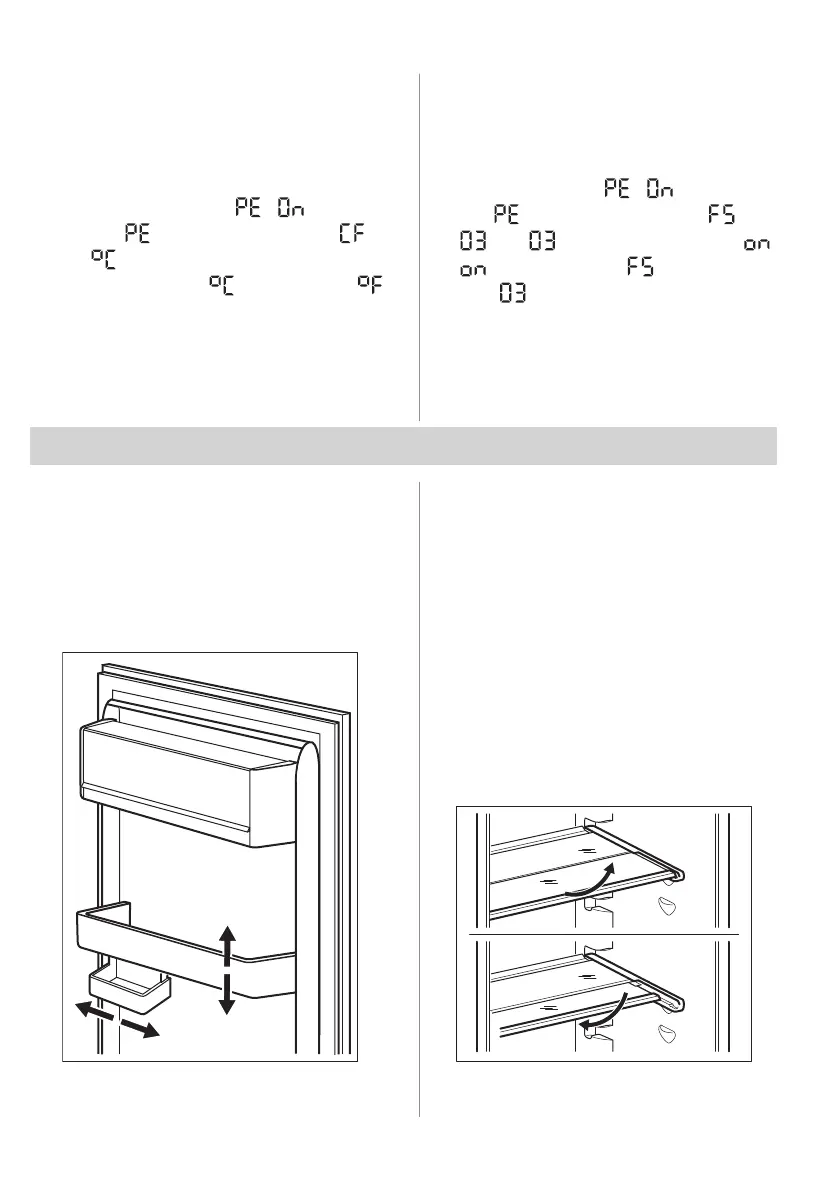
5.1 Positioning the door shelves
To permit storage of food packages of
various sizes, the door shelves can be placed
at different heights.
1. Gradually pull the shelf up until it comes
free.
2. Reposition as required.
This model is equipped with a variable
storage box which can be moved sideways.
5.2 Movable shelves
The walls of the refrigerator are equipped
with a series of runners so that the shelves
can be positioned as desired.
This appliance is also equipped with a shelf
consisting of two parts. The front half of the
shelf can be placed under the second half to
make better use of space.
To fold the shelf:
1. Take out the front half gently.
2. Slide it into the lower rail and under the
second half.
12 ENGLISH



 To Next Page