Intrinsically Safe Solutions by Design
3
FRONT
1
2
3
4
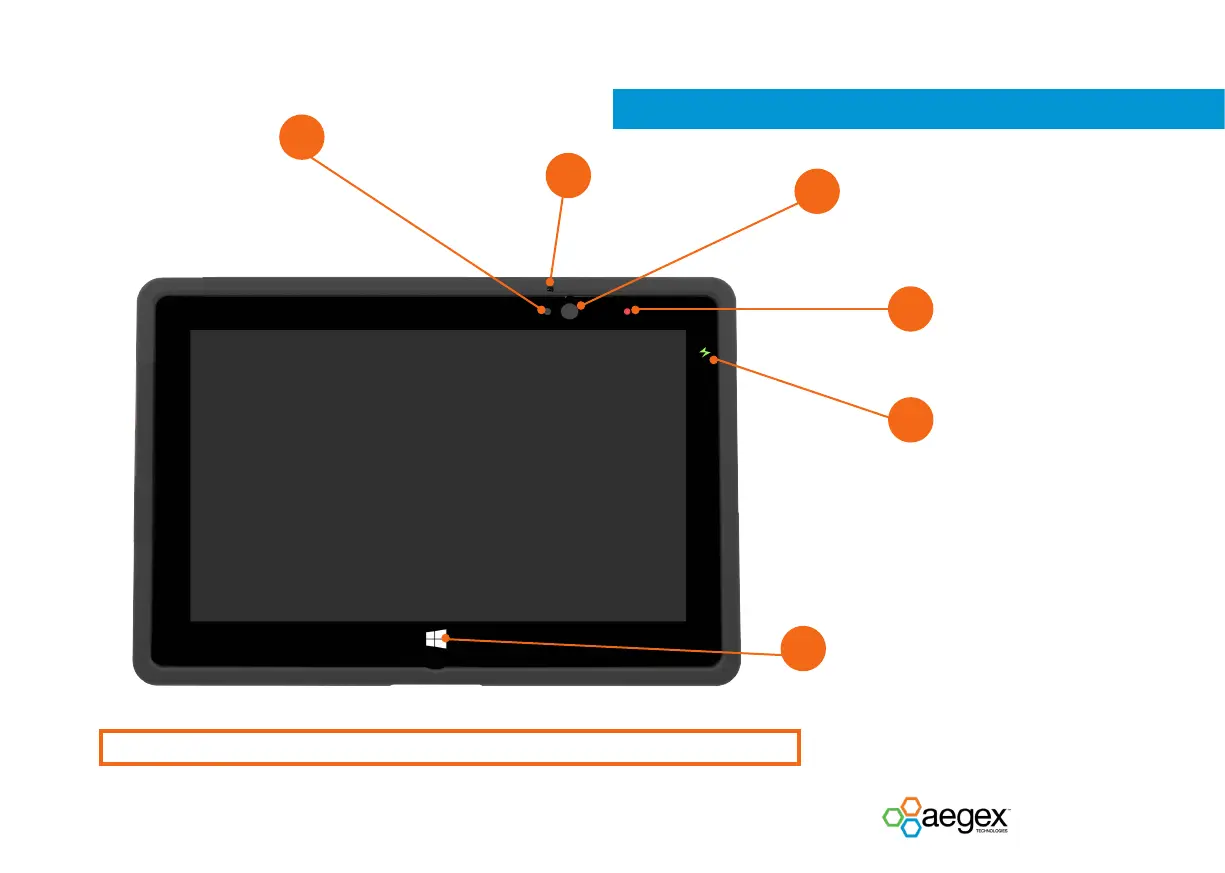
Front Microphone Outlet
Front Camera
2 MP camera for video conferencing
5
6
Ambient Light Sensor
Recognizes the ambient
light and adjusts the display
brightness if enabled in the
operating system.
Windows Home Button (Windows Icon)
Home button needs to be tapped by a larger surface
than the other areas of the touch screen until you feel
the haptic feedback. It is recommended to press the
home button with your thumb, nger parallel to the
length of the tablet.
Camera Indicator LED
Lights up if camera is activated and
during device boot and shutdown
Charging Indicator LED
OFF not connected to charger
ORANGE charging
GREEN fully charged
RED charge error
Due to Li-ion battery technology, deep
discharge can happen. To return to
normal condition battery needs to
be charged longer. Use a charging/
docking station for battery recovery.
Screen protectors must meet the anti-static requirements for the hazardous locations where the tablets are used.


 To Next Page