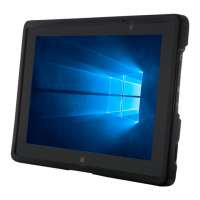
Intrinsically Safe Solutions by Design
IMPORTANT PRODUCT AND SAFETY INFORMATION
12
Warranties
For more information on warranty services of aegex10 please visit our site at
www.aegex.com/Support/Warranty.
Do not leave the device in direct sunlight because the excessive heat can damage the LCD, it is
not covered by any warranty terms.
General Information
• Do not drop, bend or twist your tablet. This can break tablet display glass, internal circuit
boards or mechanics. If the glass breaks, do not touch the glass parts of the device or at tempt
to remove the broken glass from the device. Stop using the device until authorized service
personnel replace the glass.
• Do not try to disassemble your tablet. This may damage the device and will void warranty.
• Do not connect USB, charger, headset or docking station in a hazardous environment.
• Operate your device in a place where temperature is between -10°C and +50°C and
humidity is between 10% and 90%.
• Any unauthorized service is prohibited and will void the warranty.
• Store your device in a place where temperature is between -20°C and +60°C.
• Protect your device from water and moisture intake. Keep connector doors closed when not
in use to prevent water and moisture intake.
• Listen to a headset at a moderate level, and do not place the device loudspeaker outlets near
your ear when the loudspeakers are in use.
• Use only soft, clean and dry lint-free cloth to clean your device.
• Keep the unit and accessories away from small children.
• Switch o your device before boarding an aircraft.
• Your device meets guidelines for exposure to radio waves (SAR, Specic Absorption Rate)
when kept in a minimum distance of 2.5cm to your body.
• Charge your device with the supplied charger in a place where temperature is be-
tween 0°C and +40°C.
• Only use USB charger delivered with tablet: power rating 5V - 2A.
• Do not disconnect charger by pulling the cord, doing so might void the warranty.
• Do not use damaged power cords or plugs.
• Do not use Nano-to-Micro SIM card adapters.
Save energy: You can save energy by doing following.
• Close unused applications and data connections.
• Decrease screen brightness and sound volume.
• Deactivate unnecessary sounds like touch panel sound.
• Disconnect your charger from main outlet when charger is not needed.
• Do not keep unnecessary accessories connected in your device.
Battery Safety
Visually inspect battery, battery door and port covers on a regular basis.
Your rechargeable lithium ion polymer battery operates on 3.8V and 8700mAh, 33Wh
(Manufactured by Sunwoda AMME3203)
•
DO NOT REMOVE OR REPLACE THE BATTERY PACK WHILE IN A KNOWN
HAZARDOUS LOCATION AVERTISSEMENT - RISQUE D’EXPLOSION - AFIN
D’EVITER TOUT RISQUE D’EX PLOSION, S:4SSURER QUE L’EMPLACEMENT
EST DESIGNE NON DANEREUX AVANT DE CHANGER LA BATTER IE
• Batteries have life cycles. If the time that the battery powers equipment becomes
much shorter than usual, the battery life might be at the end.
• Fully charge the battery at least every 6 months.
• Keep the device away from heat/battery temperature not to exceed 60°C.
• Do not throw battery into a re as it may explode.
• Do not soak the battery with liquid like water, tea, coee etc.
• Do not hit, bend, deform or drop the battery.
• Do not pierce battery with a sharp object such as a needle, etc.
• The battery should not have liquid from electrolyte owing, but in case the electro-
lyte comes in contact with eyes, don’t rub your eyes. Wash your eyes well with clean
water and go to see a doctor immediately. In case the electrolyte comes in contact
with your skin, wash aected a well with clean water.
• Do not externally short-circuit the battery. If externally short-circuited, the battery
may be heated, ignited or broken.
• Only use the correct battery type for this device. Incorrect battery may cause
damage.
• Follow the instructions below for proper battery disposal.
• Battery MSDS can be found at http://aegex.com/support
Recycle: Return your used electronic units to dedicated collection points. Please note
that your tablet has a battery - this cannot be disposed of with normal household waste, it
must be recycled separately.
aegex10 user guide barcode Dock user guide barcode
ÁAEG-DPU-0001-01pÈ ÁAEG-DPU-0002-01|È
AEG-DPU-0001-01 AEG-DPU-0002-01
ÁAEG-DPU-0001-02´È ÁAEG-DPU-0002-02$È
AEG-DPU-0001-02 AEG-DPU-0002-02
ÁAEG-DPU-0001-03'È ÁAEG-DPU-0002-033È
AEG-DPU-0001-03 AEG-DPU-0002-03
ÁAEG-DPU-0001-046È ÁAEG-DPU-0002-04BÈ
AEG-DPU-0001-04 AEG-DPU-0002-04
ÁAEG-DPU-0001-05EÈ ÁAEG-DPU-0002-05QÈ
AEG-DPU-0001-05 AEG-DPU-0002-05
ÁAEG-DPU-0001-06TÈ ÁAEG-DPU-0002-06`È
AEG-DPU-0001-06 AEG-DPU-0002-06
ÁAEG-DPU-0001-07cÈ ÁAEG-DPU-0002-07oÈ
AEG-DPU-0001-07 AEG-DPU-0002-07
ÁAEG-DPU-0001-08rÈ ÁAEG-DPU-0002-08~È
AEG-DPU-0001-08 AEG-DPU-0002-08
ÁAEG-DPU-0001-09öÈ ÁAEG-DPU-0002-09&È
AEG-DPU-0001-09 AEG-DPU-0002-09
ÁAEG-DPU-0001-10oÈ ÁAEG-DPU-0002-10{È
AEG-DPU-0001-10 AEG-DPU-0002-10
ÁAEG-DPU-0001-11~È ÁAEG-DPU-0002-11#È
AEG-DPU-0001-11 AEG-DPU-0002-11


 To Previous Page
 Loading...