EasyManua.ls Logo

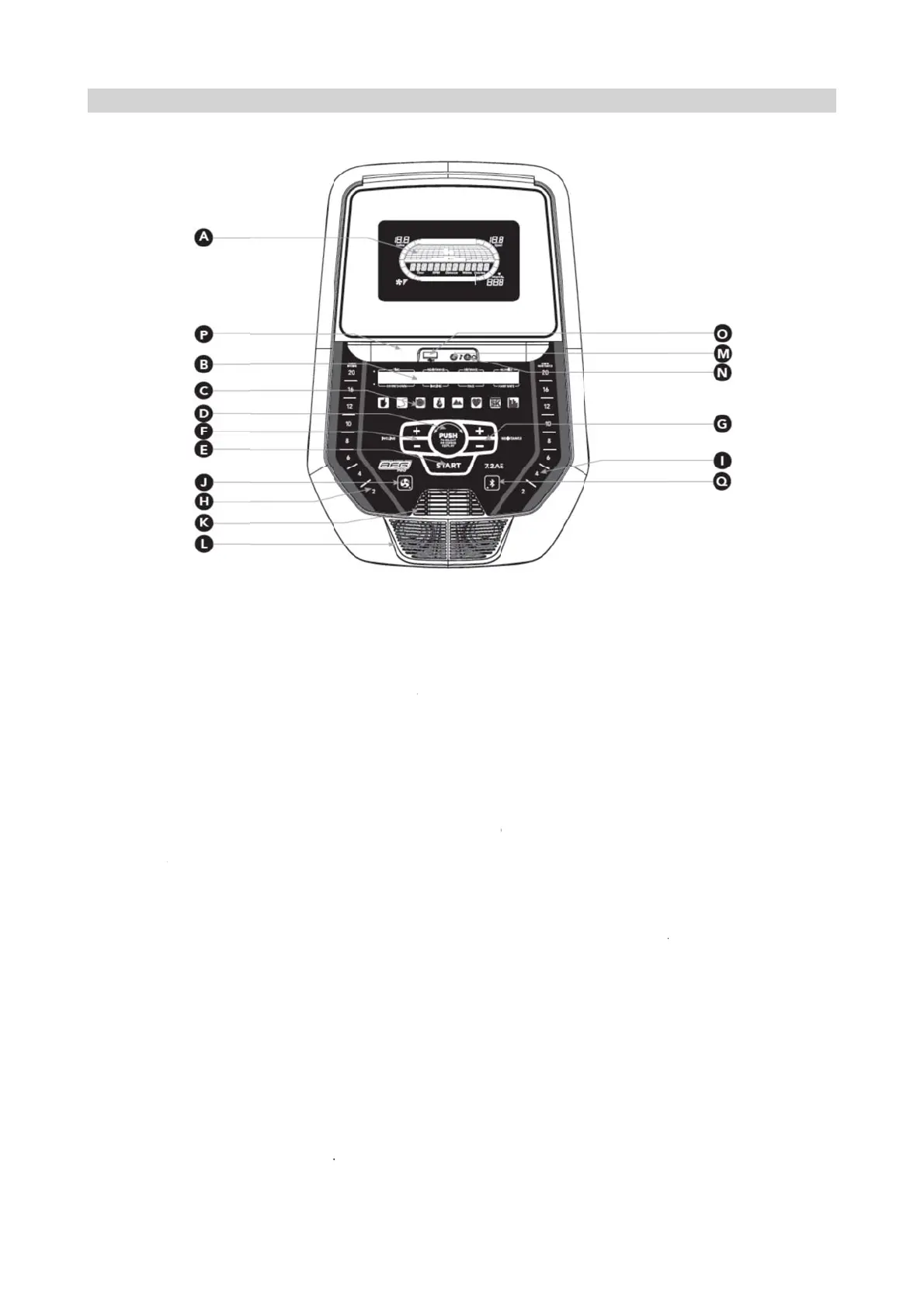
AFG Pro 7.2AI - Console Operation and Features; Console Overview

AFG Pro 7.2AI
36 pages
Print Icon
To Next Page IconTo Next Page
To Previous Page IconTo Previous Page
Loading...
2.1 Consol
e
Note: Ther
e
before use.
A
) LCD DI
S
B) LED DI
S
C) WORK
O
D) SELEC
T
E) START:
p
F) INCLIN
E
G) RESIST
A
H) INCLIN
E
I) RESIST
A
J) FAN KE
Y
K) FAN: pe
r
L) SPEAK
E
M) AUDIO I
N) AUDIO
O
Headpho
Note: wh
e
the speake
r
O) USB IN
P
P) TABLET
/
Q) BLUET
O
e
Instruction:
e
is a thin pr
o
S
PLAY WIN
D
S
PLAY: Time
,
O
UT LED IN
D
T
TARGET/
W
p
ress to beg
E
+/- KEYS:
u
A
NCE +/- K
E
E
QUICK KE
Y
A
NCE QUIC
K
Y
: press to tu
r
sonal work
o
E
RS: music
p
N JACK: pl
u
O
UT / HEAD
nes.
e
n headpho
n
r
s.
P
UT: 1A/5V
U
/
READING
R
O
OTH INDIC
o
tective she
e
D
OWS: Incli
n
,
Resistance
D
ICATORS: i
W
ORKOUT
K
in exercisin
g
u
sed to adju
s
E
YS: used t
o
Y
S: used to
K
KEYS: use
d
rn fan on an
o
ut fan.
p
lays throug
h
u
g your CD /
PHONE JA
C
n
es are plug
g
U
SB output
p
R
ACK: holds
ATOR LIGH
T
CH
A
PTE
R
e
t of clear pl
a
e, Speed, R
, Distance,
C
ndicate wha
K
NOB: rotate
/
g
, start your
w
s
t incline in
s
o
adjust resi
s
r
each desir
e
d
to reach d
e
d off.
h
speakers
w
MP3 player
C
K: plug you
r
g
ed into the
p
ower.
tablet or re
a
T
: display w
h
R
2: Con
a
stic on the
o
PM, Watts,
C
C
alories, Co
u
a
t workout is
/
press to sel
w
orkout, or r
s
mall increm
e
s
tance in sm
a
e
d incline m
o
e
sired resist
a
w
hen your C
D
into the con
s
r
headphon
e
headphone
j
a
ding materi
a
h
en machin
e
sole Instr
u
o
verlay of th
e
C
alories.
u
nt Down, In
set for the c
u
ect your de
s
e
sume exer
e
nts.
a
ll incremen
t
o
re quickly.
a
nce more q
D
/ MP3 pla
y
s
ole using th
e
s into this ja
j
ack the sou
n
a
l.
e
is paired wi
u
ction
e
console th
a
c
line, Pace,
u
rrent progr
a
ired workou
t
c
ising after
p
t
s.
uickly.
e
r is connec
t
e included a
ck to listen t
o
n
d will no lo
n
t
h a Bluetoo
t
a
t should be
Heart Rate.
a
m.
t
/target
p
ause.
c
ted to the c
o
a
udio adapto
o
your musi
c
n
ger come o
th compatibl
6
removed
o
nsole.
r
cable.
c
through th
e
u
t through
e device.
6
e

Related product manuals