8
10. Dimmer
In standby mode, press ”Scan/Dimmer” to adjust the backlight. You have a
total of 4 levels to choose from.
Specifications
Items Specifications
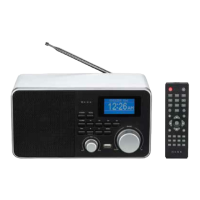
Description: DAB / FM Digital Radio
Audio Output: 0.5W
Frequency Ranges: FM: 87.5-108MHz; DAB: 174-240MHz
LCD Display: High resolution display
Power Supply: DC Power Input: 4 x 1.5v AA size Battery
USB Power Input: DC 5.5V/500mA
AC adapter Power Input: 100-240V, 50-60Hz
(please use the provided adapter)
Troubleshooting guide
Observation Potential cause / solution
The unit does not work Has the adaptor lead been correctly plugged into the
mains and the DC input jack at the side of the unit?
Is the socket used connected to the power outlet?
Has the power lead been removed from the side of the
unit without the batteries being installed?
The unit does not work
on batteries
Has the adaptor lead been removed from the side of
the unit?
Are the batteries inserted correctly?
Are the batteries run down?
No sound Is the volume control set at minimum?
Are headphones plugged into the phones jack?
Radio reception noisy
(FM)
Extend the antenna or adjust the position of the radio.
FM stereo – if weak switch to MONO as this requires
less signal strength.
Radio reception stutters /
bubbling sounds (DAB)
Signal is weak. Extend the antenna or adjust the location of
the radio. Positions higher up or nearer windows may improve
the reception.
No DAB reception Try re-orienting the antenna or moving the radio to a different
location. Check that your local area has DAB coverage


 To Next Page