Charge the Player
1
.
Use 5V/500mA Charger
Plug one end of the micro USB cable into the USB port of a charger, the other end to
the port on your device. After fully charged, disconnect the cable from your device by
pulling it straight outward.
2
.
Charge by Computer
Connect the device to a running computer via included USB cable.
Note:
To prevent battery deterioration, you are supposed to charge the battery at least
once every half a year or every year.
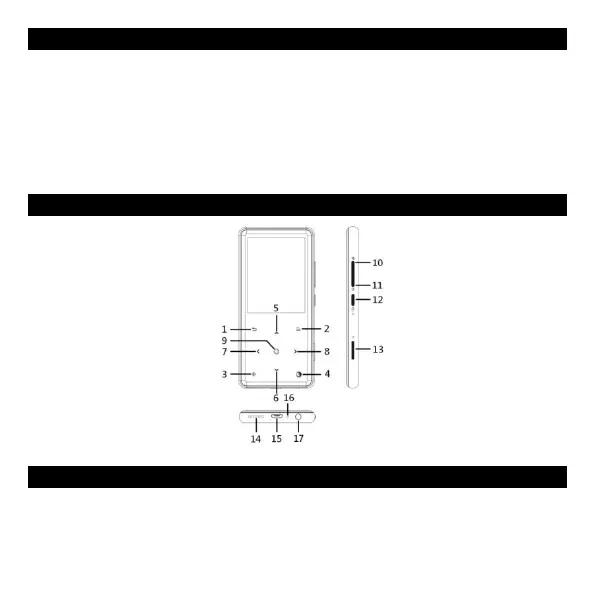
Buttons and Controls
Note:
MFB refers to Multifunction Button.
Quick Guide
1
.
Power On/Off
Long press the power button for 3 seconds to turn on/off the player.
Short press the power button to turn on/off the screen display.
2
.
Home Menu
10. Volume+
11. Volume-
12. Power button;
Screen on/off
13. TF card slot
14. Speaker
15. Micro USB port
16. MIC/Reset
17. Headphone jack
1. Back
2. Menu
3. Bluetooth
4. MFB
5. Move up
6. Move down
7. Previous/Fast rewind
8. Next/Fast forward
9. Enter/Play/Pause


 To Next Page